15 Best SaaS Help Desk Software for Support Teams 2026
Compare the top SaaS help desk software and switch to a powerful solution to manage your customer support effortlessly.
Best SaaS help desk trial
Oct 05, 2026 • 20 MIN READ
For all-around, AI-powered omnichannel value, Freshdesk leads this list for growing teams, unifying email, chat, WhatsApp, and voice in one workspace, with Freddy AI resolving routine requests and AI metered by session rather than per resolution.
Zendesk suits teams wanting customized workflows, Help Scout works for email-style simplicity, Zoho Desk works well in the Zoho ecosystem, and Intercom's product-led in-app chat is priced per Fin outcome and is best suited for teams with chat only preference. Front, Hiver, Kustomer, Kayako, LiveAgent, and HubSpot Service Hub follow below. The right pick depends on your team size, per-agent budget, and primary support channels.
What is a SaaS help desk?
Unlike traditional customer support solutions hosted on your own servers, a software-as-a-service (SaaS) help desk is delivered over the internet. It requires no hardware or on-premises configuration; the provider carries the security and maintenance costs, and your help desk data is backed up on the cloud. Your team sets up an account on the provider's site, and a simple login lets agents support customers any time, on any device.
This page compares only SaaS-delivered help desks. For a comparison that is not limited to SaaS, see the full help desk software roundup.
Top SaaS help desk platforms at a glance
The consensus across buyer guides is that there is no single winner; the right tool depends on team size, budget, and channel mix. This glance table shows the six consensus options that come up most often; the full body list below covers more options. Each row pairs the platform with the use case it fits best, its starting price, and its rating.
Platform | Best for | Starting price |
Freshdesk | All-round AI-powered omnichannel value for growing teams | Growth $19/agent/month, billed annually |
Zendesk | Configurable workflows and analytics | $19/agent/month, billed annually |
Help Scout | Clean, email-first shared inbox simplicity | $25/user/month, billed annually |
Zoho Desk | Teams in the Zoho ecosystem | $7/agent/month, billed annually |
Intercom | Product-led SaaS relying on in-app messaging | $29/seat/month, billed annually |
Kayako | Teams wanting AI billed per resolved ticket | Custom pricing |
LiveAgent | Affordable multichannel ticketing | $15/agent/month, billed annually |
Front | Collaborative shared-inbox workflows | $25/seat/month for one channel; $65/seat/month for omnichannel |
Hiver | Support inside Google Workspace | Growth, $25/user/month, billed annually |
Kustomer | Unified omnichannel customer views | Pricing on request |
HubSpot Service Hub | Support teams running on HubSpot CRM | $7/mo/seat, billed annually |
Salesforce Agentforce Service | Service teams already running on Salesforce CRM | Starter Suite $25/user/month, billed monthly or annually |
Prices are vendor-starting tiers; AI is often billed separately, which we compare below in how each help desk meters its AI.
The top SaaS help desk software for 2026
1. Freshdesk
Best all-rounder for AI-powered omnichannel customer service
Freshdesk unifies email, live chat, WhatsApp, messaging, and voice in one unified agent workspace with ready-to-use AI agents, starting with Growth at $19 per agent/month, billed annually.
Freshdesk is AI-powered customer service software for growing teams, built on Freddy AI. Freddy AI Agents understand intent and resolve routine requests, handing the case to an agent with its full context when judgment is needed. Freddy AI Copilot, an add-on on Pro and Enterprise, puts the customer's context and the next best action in front of the agent working the ticket.
Freddy AI Insights, included in Enterprise, surfaces trends and analysis of customer service so teams can act before issues arise. Freddy AI Agent is metered by session: every plan includes the first 500 sessions, then $49 buys another 100. Copilot costs $29 per agent/month as an add-on.
One workspace - the Freshdesk Command Center- holds all the channels, customer context, and history, instead of scattering them across tools or tabs.
Ready-to-use AI and a guided rollout get teams live without a specialist team, and a flexible path to scale lets them see value early and grow at their own pace.
Freshdesk features
Omnichannel ticketing: Email, chat, WhatsApp, and voice arrive in one workspace as tracked tickets
Freddy AI Agents: Resolve routine requests, with 500 sessions included on every plan
Automations: Assign, prioritize, and escalate tickets the moment they land
Knowledge base and customer portal: Self-service that answers common questions, and one of the sources from which the AI agents answer
Analytics: Out-of-the-box reporting, with custom dashboards from the Pro plan
Freshdesk pricing
Growth: $19 per agent/month, billed annually
Pro: $55 per agent/month, billed annually
Enterprise: $89 per agent/month, billed annually
14-day free trial with full access to the Freshdesk Enterprise plan
What teams achieve with Freshdesk
iPostal1 resolves 54% of queries with Freshdesk AI.
Ryan Specialty reaches a 75% first-contact resolution rate with Freshdesk.
Woolacombe Bay cut resolution time by 69% with Freshdesk.
TotalExpert achieved 248% ROI on the Freshdesk platform.
Ready to see AI agents resolve real requests end-to-end? Start a free Freshdesk trial — from your first AI agent to AI across customer service, we'll get you there.
2. Zendesk
Zendesk: Best for configurable workflows and analytics
A scalable platform with omnichannel support and deep configuration options, from $19 per agent/month on Support Team for email and ticketing, or $55 per agent/month on Suite Team for omnichannel, both billed annually.
Zendesk offers support across email, chat, social media, and phone from a single interface, with extensive customization and integration options, as well as advanced reporting. It is rated 4.3 on G2 and 4.4 on Capterra. Zendesk prices automated resolutions separately. Every Support and Suite plan includes 5 automated resolutions per agent each month, or 10 on Suite Professional. Beyond that, Zendesk charges $1.50 per committed resolution or $2.00 pay-as-you-go; Copilot is a $ 50-per-agent/month add-on on Suite Professional.
Messaging, live chat, and omnichannel routing start on the Suite plans rather than on the Support Team plan.
Key features:
Seamless support across various communication channels
Advanced analytics and reporting
Pros:
Comprehensive support suite: Offers various features across multiple channels, ensuring businesses can provide thorough and responsive customer service.
High customizability: The platform can be extensively customized to meet specific business requirements, from workflows to branding.
Scalability: Suitable for businesses of all sizes, with the capability to scale up as a company grows.
Cons:
Pricing: The starting price point may be higher than some competitors, potentially making it less accessible for tiny businesses or those with tighter budgets.
Complexity: With its vast array of features and customization options, new users may find Zendesk has a steeper learning curve than more basic platforms.
3. Help Scout
Best for clean, email-first shared-inbox simplicity
Help Scout is a human-centered support platform built around a shared inbox and knowledge base, starting at $25 per user/month on Standard, billed annually.
Help Scout pairs a shared inbox with a knowledge base and live chat capabilities in an interface that is intuitive for teams of any skill level. Its AI Answers chatbot is billed at $0.75 per resolution on the Standard, Plus, and Pro plans. That simplicity has a limit: routing starts on the Plus plan, so teams on Standard assign tickets themselves. It is rated 4.6 on Capterra.
Key features:
Shared inbox
Knowledge base capabilities
Pros:
User-friendly interface: Help Scout is intuitive and easy to navigate, making it accessible for users of all skill levels.
Multi-channel support: Offers a seamless integration of various communication channels, including email, live chat, and a self-service knowledge base, facilitating a comprehensive support experience.
Shared inbox: Enhances collaboration among team members by allowing them to manage customer queries efficiently from a unified platform.
Knowledge base capabilities: Enables businesses to build a self-service portal, reducing the number of support requests and empowering customers to find answers independently.
Cons:
Limited customization: While many praise Help Scout for its simplicity, it may lack advanced customization options needed by larger teams or those with specific workflow requirements.
Pricing: At $20 per user per month, it may be pricey for small businesses or startups with limited budgets, especially when scaling the support team.
4. Zoho Desk
Best for teams in the Zoho ecosystem
A cost-effective platform with multichannel support and the Zia AI assistant, from $7 per agent/month, billed annually.
Zoho Desk brings context to support with multichannel handling across email, social media, live chat, and phone, and integrates tightly with other Zoho applications, though telephony starts on Professional and live chat on Enterprise. Zia, Zoho's built-in AI assistant, is available from the Professional plan.
Zia Agents themselves are free, with LLM usage billed in tokens beyond a monthly allowance, and generative AI can also run on a customer's own API key. It is rated 4.5 on Capterra and 4.4 on G2. Teams outside the Zoho ecosystem benefit less from its connectivity.
Key features:
AI-Powered Assistant (Zia)
Multi-channel support
Pros:
Integration with Zoho Suite: For businesses already within the Zoho ecosystem, Zoho Desk offers seamless integration, allowing for streamlined operations and data synchronization across platforms.
Scalability: The platform is designed to accommodate the growth of your business, with features and plans that can expand to meet the needs of any size enterprise.
Affordable pricing: With plans starting at $14 per month per user, Zoho Desk provides a cost-effective solution for businesses seeking a powerful customer service tool without a significant investment.
Cons:
Learning curve: Due to its extensive features and customization options, new users may experience a learning curve when first adopting the platform.
Dependence on Zoho Ecosystem: While integration with Zoho applications is a strength, businesses not already using Zoho products may not benefit as much from the seamless connectivity.
5. Intercom
Best for product-led SaaS and in-app messaging
A chat-first platform centered on proactive in-app messaging, from $29 per seat/month on Essential, billed monthly.
Intercom is built around in-app and proactive messaging for product-led teams: chats, banners, and tooltips reach customers inside the product itself, on every plan. Its Fin AI Agent is billed from $0.99 per Fin outcome, and its Copilot is billed at $29 per agent/month, billed annually. It is rated 4.5 on Capterra. Because Fin is billed per outcome, its AI costs rise with the volume it handles.
Features
Proactive in-app messaging
Fin AI Agent with ready-made app connectors
Pros
Quick app hookups: Ready-made connector templates link Fin to storefront and payment tools such as Shopify and Stripe, and teams combine them to suit their own processes.
Reporting by question: Teams can ask Fin Operator about their support data and get visual answers that summarize volumes and trends.
Collision awareness: Agents can tell when a colleague already has a conversation open, which helps avoid two people working the same request.
Cons
Vendor-defined AI charges: Fin's outcome billing follows Intercom's own definitions, so a conversation can count as resolved and be billed when the customer simply goes quiet.
Permission setup up front: Admins must build each role, the admin role included, before the team can sign in, which lengthens rollout.
6. Kayako
Best for teams wanting AI billed per resolved ticket
A multichannel support platform with internal collaboration, at $1 per resolved ticket.
Kayako One brings a unified inbox, ticketing, knowledge base, live chat widget, automation rules, and reporting into a single plan, with white-glove onboarding and setup. Kay counts a resolution only when it solves the customer's issue without a human agent, so escalations to a person and simple deflections are not charged.
Kayako does not publish a price for the Kayako One platform itself, so the total cost of a team's seats is known only after a sales conversation.
Key features:
Supports a wide range of communication channels
Internal collaboration tools that help improve team coordination and response times.
Pros:
Multi-channel support: Kayako excels in providing support across various channels, including live chat and self-service, ensuring customers can reach out through their preferred method.
Collaboration features: The platform offers robust collaboration tools like internal ticket notes and visibility into ticket assignments, fostering team coordination.
Comprehensive clarity: Gives clear insights into which tickets are assigned and which are pending, helping manage workload and response times effectively.
Cons:
Cost-prohibitive features: Many agent-friendly features are locked behind higher-cost plans, making them less accessible for businesses on a tight budget.
Pricing: At $60 per agent per month, Kayako is one of the more expensive options, potentially putting it out of reach for smaller organizations.
7. LiveAgent
Best for affordable multichannel ticketing
A ticketing system with live chat and social integration, from $15 per agent/month, billed annually.
LiveAgent combines a ticketing system, live chat, social media integration, and a knowledge base into a single interface, with quick setup. AI Agents are listed starting with its Small business plan, with full AI setup included from the Medium business plan. It is rated 4.7 on Capterra. The entry plan covers ticketing, live chat, and the knowledge base; the call center arrives on Medium business, and the social channels on Large business.
Key features:
Robust ticketing system
Live chat and social media integration
Pros:
Affordability: With plans starting at $9 per agent per month, LiveAgent offers an economical option for businesses looking to enhance their customer support without a significant financial investment.
Comprehensive support channels: The platform's wide range of support channels ensures that businesses can meet customers where they are, enhancing accessibility and satisfaction.
Ease of use: LiveAgent is intuitive, allowing for quick setup and adoption by support teams, which can lead to faster response times and improved customer service.
Cons:
Limited features on the basic plan: The most affordable plan offers limited functionality, necessitating upgrades to access more advanced features, which can increase the cost significantly.
Complexity with advanced features: While LiveAgent is user-friendly, the sheer breadth of features and customization options on higher-tier plans may require a learning curve for some users or teams.
8. Front
Best for collaborative shared-inbox workflows
A communication platform centralizing email, chat, and social in a shared inbox, from $25 per seat/month on Starter for a single channel, or $65 per seat/month on Professional for all of them, both billed annually.
Front centralizes channels in a shared inbox with integrations and analytics. Its Autopilot AI agent is an add-on at $0.05 per conversation on every plan, and its Copilot is $20 per seat/month, included in Enterprise. It is rated 4.7 on G2. Larger teams should weigh per-seat cost.
Key features:
Shared inbox for seamless team collaboration
Integration with numerous apps and services
Advanced analytics and reporting
Customizable workflows to suit various team needs
Pros:
With robust integration options, Front seamlessly connects with CRM systems, project management tools, and other essential business applications, enhancing productivity.
Provides detailed insights into team performance and customer engagement, enabling businesses to make data-driven decisions to improve service quality.
Cons:
Starting at $59 per seat per month, Front may be considered expensive for small businesses or startups, especially those with a large support team requiring multiple seats.
Due to its extensive features and customization options, new users may experience a steeper learning curve, requiring more time to leverage the platform's capabilities fully.
9. Hiver
Best for support inside Google Workspace
A Gmail-native shared inbox and task tool, from $25 per user/month, billed annually.
Hiver sells two products at the same plan prices: Hiver in Gmail, which manages email support from the Gmail inbox, and Hiver Omni, a dedicated platform for email, chat, and other channels. AI Agents and AI Copilot are included from Growth on both, while AI QA and AI Insights start on Elite.
Voice is an add-on on Hiver Omni only, at $30 per voice seat/month, with 1,000 minutes per voice seat included. It is rated 4.7 on Capterra. SLAs, CSAT surveys, and the customer portal start on Pro, so Growth teams add them by upgrading.
Key features:
Shared inboxes for Gmail
Email delegation and task assignment
Email tagging for better organization
Automation of repetitive tasks
Analytics and performance tracking
Pros:
Hiver's native integration with Gmail makes it incredibly intuitive for teams already familiar with the Google Workspace ecosystem, eliminating the learning curve typically associated with adopting new software.
By allowing team members to share inboxes, delegate emails, and track the status of tasks directly within Gmail, Hiver significantly improves productivity and ensures no customer query goes unanswered.
Cons:
Businesses looking for a comprehensive help desk solution that includes phone, chat, or social media support might find Hiver limiting, as its features are primarily designed around email collaboration.
While Hiver's starting price is reasonable, costs can add up for larger teams, making it important for businesses to consider the overall value and return on investment as their team grows.
10. Kustomer
Best for unified omnichannel customer views
A platform consolidating email, SMS, chat, and social into one customer view, with pricing on request.
Kustomer unifies channels into a single customer view, using AI and automation to route and handle repetitive tasks, and lists technology and B2B among the industries it serves, alongside retail, financial services, travel, and health. Its AI Agents for Customers are billed at $0.60 per engaged conversation. It is rated 4.7 on Capterra. Kustomer does not publish plan prices, so teams request a quote.
Key features:
Unified customer view across all channels
AI and automation for efficient service
Pros:
Kustomer uses AI and automation to streamline repetitive tasks and route inquiries, enabling agents to focus on more complex and high-value interactions.
The platform is highly scalable and customizable, allowing businesses to tailor the system to their specific needs and grow their customer service capabilities as their business expands.
Cons:
With a starting price of $89 per user per month, Kustomer is positioned at the higher end of the market, which may be a barrier for small businesses or startups with limited budgets.
The breadth of features and capabilities, while beneficial for larger organizations, maybe more than what is needed for smaller teams.
11. HubSpot Service Hub
Best for support teams running on HubSpot CRM
A help desk built into the HubSpot platform, with ticketing, live chat, and a knowledge base, from Professional at $90 per seat/month, billed annually, plus a required one-time $1,500 onboarding fee.
HubSpot Service Hub keeps support tickets on the same customer record as marketing and sales activity, which suits teams already running on HubSpot. Ticket
pipelines, routing, live chat, and calling start on Starter, while the help desk workspace, knowledge base, customer portal, and Customer Agent arrive on Professional. Its Customer Agent is metered in HubSpot Credits rather than charged per seat. It is rated 4.4 on Capterra. Starter, from $7 per seat/month, carries no help desk workspace or AI agent, so Professional is the comparable plan.
Key features:
HubSpot CRM integration
Automation and satisfaction surveys
Pros:
Comprehensive toolset: Offers a wide range of features, including shared inbox, reporting capabilities, satisfaction surveys, and automation, catering to various support needs.
Integration with HubSpot CRM: Provides a seamless experience for businesses already using HubSpot’s ecosystem, enabling better customer data management and personalized support.
Free plan availability: Its free plan makes it an attractive option for small businesses or those looking to trial the software before committing financially.
Cons:
Limited support on the free plan: The free plan lacks direct access to technical support, relying instead on community forums, which may not suffice for urgent or complex issues.
Pricing structure: While it offers a free plan, the jump to paid plans starting at $45/month for additional features and support might be steep for some businesses.
12. Salesforce Agentforce Service
Best for service teams already running on Salesforce CRM
A CRM-based service platform with Agentforce AI agents, from $25 per user/month on Starter Suite, billed monthly or annually, with case management starting on Core at $195 per user/month, billed annually.
Agentforce Service (formerly Service Cloud) runs service on the same Salesforce CRM that sales and marketing work in. Starter Suite bundles sales, service, and marketing tools with built-in AI, while Pro Suite adds real-time chat and more room for customization and automation, on annual billing with a contract. Transaction fees apply on top of both. Agentforce AI agents are billed per action through Flex Credits, at $500 per 100,000 credits, and the Advanced edition includes Casey, the Help Agent.
Features
Case tracking through the Service Console
Agentforce AI agents, paid for with Flex Credits
Pros
Shared CRM: Support, sales, and marketing work in one Salesforce CRM, a natural fit for companies already running on Salesforce.
Wide channel coverage: Requests can arrive through email, phone calls, messaging apps, chat, SMS, and self-service portals.
Flexible configuration: The platform can be tailored to how each support operation already works.
Cons
Several cost lines: Edition fees, transaction fees, and Flex Credit usage for AI agents are charged separately, so forecasting the full bill takes extra work.
Contract terms: From Pro Suite up, plans are paid yearly, and Pro Suite needs a signed contract.
How each help desk meters its AI
AI pricing is now a decision axis in its own right, and platforms handle it very differently — some bundle AI into the plan, others charge per resolution or per outcome on top. This is where costs diverge most as ticket volume grows, so it deserves its own column alongside features and base price. The table below is a representative subset of the vendors on this page; other listed platforms bundle AI or price it as noted in their entries.
Platform | AI pricing model | Figure (as of date)
|
Freshdesk | Per session for Freddy AI Agents; Freddy AI Copilot as a per-agent add-on | 500 sessions included on every plan, then $49 per 100; Copilot $29 per agent/month on Pro and Enterprise |
Zendesk | Per automated resolution beyond a plan allowance; Copilot add-on | 5 per agent/month included, or 10 on Suite Professional, then $1.50 committed or $2.00 pay-as-you-go; Copilot $50 per agent/month on Suite Professional |
Help Scout | Per resolution, AI Answers add-on | $0.75 per resolution on Standard, Plus, and Pro |
Zoho Desk | Zia included from Professional; generative AI on your own API key | Included in the plan from Professional |
Intercom (Fin) | Per Fin outcome | From $0.99 per outcome |
Kayako | Per resolved ticket, Kay AI agent | $1 per resolved ticket |
LiveAgent | AI Agents included from Small business | Included in the plan |
Front | Autopilot per conversation; Copilot add-on per seat | Autopilot from $0.05 per conversation; Copilot $20 per seat/month, included in Enterprise |
Hiver | AI Agents and AI Copilot included on Growth | Included on Growth |
Kustomer | Per engaged conversation, AI Agents for Customers add-on | $0.60 per engaged conversation |
HubSpot Service Hub | Per HubSpot Credit; Customer Agent metered at 50 credits per resolved conversation, on Professional and Enterprise | $9.00 per 1,000 credits paid annually, $10.00 paid monthly; 3,000 credits included on Professional |
Salesforce Agentforce Service | Per action through Flex Credits for Agentforce AI agents | $500 per 100,000 Flex Credits |
Freddy AI Agents resolve routine requests end-to-end, and Freddy AI Copilot helps every agent perform at their best, both included in the unified agent workspace — so AI value is predictable rather than metered per outcome. For a deeper look at how the AI works, see what Freshdesk does.
How to choose the best SaaS help desk software
Every buyer guide closes on the same three variables. Here is how to weigh them.
What team size is it for?
Small, email-first teams can start with a shared inbox such as Help Scout or Hiver, or with Freshdesk, whose Growth plan launches an AI-powered service over email. Growing teams (roughly 50 to 500 employees) that want AI agents to handle routine requests and hand the rest to a person, without enterprise setup overhead, are a good fit for Freshdesk. Teams that need deeply customized workflows should compare how much configuration each platform asks of their admins before the first AI agent goes live.
What is your budget per agent?
Starting prices vary by plan, pricing unit, and billing term, so compare them in the table above with the plan that includes the channels you need. Compare the AI pricing unit too: a low seat price with per-resolution AI can cost more at volume than a higher seat price with an included session allowance.
Which channels do you support?
If email is your primary channel, an email-first shared inbox is enough. If customers reach you across email, chat, messaging, and voice, choose a platform that unifies them. Freshdesk Omni brings those channels into a single workspace, along with each customer's history, so agents can see the full conversation wherever it started.
Why Freshdesk is a reliable SaaS help desk
Alongside AI agents that resolve routine requests, growing teams need a help desk that keeps everyday support work moving. Freshdesk does this in three ways: it brings the right people into a ticket, automates repetitive steps, and links support to the apps other teams use.
Collaborate effortlessly
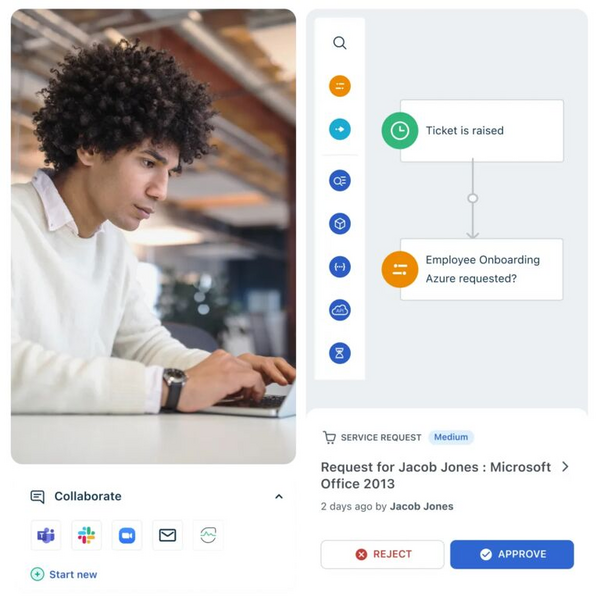
Freshdesk's collaboration features let agents work with internal teams to resolve issues faster, sharing ownership of problems and holding discussions inside the ticket thread through your help desk. Teams can add colleagues, vendors, or approvers to a ticket as collaborators and hold side discussions in threads next to it, so everyone working on an issue sees its status and history in one place. When a spike in traffic or a specialist task calls for extra hands, day passes give occasional agents access for a day without a full license.
Automate repetitive tasks
Freshdesk lets you automate routine work to improve agent productivity: route and assign tickets to the right agents, create preset responses for common queries, and set escalation rules if deadlines slip. Automations sort and assign tickets as they arrive, run time- and event-based triggers for follow-up work, and escalate tickets before they breach their SLA. Canned responses let agents insert ready answers to frequently asked questions.
Integrate with the apps you already use
Freshdesk MCP lets teams work with Freshdesk from the compatible AI tools they already use, giving those tools access to tickets, conversations, and customer information, and brings approved actions from other business systems into Freshdesk workflows. Ready-made integrations with Slack, Microsoft Teams, Shopify, and Jira connect support to the tools where collaboration, commerce, and engineering work happens.
The Freshdesk Marketplace extends your help desk further with integrations spanning CRM, team collaboration, reporting and analytics, email marketing, and more, so support stays connected to the tools your team already relies on.
What are the benefits of using SaaS help desk software?
For a growing support team, SaaS means less to run and more room to scale. The five benefits below cover where agents can work from, how easily a team adopts the tool, who handles updates, how costs are tracked against the plan you choose, and how customer data is protected.
Anytime, anywhere access
A SaaS help desk should provide teams with collaboration features so agents can work together across functions to deliver quick, consistent answers.
Ease of use and implementation
SaaS help desks require minimal setup and are easy to navigate, so agents and admins can get started in minutes and managers can focus on customers from day one.
Updates and maintenance
With SaaS, you never manage software updates, patches, or bug fixes yourself — the provider handles them automatically without server shutdowns.
Affordability
SaaS help desks follow a subscription model billed monthly or annually, so you choose the plan that fits and pay for the features you need.
Data security
A SaaS help desk keeps customer data in the cloud and avoids the vulnerabilities of on-premises setups, without paying separately for high-level security features.
What are the features of a SaaS help desk software?
Most SaaS help desk software is built around these core features:
Omnichannel support: Email, live chat, social media, and phone all come together on one platform, so businesses manage every conversation in one place.
Ticketing: A ticketing system converts inquiries into tickets that can be assigned, prioritized, and tracked to resolution.
Self-service: Customers find answers to common questions in a knowledge base and customer portal without needing to contact support, which frees agents for complex work.
AI agents and copilot: AI agents handle routine requests and hand complex ones to a person, while an AI copilot provides agents with context and next steps for the tickets they handle.
Automation: Rules categorize, route, and respond to tickets based on predefined criteria.
Analytics and reporting: Analytics and reporting tools surface insights into performance and customer satisfaction.
Integrations: Connections to CRM systems, e-commerce platforms, and project management tools keep support connected to the wider business.
What are the best practices for setting up and running SaaS help desk software?
Once the choice is made, these four practices keep a SaaS help desk working well for customers and agents.
Connect every channel at setup. When email, chat, messaging, and voice all land in the help desk through an omnichannel approach, customers reach you on their preferred method, and no conversation sits outside the tool.
Train agents on the help desk as well as the product. Give them product knowledge, the authority to solve problems, and confidence with the views, canned responses, and escalation paths they will use every day.
Watch for issues before customers report them. Use SLA alerts and live dashboards to monitor potential issues and address them before they affect customers.
Review feedback and reports on a schedule. Gather and act on customer feedback regularly, and use the help desk's analytics to understand performance, satisfaction, and recurring issues.
Frequently asked questions
Which SaaS help desk is best for a small, email-first team?
Start with a shared inbox that can add AI as volume grows. Freshdesk's Growth plan starts there, with Freddy AI Agent sessions included, and Help Scout or Hiver, a Gmail-native option, are email-first alternatives. If you expect to grow into chat, messaging, and voice, choose a platform that unifies channels from the start so you do not have to migrate again later.
How much does SaaS help desk software cost per agent?
Starting prices depend on each vendor's unit and billing term: LiveAgent from $15 per agent/month and Help Scout from $25 per user/month, both billed annually; Zendesk from $19 per agent/month on Support Team, or $55 on Suite Team once you need omnichannel; Intercom from $29 per seat/month, billed monthly; and Kustomer on request. Add the AI line before you compare, since per-resolution models can raise the effective cost at high volume.
How is AI priced across help desk platforms?
Models vary widely. Freshdesk meters Freddy AI Agents by session, with 500 included on every plan, and sells Freddy AI Copilot as an add-on on Pro and Enterprise. Zendesk charges for automated resolutions beyond the plan allowance, at $1.50 committed or $2.00 pay-as-you-go. Intercom's Fin charges from $0.99 per outcome, Help Scout's AI Answers charges $0.75 per resolution, and Front's Autopilot charges by outcome, from $0.05 for triage to $0.89 for a resolution. Put the AI unit next to the seat price when you compare.