

Sep 19, 2026 • 36 MIN READ
Leading a growing support team and finding it hard to deliver quick resolutions without adding headcount at the same rate as ticket volume? Customer service leaders and customer experience (CX) operations teams often struggle to keep up with queries, meet service goals, and prove value to the business, all while budgets stay tight and customer expectations keep rising. Most help desk software is built for large enterprises, packed with complex features, steep learning curves, and pricing that lean teams neither need nor can afford. That is why choosing the right help desk software for your team matters. Below is a detailed breakdown of each tool's features, pricing, pros, and cons.
Best options by use case
Each pick below stands on its own. Freshdesk is listed first because it pairs budget-friendly ticketing with AI agents that are ready to use.
Freshdesk: Best for growing teams that want ticketing, automation, and ready-to-use AI without an enterprise rollout, from US$19 per agent per month on Growth, billed annually, with a 14-day free trial of the full Enterprise plan.
Zoho Desk: Best for teams already in the Zoho ecosystem that want the lowest entry price - Express from US$7 per user per month billed annually, capped at five agents.
Help Scout: Best for a clean, friendly shared-inbox experience that feels like personal email, from US$25 per user per month billed annually, or US$30 billed monthly, with a free plan for up to five users.
Hiver: Best for turning a normal Gmail inbox into a collaborative help desk without learning a new platform, from US$25 per user per month billed annually.
Zendesk: Best for teams with administrator capacity to configure routing, service level agreements (SLAs), and reporting. Support Team from US$19 per agent per month billed annually; its omnichannel Suite plans are priced separately.
Gorgias: Best for e-commerce brands needing deep Shopify or Magento integration and ticket-based pricing
Additional options covered in detail below include Intercom, Front, HubSpot Service Hub, and HappyFox, with Kayako also worth a look for multichannel visibility.
Key features to look for
When comparing tools, weigh these four things, and weigh the last one hardest, because AI setup is where growing teams win or lose the most time.
Omnichannel inbox: Combines email, live chat, social media, phone, and messaging into one place, so agents respond without switching tools.
Knowledge base: Lets customers find answers on their own without filing a ticket, reducing incoming volume.
Automations: Route common questions to the right person and trigger auto-replies.
AI readiness and pricing: Covers how quickly AI agents are ready to use, and how both the platform and its AI are billed, per agent, per resolution, per ticket, or included.
Best for growing teams that want built-in AI agents without enterprise cost or setup
Most tools tag advanced AI as an enterprise feature - higher cost, longer setup. Freshdesk is built for the opposite: AI agents that are ready to use for growing teams, without an enterprise transformation program.
Freshdesk is where AI-powered customer service comes together: Freddy AI Agents, Freddy AI Copilot, and Freddy AI Insights working alongside the team's tickets and knowledge base. Freshdesk Omni, the omnichannel edition, extends the same AI across chat, phone, social, and messaging and is priced separately.
Freddy AI Agents, Freddy AI Copilot, and Freddy AI Insights working across email, chat, phone, and social in one workspace. Freddy AI Agents understand intent and resolve routine requests, handing off to an agent when a case needs judgment. Teams deploy prebuilt agents for real use cases through a no-code builder, and the agents improve as more conversations pass through them. A guided rollout, tours, quick-starts, and onboarding flows, configures the AI fast, so a growing team can launch without specialist staff.
A lean team can prove value first: a 14-day trial gives full access to the Enterprise plan on real work, before any commitment.
Resolve with AI: Routine requests are handled without an agent picking them up, with handoff when judgment is needed.
Meet customers everywhere: Channels, context, and history live in one connected workspace.
Empower every agent: Freddy AI Copilot surfaces context and the next best action.
Improve continuously: Freddy AI Insights surfaces trends so teams can act before issues escalate.
Start with ready-to-use AI: Prebuilt agents cover real use cases from day one and improve as they run.
Grow at your pace: Start with one use case, or expand across teams and channels.
Freshdesk pre-integrates with common commerce, payment, and logistics tools, so agents act on order and account data without leaving the ticket.
Both Freshdesk and Zendesk meter AI usage and sell an agent-side assistant separately, so the difference is not the billing model, it is how long the AI takes to reach real tickets. Freshdesk ships prebuilt agents with a guided rollout; Zendesk's workflows and automation paths are configured before its AI resolution runs reliably.
Results teams have reported:
iPostal1 resolves 54% of queries with Freddy AI.
Hobbycraft handles up to 30% of queries with Freddy AI.
Ryan Specialty resolves 75% of tickets on a single reply.
Woolacombe Bay cut average resolution time by 70%, to 10 minutes.
TotalExpert achieved 248% return on investment (ROI) on the Freshdesk platform.
Ready to see ready-to-use AI in action? Start a free trial of Freshdesk, 14 days with full access to the Enterprise plan.
Head-to-head comparison of leading help desk platforms
Here is a quick overview of each solution's pricing and positioning, on the axes that matter most for a growing team.
Platform | Base price (annual) | Free tier / trial | AI setup and pricing | Best for
|
Freshdesk | US$19/agent/month (Support Team) | 14-day trial of Suite Professional, no credit card | Ready-to-use Freddy AI Agents, guided rollout; 500 AI agent sessions once per account, then US$49/100; Freddy AI Copilot US$29/agent/month on Pro and Enterprise | Growing teams needing AI-driven omnichannel support that is simple and scalable |
Zendesk | US$55/agent/month (Suite Team) | 14-day trial of Suite Professional, no credit card | Resolution allowance from US$2/agent/month; Copilot US$50/agent/month from Suite Professional | Businesses needing advanced automation and reporting |
Intercom | US$29/seat/month (Essential) | 14 days, no credit card | Fin from US$0.99 per outcome | Software as a service (SaaS) and tech-first businesses prioritizing AI-first messaging |
Zoho Desk | US$7/user/month (Express) | Free edition for three users | Built-in Zia AI from Professional. Prebuilt AI agents run on Zoho's Zia Agents platform, free up to 30 million tokens a month, then US$0.30 per million | Teams already in the Zoho ecosystem wanting an affordable, all-in-one solution |
Hiver | US$25/user/month (Growth) | 7-day trial of the Elite plan | AI Agents and AI Copilot included from Growth | Teams that want to run support directly inside Gmail |
Front | US$25/seat/month (Starter, up to 10 seats) | 14-day trial of the Professional plan, no credit card | Autopilot from US$0.05/conversation; Copilot US$20/seat/month | Teams prioritizing internal collaboration and shared-inbox management |
Help Scout | US$25/user/month (Standard, annual) | Free plan for five users | AI inbox assistant included; AI Answers US$0.75/resolution | Teams wanting a simple, shared-inbox help desk with built-in collaboration |
HubSpot Service Hub | US$20/seat/month (Starter) | Free tier for two users | Breeze credits: 50 per resolution, US$0.010 each | Businesses already using HubSpot CRM wanting an integrated help desk |
HappyFox | US$24/agent/month (Basic) | 14-day trial, all plans, no credit card | AI Chatbot US$0.33 per resolution; AI Autopilot from US$0.02 per action; AI Contact Center platform from US$99/agent/month | Teams needing multilingual, omnichannel support with strong automation |
Gorgias | US$10/month (Starter, 50 tickets, monthly) | 7-day trial, all features, no payment details | AI agent US$0.90 per automated interaction | E-commerce teams needing storefront integrations and in-ticket order management |
How the 10 best small-business help desk tools were selected
To build this list we analyzed more than 30 help desk platforms built for customer service teams, focusing on what growing teams need. Each platform was evaluated on:
Ease of use: Clean, out-of-the-box interfaces that are quick to set up.
Affordability: Budget-friendly plans that stay cost-effective as your team grows.
Essential features: Ticketing, automation, multichannel support, self-service, and reporting.
AI capabilities: Ready-to-use AI that speeds up responses and reduces repetitive tasks.
Scalability: Tools that support larger teams and higher ticket volumes over time.
Vendor support: Reliable support and helpful onboarding resources.
Detailed comparison of the 10 best help desk software solutions, plus one to watch
1. Freshdesk
Freshdesk is the AI-powered customer service platform for growing teams, from a first AI agent to AI across customer service. Email requests become tickets the team can track, assign, and resolve in one workspace. Freshdesk Omni, the omnichannel edition, adds chat, phone, social, and messaging to that workspace and is priced separately.
Freshdesk Command Center brings channels, queues, and AI activity into one view, so agents can see what is waiting and act on it without switching tools. It is part of Freshdesk Omni, the omnichannel edition, which is priced separately. Freddy AI works across this workspace, Freddy AI Agents converse with customers and resolve queries with knowledge base recommendations, while Freddy AI Copilot helps agents summarize conversations, draft responses, and assign tickets.
Key features of Freshdesk
Freddy AI Agents: Resolve routine queries across channels and hand off to an agent with full context when a case needs judgment.
Freddy AI Copilot: Drafts replies, summarizes tickets, and auto-fills fields inside the ticket the agent is working.
Freddy AI Insights: Surfaces the patterns behind customer satisfaction score (CSAT) dips and SLA breaches so leaders fix causes rather than cases.
Command center: Brings email, chat, phone, social media, and messaging into a single view, on Freshdesk Omni.
Knowledge base: A self-service library customers search before they file a ticket.
Collision detection: Alerts agents when someone else is viewing or replying to the same ticket.
Automated routing: Assigns tickets by skills and availability.
Workflow builder: No-code, drag-and-drop design for support workflows.
Pros and cons of Freshdesk
Pros | Cons
|
Prebuilt AI agents ship with support skills ready to use | The mobile app lacks some functionality available on the web |
Affordable pricing with strong features in lower-tier plans | Freddy AI Copilot is a paid add-on on Pro and Enterprise, not a plan inclusion |
Unified interface connecting ticketing, support, and analytics | Custom integrations may require assistance to self-implement |
Complimentary support and onboarding at no extra cost |
Freshdesk pricing
Freshdesk pricing starts at US$19 per agent per month on Growth, with Pro at US$55 and Enterprise at US$89, all billed annually. Every plan includes ticket management, a knowledge base, SLA management, and automations. AI is priced separately. Freddy AI Agent is included on every plan for the first 500 sessions, once per account, then US$49 per 100 sessions. Freddy AI Copilot is a US$29 per agent per month add-on on Pro and Enterprise, not a plan inclusion. Freddy AI Insights is included on Enterprise only. A 14-day trial gives full access to Enterprise.
Freshdesk Omni, the omnichannel edition, adds chat, phone, social, and messaging in one workspace and is priced separately.
What customers say
“What I like most about Freshdesk is its intuitive interface and simple ticket management. Creating, assigning, and tracking tickets is easy, while automation features like ticket routing, SLA management, and canned responses save time and improve productivity. Its integrations, reporting, and analytics also help teams manage support efficiently and track performance. Overall, Freshdesk is a reliable, user-friendly help desk solution that helps teams deliver better customer support.” - Sreenivasan p.
Quality Assurance Engineer, Hospital & Health Care
“Freshdesk has a user-friendly interface and an efficient ticket management system. It helps support teams organise customer queries, prioritise issues, and track resolution in one place. I also appreciate its automation feature, knowledge base integration, and multi-channel support, which improve productivity and enhance the overall customer experience. I also like Freshdesk because it is easy to use, helps me manage customer tickets, and offers automation features that make customer support faster and more organised.” - Aditya S.
2. Zendesk
Zendesk is a customer service platform that manages support requests across email, chat, social media, and other channels from a unified ticketing interface. It includes ticket assignment, automation, SLA tracking, reporting, and self-service through a knowledge base and community forums. Zendesk AI helps with ticket classification and response suggestions in select plans.
If you want a simpler, more unified platform, see the Freshdesk vs Zendesk comparison.
Key features of Zendesk
Workflow management: Routes tickets, triggers notifications, and applies tags through automated workflows.
Ticket assignment: Assigns tickets using predefined rules, availability, or priority.
SLA tracking: Monitors response and resolution targets with automated breach alerts.
Reporting: Provides dashboards and custom reports for support performance and agent productivity.
Pros and cons of Zendesk
Pros | Cons
|
Customizable workspaces per department | AI configuration can force admins to switch screens |
Integrates with third-party business intelligence (BI) tools | Users report slow vendor support |
Workflow management to forecast demand | High total cost of ownership |
Zendesk pricing
Zendesk pricing starts at US$19 per agent per month for Support Team, with Suite Team at US$55 and Suite Professional at US$115, all billed annually (checked 9 September 2026). Support Team is not an omnichannel plan; Suite Team is the cheapest that is.
Zendesk AI agents are included in every Suite and Support plan, and Zendesk bills only for requests the AI agent resolves without escalating to a person. Each plan carries a monthly automated-resolution allowance set in dollars per agent seat, starting at US$2 on Support Team, with larger allowances on the Suite plans. Zendesk Copilot is a separate add-on at US$50 per agent per month on Professional plans and above.
A 14-day free trial is available with no credit card required. By default, most trials start on the Zendesk Suite Professional plan.
3. Intercom
Intercom is a unified customer service platform offering a help desk with AI-powered messaging that turns conversations into tickets. Fin, Intercom's AI agent, handles queries by learning from a support team's responses and knowledge base, with context-aware answers and handoffs to human agents.
Weighing conversational support against a traditional help desk? See the Freshdesk vs Intercom comparison.
Key features of Intercom
Unified inbox: Manages email, chat, and social conversations in one place.
AI Copilot: Offers AI suggestions, autofill responses, and next best actions.
Reporting: Monitors support volume, resolution time, and team performance.
Knowledge hub: Provides self-service through a help center integrated into the support flow.
Pros and cons of Intercom
Pros | Cons
|
Natural language processing (NLP) for complex queries | Chat-first design lacks parent-child ticketing |
Integrates with third-party apps and tech stacks | Real resolution rates can fall short of vendor claims |
Clean, intuitive interface | Base and AI pricing higher than many competitors |
Intercom pricing
Intercom pricing starts at US$29 per seat per month on Essential, with Advanced at US$85 and Expert at US$132, all billed annually . Base plans include Messenger, a shared inbox with ticketing, prebuilt reports, and a public help center. A 14-day trial is available with no credit card.
Fin is billed per outcome rather than per seat: US$0.99 for a resolution, and US$9.99 for a lead-qualification outcome. Running Fin on a non-Intercom help desk carries a 50-outcome monthly minimum.
4. Zoho Desk
Zoho Desk is a cloud-based help desk that routes queries from email, phone, live chat, social media, and web forms into a unified ticketing workspace. Its AI assistant, Zia, detects sentiment and intent, suggests responses, and auto-tags tickets. Zoho Desk integrates with other Zoho tools like CRM, making it a strong fit for teams already in the Zoho ecosystem.
For a scalable alternative, see the Freshdesk vs Zoho Desk comparison.
Key features of Zoho Desk
Self-service: Provides a branded help center with FAQs, knowledge base articles, and a community forum.
Workflow automation: Automates ticket assignment, status updates, and escalations.
Multi-level escalations: Routes unresolved tickets to higher tiers to maintain SLAs.
Built-in analytics: Delivers standard and custom reports on ticket trends and agent performance.
Pros and cons of Zoho Desk
Pros | Cons
|
Integrates well within the Zoho ecosystem | Admin experience can feel fragmented |
Customizable knowledge base | 24/7 vendor support costs extra |
Zia included from Professional at no extra cost | Express is capped at five users |
Zoho Desk pricing
Zoho Desk pricing starts at US$7 per user per month on Express, with Standard at US$14, Professional at US$23, and Enterprise at US$40, all billed annually. Monthly billing is US$9, US$20, US$35, and US$50 respectively. Express is capped at five users and covers email, social, and web forms, with ticket assignment, workflow automation, multi-level escalations, ticket history, contact management, and a custom domain. A free edition covers three users.
Zia is built into Professional and Enterprise rather than metered per resolution, and prebuilt AI agents come with up to 30 million free tokens per month.
5. Hiver
Hiver is a help desk that runs inside Gmail, turning a shared Gmail inbox into a collaborative support workspace without switching to a separate platform. It adds shared inboxes, email assignment, status tracking, internal notes, and triage on top of the Gmail interface teams already use. Comparing a Gmail-native tool with a standalone platform? See the Freshdesk vs Hiver comparison.
Key features of Hiver
Shared inboxes: Manages support email as assignable, trackable conversations inside Gmail.
Email assignment: Assigns emails to teammates with clear ownership and status.
Collision alerts: Warns when two agents open the same conversation.
SLA and analytics: Tracks response times and team performance from within Gmail.
Pros and cons of Hiver
Pros | Cons
|
No new platform to learn for Gmail teams | Tied to the Google Workspace environment |
Fast to onboard | Fewer channels than full omnichannel platforms |
Familiar inbox interface | Advanced automation is more limited |
Hiver pricing
Hiver pricing starts at US$25 per user per month on Growth, with Pro at US$55 and Elite at US$85, all billed annually (checked 9 September 2026). Monthly billing is higher. Plans include shared inboxes, email assignment, collision detection, and basic analytics inside Gmail. Hiver includes AI Agents and AI Copilot from Growth, its entry plan, rather than metering them separately; AI QA and AI Insights are reserved for Elite. A 7-day free trial gives full access to the Elite plan.
6. Front
Front is a customer service communication hub that brings team collaboration and support into a single workspace with shared inboxes, internal comments, and drafts. Its integrations with CRM, chat, and project management tools help unify ticketing across organizations. See the Freshdesk vs Front comparison for a side-by-side view.
Key features of Front
Routing rules: Direct messages to the right teammate based on sender, keywords, or channel.
Message templates: Give agents reusable replies for faster, consistent responses.
Team inbox: Holds internal comments, task assignment, and progress tracking in one shared view.
Round-robin distribution: Balances workload evenly across available team members.
Pros and cons of Front
Pros | Cons
|
Real-time team collaboration | Support can be slow to respond |
Integrates with third-party apps | Limited inbox customization |
Quick to implement | New users may face a learning curve |
Front pricing
Front pricing starts at US$25 per seat per month on Starter, which covers up to 10 seats, with Professional at US$65 for up to 50 seats and Enterprise at US$105, all billed annually (checked 9 September 2026). Monthly billing is US$35 on Starter and US$85 on Professional; Enterprise is available on annual terms only. Plans include a shared inbox and ticketing, automation rules, basic analytics, and a no-code public knowledge base. A 14-day free trial gives all the features of the Professional plan, with no credit card required.
Front prices its AI separately from seats. Autopilot, its AI agent, starts at US$0.05 per conversation. Copilot and Smart QA are US$20 per seat per month each as add-ons, Smart CSAT is US$10, and Smart QA and Smart CSAT together are US$25; all three are included in Enterprise.
7. Help Scout
Help Scout is a customer service help desk built around a shared-inbox model, gathering messages from email, chat, messaging channels, and web forms into a single workspace. It offers workflows, private notes, automation rules, a self-service knowledge base, and an embeddable widget called Beacon. Curious how it compares? See the Freshdesk vs Help Scout breakdown.
Key features of Help Scout
AI chatbot: Handles common queries instantly for real-time responses.
Smart routing: Directs conversations by customer profile, topic, or agent skills.
Generative-AI writing assistant: Suggests replies while maintaining tone and accuracy.
Insights and analytics: Reports on volume, resolution time, and customer satisfaction.
Pros and cons of Help Scout
Pros | Cons
|
Intuitive, easy to get started | Rigid, rule-based workflows |
CRM integration adds context | Fewer integrations than some platforms |
Tags and notes streamline collaboration | AI Answers is metered per resolution on top of the plan |
Help Scout pricing
Help Scout pricing starts at US$25 per user per month on Standard, with Plus at US$45 and Pro at US$75, on monthly billing and around 16% less paid annually. A free plan covers five users, and a 15-day trial is available on Standard and Plus. Plans include multiple inboxes, Docs sites for self-service, advanced reports, CSAT ratings, Net Promoter Score (NPS) surveys, and access to the application programming interface (API) and 100+ integrations. Help Scout includes an AI inbox assistant from Standard, with unlimited AI Drafts from Plus. The AI Answers agent is metered separately at US$0.75 per resolution, with a monthly cap you can set.
8. HubSpot Service Hub
HubSpot Service Hub is a help desk built within the HubSpot CRM platform, consolidating messages from email, live chat, web forms, Facebook Messenger, and WhatsApp into a shared inbox. Because it is part of HubSpot's CRM environment, it aligns support with sales and marketing on shared customer history.
For simpler or more affordable options, see HubSpot Service Hub alternatives.
Key features of HubSpot Service Hub
Ticket management: Organizes and tracks issues in a central dashboard.
Omnichannel messaging: Connects across email, chat, Facebook Messenger, and forms.
Knowledge base: Provides a searchable help center for customer self-service.
SLA management: Sets and monitors response and resolution targets.
Pros and cons of HubSpot Service Hub
Pros | Cons
|
Intuitive UI, little training needed | Excess CRM features for support-only teams |
Strong analytics and reporting | Professional and Enterprise carry a one-time onboarding fee |
Great for native HubSpot integrations | Breeze Copilot is CRM-focused |
HubSpot Service Hub pricing
HubSpot Service Hub starts at US$20 per seat per month for Starter, with Professional at US$100 and Enterprise at US$150, per HubSpot's product and services catalog. A free tier covers up to two users with no credit card. HubSpot's marketing pricing page shows lower annual-commitment rates for Starter and Professional, so check which term a quote is using before comparing it with anything else.
Professional and Enterprise also carry a one-time onboarding fee, US$1,500 and US$3,500 respectively. The base plan includes help desk tools, a customer portal, feedback surveys, and a knowledge base.
HubSpot meters AI in credits rather than per resolution or per agent. Plans include a monthly credit allowance, 500 on Starter, 3,000 on Professional, and 5,000 on Enterprise, with additional credits at US$0.010 each, capacity packs at US$10 per 1,000 credits, and pay-as-you-go top-ups. A Breeze Customer Agent resolution consumes 50 credits.
9. HappyFox
HappyFox is a cloud-based help desk that centralizes email, live chat, social media, phone, and web forms into one ticket queue, with support in over 35 languages. Its Smart Rules engine triggers actions, auto-assigns tickets, and escalates overdue issues.
For stronger automation and integrations, see the Freshdesk vs HappyFox comparison.
Key features of HappyFox
AI Answers: Generates responses from your knowledge base and ticket history.
Agent collision: Alerts agents when someone else is handling a ticket.
Smart rule automation: Automates assignment, tagging, and status changes.
Ticket templates: Provides predefined formats for common support scenarios.
Pros and cons of HappyFox
Pros | Cons
|
Easy to implement | Live chat and chatbot are add-ons |
Prompt vendor support | Basic is capped at five agents |
Highly customizable workflows | Real-time collaboration needs integrations |
HappyFox pricing
HappyFox pricing starts at US$24 per agent per month on Basic, with Team at US$49 and Pro at US$99, all billed annually; Enterprise Pro is quoted on request. Annual billing saves 20%. Annual billing saves 20%, per the same page. Basic is capped at five agents; higher plans have no agent limit. Agent-based plans include unlimited tickets, SLA management, omnichannel ticket creation, and a built-in knowledge base, while unlimited-agent plans are built around annual ticket volume. Every plan starts with a 14-day free trial, with no credit card required.
HappyFox prices its AI separately from seats: AI Chatbot is US$0.33 per resolution and AI Autopilot starts at US$0.02 per action, with AI Contact Center platform access from US$99 per agent per month
10. Gorgias
Gorgias is a help desk built for e-commerce brands, consolidating email, live chat, social media, SMS, and voice into a single dashboard. It integrates with Shopify, BigCommerce, WooCommerce, and Magento, letting agents issue refunds or generate discount codes directly within tickets.
See the Freshdesk vs Gorgias guide for a comparison.
Key features of Gorgias
Automated routing: Directs tickets by customer intent, channel, skills, or priority.
Rule-based workflows: Automate tagging, assigning, and closing tickets.
AI summaries: Generate quick summaries of long conversations.
Custom dashboards: Track support performance and productivity in real time.
Pros and cons of Gorgias
Pros | Cons
|
Unified view of emails, chats, and calls | Peak-season costs rise with ticket-based pricing |
Responsive onboarding support | Built for e-commerce, less useful elsewhere |
Strong e-commerce integrations | UI can feel dated |
Gorgias pricing
Gorgias prices by ticket volume rather than by agent. Helpdesk starts at US$10 per month on Starter, which includes 50 tickets and is billed monthly only, with Basic at US$50 per month for 300 tickets, Pro at US$300 for 2,000 tickets, and Advanced at US$750 for 5,000 tickets, all billed annually; Enterprise is quoted on request. Tickets beyond the allowance cost US$0.40 each on Starter and Basic, and US$0.36 on Pro and Advanced. Plans include a help center, macros, rules, views, routing, satisfaction surveys, and 150+ integrations. A 7-day free trial gives access to all features, with no payment details required.
The AI agent is billed per automated interaction: US$0.90 on annual contracts and US$1.00 on monthly, with 30 interactions included on Starter and Basic, 190 on Pro, and 530 on Advanced, and US$1.50 for each interaction beyond that. Gorgias notes that each automated interaction also counts as one helpdesk ticket.
Also worth a look: Kayako
Kayako is a customer service platform for managing conversations across email, chat, and social channels, giving agents visibility into customer history. It includes automated workflows, SLAs, collaboration tools, a knowledge base builder, and customer-journey tracking through its SingleView interface.
If you want stronger support quality or budget friendliness, see the Freshdesk vs Kayako comparison.
Kayako publishes one price: US$1 per resolved ticket for Kay, its AI agent, with no seat fees and no setup fees. A resolution counts only where Kay settles the issue without a human agent; escalations and simple deflections are not charged.
Kayako One, the full help desk platform, includes a shared inbox and ticketing system, multiple team inboxes, prebuilt reporting, and both public and multilingual private help centers, with Kay at that same US$1 per resolution. It carries no published per-agent price, the platform is quoted on request.
How to pick the right help desk for your small business
The challenge is finding a tool that is easy to use, carries the right features, and fits your budget, without enterprise complexity. Here is what to look for.
Is it easy to set up and use?
Your team should not need days of training. Look for an intuitive interface, minimal setup time, and clear navigation, plus drag-and-drop automation, quick ticket views, and AI-assisted responses. A solid onboarding experience and knowledge base shorten the learning curve.
How ready is the AI, and how is it priced?
Modern help desks offer built-in AI in two forms, and how long each takes to configure matters as much as what it does. An AI copilot works alongside agents, suggesting knowledge base articles and summarizing threads. An AI agent handles routine questions and routing on its own, escalating to a person when a case needs judgment. Compare AI setup time, ready-to-use agents, and the AI pricing model alongside the seat price, not after it. Some vendors meter AI per resolution, so cost rises with ticket volume. Some sell it as a per-agent add-on, so it rises with headcount. Some include it in the plan.
Are the features essential, or bloat?
Many platforms pack in enterprise features you may never use. Focus on multichannel support, ticket management that centralizes conversations, prebuilt automation, and out-of-the-box reporting.
Is the pricing predictable?
Growing teams need transparent pricing. Watch for hidden fees around automation, integrations, onboarding, or reporting, and confirm essential features exist in lower-tier plans. Free trials and freemium plans let you test before committing. Among the more affordable options are Zoho Desk and Help Scout.
Our methodology for selecting the 10 best small business help desk software
To curate this list, we analyzed over 30 help desk platforms built for customer service teams. Our focus was on identifying tools that match the unique needs of small businesses, startups, and mid-sized teams. Here’s how we scrutinized and evaluated each platform:
Ease of use: Clean, out-of-the-box interfaces that are easy to set up and use
Affordability: Budget-friendly plans that remain cost-effective as your team grows
Essential features for SMB support: Ticketing, automation, multichannel support, self-service, and reporting
AI capabilities: Built-in AI to speed up responses and reduce repetitive tasks
Scalability: Tools that can support larger teams and higher ticket volumes over time
Vendor support: Reliable vendor support and helpful onboarding resources
This helped us identify 10 small business-friendly help desk tools that are simple, scalable, and built to help small businesses deliver excellent customer service.
Head-to-head comparison of leading help desk platforms
Wondering what is help desk software that's right for you and how our 10 platforms stack up? Here’s a quick overview of each solution’s pricing and key features:
Platforms | Base Price (Annual) | Best For |
|---|---|---|
Freshdesk | $15/user/month | Small teams and SMBs needing an AI-driven, multichannel help desk that’s simple, scalable, and efficient |
Zendesk | $19/agent/month | Businesses needing multichannel support with advanced automation and reporting features |
Intercom | $29/seat/month | SaaS and tech-first businesses that prioritize AI-first support and real-time messaging |
Zoho Desk | $7/agent/month | Teams using the Zoho ecosystem looking for an affordable, all-in-one support solution |
Front | $25/seat/month | Support teams that prioritize internal collaboration and shared inbox management |
Help Scout | $25/month for 100 contacts | Teams looking for a simple, shared inbox-style help desk with built-in collaboration tools |
HubSpot Service Hub | $90/seat/month | Businesses already using HubSpot CRM that want a fully integrated help desk across sales, marketing, and support |
HappyFox | $24/agent/month | Teams that need multilingual, omnichannel support with strong automation and customizable workflows |
Gorgias | $10/month for 50 tickets | eCommerce teams needing storefront integrations and in-ticket order management |
Kayako | $79/month | Teams that need multichannel visibility and customer journey tracking in a simple, unified interface |
Detailed comparison of the top 10 help desk software solutions
Now that you’ve seen a quick comparison of the top solutions, let’s dive deeper into each platform’s features, pricing, pros, and cons. This detailed breakdown will help you understand how each tool performs, making it easier to choose the right help desk solution.
1. Freshdesk
Freshdesk is an AI-powered customer service platform built to help small and growing teams manage customer conversations with ease. Designed to uncomplicate customer service, it uses AI to simplify everyday support tasks, reduce manual effort, and keep teams focused on what matters most: helping customers.
At its core, Freshdesk provides a modern help desk system that consolidates support requests from multiple channels into a single, organized dashboard. Whether customers reach out via email, chat, phone, or social media, every message is converted into a ticket that your team can track, assign, and resolve, all in one place, without the complexity that slows down service.

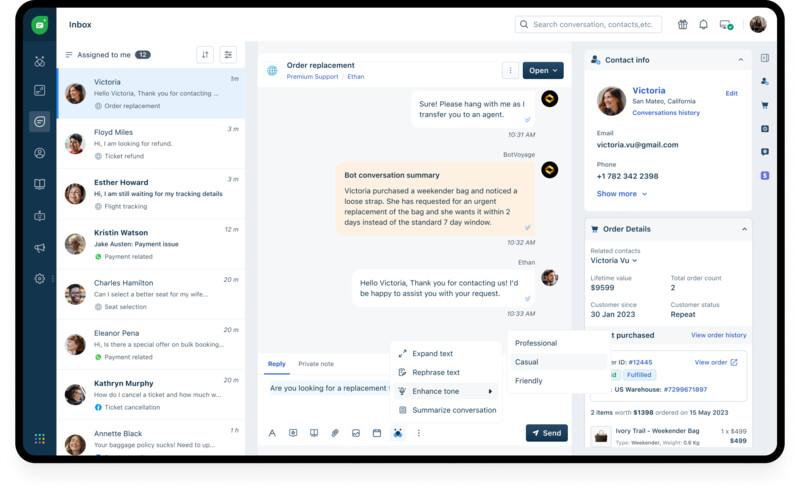
What sets Freshdesk apart is its intuitive interface and out-of-the-box setup that make it easy for teams to get started quickly. Its unified omnichannel inbox simplifies ticket management by bringing every conversation into one place, while pre-built templates help agents respond faster and more consistently. Agents can prioritize, categorize, and automate repetitive tasks, so nothing slips through the cracks.
Freshdesk also offers Freddy AI, its smart AI engine for help desk and ticketing automation. Freddy AI works as an autonomous customer service agent (AI agent), conversing with customers and helping them resolve queries with AI-powered assistance and knowledge base recommendations. For agents, it can act as an AI assistant (AI Copilot), helping agents summarize conversations, draft responses, assign tickets, and provide quick, effective support.
Not just that, Freshdesk can be implemented within weeks, and comes with complementary onboarding and after-sales support to ensure teams can start seeing value from day one.
Key features of Freshdesk
AI Copilot: Assists agents in real time by drafting responses, summarizing tickets, and auto-filling fields, helping them resolve queries faster with less effort.
AI Agent: Handles common customer queries using Freddy AI-powered bots that offer instant, accurate answers through conversational workflows.
Omnichannel inbox: Brings all customer conversations from email, chat, phone, social media, and messaging apps into a single view. This feature helps agents to respond to tickets quickly without switching between tools.
Sentiment analysis: Analyzes customer messages to detect tone and urgency, allowing agents to prioritize tickets and tailor responses appropriately.
Pre-built templates: Provides ready-to-use email and ticket response templates for common queries. Templates help agents save time, maintain consistency, and deliver professional, on-brand communication.
Knowledge base: Helps support teams create and manage a self-service library of articles so customers can find answers on their own and reduce incoming ticket volume.
Collision detection: Enables agents to prevent duplicate efforts by alerting agents when someone else is viewing or replying to the same ticket.
Out-of-the-box interface: Offers a clean, intuitive design that’s easy to navigate from day one, so teams can get started without extensive training or technical support.
Automated routing: Assigns tickets to the right agents or teams based on their skills and availability, ensuring faster resolution and better accountability.
Workflow builder: Helps design and automate complex support workflows without code, using drag-and-drop tools to streamline repetitive tasks and approvals.
Pros and cons of Freshdesk
Pros | Cons |
|---|---|
AI Studio helps build and deploy smart AI agents with pre-built support skills | The mobile app lacks certain functionalities available in the web version |
Affordable pricing with great features in lower-tier plans | Lacks in-built workforce management capabilities |
Unified interface that connects ticketing, support, and analytics | Custom integrations may be technical to self-implement and require assistance |
Complimentary support and onboarding services at no extra cost |
Freshdesk pricing
Freshdesk’s pricing starts from $15/user/month, making it one of the most budget-friendly help desk solutions. At this price, Freshdesk offers ticket management across email and social channels, a knowledge base, SLA management, and basic automations.
You also get team collaboration features like private notes and collision detection, along with standard reporting and analytics. Freshdesk also offers Freddy AI Agents for autonomous, self-managed ticketing (1,000 bot sessions per month) and AI Copilot for ticketing assistance. These AI features can be purchased as affordable add-ons along with the base plan.
Freshdesk doesn’t lock essential features behind higher-tier plans. The pricing is transparent, with no hidden add-ons or surprise charges, making it easy for businesses to predict costs month after month. As your support volume grows, Freshdesk remains cost-friendly, offering scalable plans that let you add agents or channels without sudden jumps in price.
User reviews and opinions on Freshdesk
“We chose Freshdesk over its competitors primarily due to its user-friendly interface, robust automation features, and seamless integration capabilities. Previously, our communication with the client was handled exclusively via email, which often led to delays and inefficiencies. Since implementing Freshdesk, we have seen significant improvements.” Dominik Plichta E-commerce business unit director, Fulfilio |
“Freshdesk has been essential to our Support team for 9 years, providing our global customers with a seamless platform for submitting assistance requests. With efficient regional routing, streamlined workflows, enhance user experience and task management. We effectively monitor timely resolutions, productivity, and customer satisfaction, exceeding 97% in our SLAs. Their commitment to innovation keeps us aligned with the latest technological advancements, ensuring we deliver exceptional service.” Tracey Bothra Seidor Africa |
2. Zendesk
Zendesk is a customer service software platform that provides tools for managing support requests across email, chat, social media, and other channels. It offers a ticketing system to track and respond to customer queries from a unified interface.
The platform includes features such as ticket assignment, automation, SLA tracking, and reporting. It also supports self-service through a knowledge base and community forums. Zendesk AI helps with ticket classification and response suggestions, though these are included in select plans.
However, Zendesk’s users often complain about features like settings, analytics, and AI scattered in different windows. This forces agents to switch screens repeatedly, impacting their efficiency. If you are looking for a simpler platform that offers a unified interface, you might want to explore Freshdesk. Check out our detailed Freshdesk vs Zendesk comparison to find the best fit for your support team.
Key features of Zendesk
Workflow management: Helps streamline support with automated workflows that route tickets, trigger notifications, and apply tags based on defined conditions.
Ticket assignment: Automatically assigns tickets to agents or groups using predefined rules, agent availability, or ticket priority to ensure timely responses.
SLA tracking: Enables agents to monitor service-level agreements by setting response and resolution time targets, with automated alerts for breaches.
Reporting: Offers built-in dashboards and custom reports to analyze support performance, ticket volumes, and agent productivity.
Pros and cons of Zendesk
Pros | Cons |
|---|---|
Enables teams to customize workspaces as per their department | Zendesk’s AI relies on Ultimate AI, a separate tool that forces admins to switch screens to configure and retain it |
Integrates with third-party business intelligence tools for in-depth analytics | Users report that the vendor support from Zendesk is slow and unresponsive |
In-built workflow management features to forecast demand and optimize staffing | High total cost of ownership, often more expensive than other help desk solutions |
Zendesk pricing
Zendesk’s pricing starts at $19 per agent per month. The base plan includes a multichannel ticketing system that supports email, social media, and web forms. It also offers a unified agent workspace, customer interaction history, macros for quick replies, basic automation with triggers, and prebuilt dashboards for reporting.
3. Intercom
Intercom is a unified customer service platform that offers a help desk with AI-powered messaging. This platform turns conversations into tickets that agents can assign, respond to, and track without needing to switch between tools.
Fin, Intercom’s proprietary AI agent, is one of Intercom’s biggest differentiators. Built to handle complex queries with high accuracy, Fin continuously learns from your support team’s responses and knowledge base to improve over time. It offers intelligent conversational flows, context-aware answers, and smooth handoffs to human agents, ensuring customers get the right help at the right time.
If you're weighing your options between conversational support and more traditional help desk setups, you may want to look into Freshdesk. Our Freshdesk vs Intercom comparison breaks down what you need to know.
Key features of Intercom
Unified inbox: Helps agents manage customer conversations from email, chat, and social channels in a single inbox for better visibility and faster responses.
AI Copilot: Assists agents during conversations with AI-powered suggestions, autofill responses, and next best actions.
Reporting: Helps support managers monitor support volume, resolution time, and team performance with detailed, customizable reports.
Knowledge hub: Provides customers with self-service options through a help center that’s easy to update and integrated into your support flow.
Pros and cons of Intercom
Pros | Cons |
|---|---|
Natural language processing capabilities to interpret and resolve complex queries | Chat-first design lacks key ticketing features like parent-child structure |
Integrates well with third-party business apps and tech stacks | Real resolution rates of the AI agent fall short of vendor claims |
Clean, intuitive interface with minimal bloat | Base pricing and AI agent resolution pricing are higher than competitors |
Intercom pricing
Intercom’s pricing starts at $29 per seat per month. The base plan includes key support capabilities such as Messenger, a shared inbox with ticketing, pre-built reports, and a public help center.
Note: Fin AI resolutions are charged extra at $0.99 per resolution.
4. Zoho Desk
Zoho Desk is a cloud‑based customer service help desk platform designed to streamline support operations and centralize customer interactions. The system routes queries from email, phone, live chat, social media, and web forms into a unified ticketing workspace, helping support teams manage requests more efficiently.
Zoho’s AI assistant, Zia, helps agents by detecting sentiment and intent, suggesting responses, auto‑tagging tickets, and predicting anomalies in ticket patterns. Moreover, the platform integrates with other Zoho tools like CRM, making it a great choice for businesses already using the Zoho ecosystem.
While Zoho Desk offers great features for small businesses, it may not be the right fit for teams seeking prompt vendor support for native AI features without extra subscriptions. If you're considering a more intuitive or scalable alternative, our Freshdesk vs Zoho Desk comparison breaks down the key differences to help you decide.
Key features of Zoho Desk
Self-service: Enables agents to set up a branded help center with FAQs, knowledge base articles, and a community forum to help customers find answers on their own.
Workflow automation: Automates repetitive tasks such as ticket assignment, status updates, and escalations using custom rules and blueprints.
Multi-level escalations: Automatically routes unresolved tickets to higher support tiers to maintain accountability and resolve issues within SLA.
Built-in analytics: Tracks support metrics with standard and custom reports that offer insights into ticket trends, agent performance, and customer satisfaction.
Pros and cons of Zoho Desk
Pros | Cons |
|---|---|
Integrates well within the Zoho ecosystem | Fragmented admin experience with features like settings, live chat, and workflows scattered across the interface |
Customizable knowledge base that can be used for training the AI agents and internal teams | 24/7 vendor support is available only at an extra charge |
AI features are available at no extra cost, making them accessible for small teams | Essential Copilot features require purchasing a separate ChatGPT Plus subscription |
Zoho Desk pricing
Zoho Desk’s pricing starts at $7 per agent per month. The base plan covers essential support channels like email, social media, and web forms. It includes features such as ticket assignment, workflow automation, multi-level escalations, ticket history, contact management, and support for a custom domain.
5. Front
Front is a customer service communication hub designed to bring team collaboration and support into a single workspace. This platform offers tools to streamline internal collaboration among support agents through shared inboxes, internal comments, and drafts.
Front’s integrations with CRM, chat, and project management tools help unify ticketing and support across organizations. Its automation rules and load distribution workflows ensure optimal support quality with adequate agent productivity.
Want to see how it stacks up against other tools? Explore our Freshdesk vs Front comparison to find the best fit for your support needs.
Key features of Front
Routing rules: Automatically directs incoming messages to the right teammate or queues them based on sender, keywords, or channel.
Message templates: Helps create reusable response templates to reply faster and maintain consistency across customer interactions.
Team inbox: Enables multiple agents to collaborate on support requests through a shared inbox where agents can comment internally, assign tasks, and track progress.
Round-robin distribution: Distributes incoming conversations evenly across available team members to balance workload and reduce response time.
Pros and cons of Front
Pros | Cons |
|---|---|
Offers real-time team collaboration for better efficiency and accountability | Customer support can be slow and unresponsive |
Integrates well with third-party apps for a unified customer journey view | Limited inbox customization that requires agents to spend extra time sorting tickets |
Easy to implement with quick setup, minimal vendor support required | New users may face a learning curve, potentially delaying adoption |
Front pricing
Front’s pricing starts at $25 per seat per month for teams of up to 10 users. The base plan includes shared inbox and ticketing, AI-powered topic tagging, up to 10 automation rules, basic analytics, and a no-code public knowledge base.
6. Help Scout
Help Scout is a customer service help desk platform built around a shared inbox model. It gathers messages from email, chat, messaging channels, and web forms into a single workspace. Support teams can manage common customer queries from one place, using a simple interface.
The platform includes tools for workflows, private notes, automation rules, and custom views to help teams stay organized. Agents can tag conversations, route tasks, and collaborate without switching between tools. Help Scout also offers a self-service knowledge base and an embeddable support widget called Beacon for web-based assistance.
Curious how it compares to other top help desk solutions like Freshdesk? Check out our Freshdesk vs Help Scout breakdown to see which platform fits your business best.
Key features of Help Scout
AI chatbot: Handles common customer queries instantly with an AI-powered chatbot. This feature helps deliver real-time responses and reduces manual workload.
Smart routing: Directs conversations to the right agent or team based on customer profile, topic, agent skills, or custom rules.
GenAI writing assistant: Generates suggested replies with AI to help agents respond quickly while maintaining tone and accuracy.
Insights and analytics: Track support performance with built-in reports that show trends in volume, resolution time, and customer satisfaction.
Pros and cons of Help Scout
Pros | Cons |
|---|---|
Intuitive, user-friendly interface that is easy to get started with | Rigid, rule-based workflows that require manual setup and lack natural language understanding |
CRM integration adds extra context to every interaction for better ticket insights | Limited integration options compared to other help desk platforms |
Tags and internal notes features streamline internal collaboration between agents | A sudden increase in ticket volumes can cause a sharp rise in pricing |
Help Scout pricing
Help Scout’s pricing starts at $25 per month for up to 100 contacts, with support for unlimited agents. The plan includes multiple inboxes, Docs sites for self-service, advanced reports, CSAT ratings, NPS surveys, customer properties, and access to API and 100+ integrations.
7. HubSpot Service Hub
HubSpot Service Hub is a customer service help desk built within the broader HubSpot CRM platform. It consolidates customer messages from email, live chat, web forms, Facebook Messenger, WhatsApp, and more into a shared inbox. This unified workspace allows support teams to triage, prioritize, and respond to tickets from a single view.
Because Service Hub is part of HubSpot’s integrated CRM environment, it offers alignment between support and other customer-facing teams, like sales and marketing. This connection gives teams shared visibility into customer history, interactions, and feedback across all touchpoints.
However, for small businesses seeking simpler or more affordable tools, there are several HubSpot Service Hub alternatives like Freshdesk that offer strong functionality without the CRM dependency or higher cost.
Key features of HubSpot Service Hub
Ticket management: Automatically organizes and tracks customer issues in a central dashboard with tools to prioritize, assign, and update tickets.
Omni-channel messaging: Enables agents to connect with customers across email, chat, Facebook Messenger, and forms from one unified inbox.
Knowledge base: Helps support teams build and manage a searchable help center to let customers find answers without contacting support.
SLA management: Helps set response and resolution time targets, and monitors SLA performance with alerts and tracking.
Pros and cons of HubSpot Service Hub
Pros | Cons |
|---|---|
Intuitive user interface that requires almost no training | Includes excessive CRM features that are not useful for customer service teams |
The analytics and reporting capabilities are stronger compared to some competitors | High total cost of ownership compared to other help desk platforms |
Great for businesses looking for native HubSpot integrations | Breeze AI Copilot is built for CRM automation with limited use cases in customer service |
HubSpot Service Hub pricing
HubSpot Service Hub’s base plan is priced at $90 per seat per month, which includes help desk tools, a customer portal, feedback surveys, a knowledge base, and a dedicated customer success workspace. However, the pricing is on the higher side compared to other help desk software solutions, which may not suit small businesses with tighter budgets.
8. HappyFox
HappyFox is a cloud-based customer service help desk platform designed to centralize support requests from email, live chat, social media, and web forms into one ticket queue. This platform supports omnichannel communication, routing customer interactions from email, chat, phone calls, and social media into tickets, with support in over 35 languages.
HappyFox also offers great automation through its Smart Rules engine, allowing teams to trigger actions, auto-assign tickets, escalate overdue issues, and reduce manual effort. The platform includes SLA enforcement and customizable workflows to ensure tickets follow consistent processes.
However, if you are looking for stronger automation and integrations, alternatives like Freshdesk may be a better choice. Read our Freshdesk vs HappyFox comparison to see which solution better fits your support goals.
Key features of HappyFox
AI Answers: Deflects repetitive queries with AI-generated responses that pull from your knowledge base and ticket history.
Agent collision: Prevents duplicate efforts by alerting agents when someone else is viewing or responding to the same ticket.
Smart rule automation: Automates actions like ticket assignment, tagging, and status changes based on custom triggers and conditions.
Ticket templates: Enables agents to use pre-defined templates to create structured responses for common support scenarios and save time.
Pros and cons of HappyFox
Pros | Cons |
|---|---|
Easy to implement and get started with, minimal learning curve | Essential features like live chat and chatbot are add-ons instead of in-built functionalities |
Prompt vendor support and assistance | Lacks skill-based routing, requiring manual ticket assignment for agents |
Workflows are well-customizable to suit unique business use cases and processes | Real-time team collaborations require additional third-party integrations |
HappyFox pricing
HappyFox offers two distinct pricing models to suit different team sizes and needs. The agent-based plans start at $24 per agent per month and include features such as unlimited tickets, SLA management, omnichannel ticket creation, a built-in knowledge base, and single sign‑on support for up to five agents.
HappyFox also offers unlimited-agent plans, beginning at $1,999 per month. This plan is built around annual ticket volume limits and supports up to 20,000 tickets per year, and offers around 20 custom fields.
9. Gorgias
Gorgias is a customer service help desk platform built specifically for eCommerce brands. It consolidates customer messages from email, live chat, social media, SMS, and voice into a single dashboard, making it easier for e-retailers to manage high support volumes without switching tools.
This platform integrates with eCommerce platforms like Shopify, BigCommerce, WooCommerce, and Magento. Using Gorgias, support agents can perform actions like issuing refunds or generating discount codes directly within tickets.
Want to see how it compares to other options like Freshdesk? Check out our Freshdesk vs Gorgias guide to find the best fit for your support team.
Key features of Gorgias
Automated routing: Directs incoming tickets to the right team or agent based on customer intent, channel, agent’s skills, bandwidth, or priority.
Rule-based workflows: Helps set up custom rules to automate repetitive actions like tagging, assigning, or closing tickets.
AI summaries: Generates quick summaries of long support conversations to help agents understand context faster and offer quicker resolutions.
Custom dashboards: Helps create tailored dashboards to track customer support performance metrics and team productivity in real time.
Pros and cons of Gorgias
Pros | Cons |
|---|---|
Offers a unified view of emails, chats, and calls in a single interface | Costs can quickly add up during peak seasons due to the ticket-based pricing model |
A responsive and proactive support team that actively assists during onboarding | Built for eCommerce, making it less useful for other industries |
Great integrations with eCommerce tech stacks like Shopify, Magento, and BigCommerce | The UI can feel outdated and needs modernization |
Gorgias pricing
Gorgias’ pricing starts at $10/month for up to 50 tickets, with unlimited agents included. The plan offers a help center with unlimited articles, ticket management features like macros, rules, views, routing, and satisfaction surveys. It also includes 150+ integrations, live performance monitoring, team management, and SSO.
Note: The AI agent is available separately at $1 per resolved query.
10. Kayako
Kayako is a customer service platform designed to help teams manage conversations across multiple channels in one place. It supports email, chat, and social interactions, offering agents visibility into customer history and past interactions.
The platform includes features like automated workflows, SLAs, internal collaboration tools, and a knowledge base builder. Kayako also offers customer journey tracking through its SingleView interface, helping agents deliver more personalized support.
If you are looking for better support quality or budget friendliness, you might want to explore more scalable and reliable options like Freshdesk. Our Freshdesk vs Kayako comparison highlights how the two platforms stack up across pricing, features, and usability.
Key features of Kayako
AI ticket triaging: Automatically analyzes and prioritizes incoming tickets based on urgency, topic, priority, or customer history.
Shared inbox: Helps multiple agents collaborate seamlessly using a centralized inbox that captures support requests from all channels.
Public help center: Offer customers 24/7 access to answers with a searchable, customizable self-service portal.
Ticket insights: Tracks ticket activity, trends, and customer satisfaction to improve service quality and response times.
Pros and cons of Kayako
Pros | Cons |
|---|---|
User-friendly dashboard that gives quick access to ticket statuses and insights | Sudden price hikes from the vendor that can impact long-term affordability |
Auto-prioritization capabilities that help manage tickets and agent tasks | Limited customizability in reporting and analytics |
Workflows are easy to build and manage, enabling better automation | Occasional system errors that can slow down ticket resolution |
Kayako pricing
Kayako offers a single pricing option of $79 per month and includes all core features. This plan offers a shared inbox and ticketing system, support for multiple team inboxes, prebuilt reporting, and both public and multilingual private help centers. It also supports multi‑brand messaging.
Note: AI resolutions are charged at an add-on rate of $1 per resolution.
How to pick the right help desk solution for your small business?
Choosing the right help desk software can be a game-changer for small businesses. The challenge? Finding a tool that’s easy to use, packed with the right features, and fits your budget, without the complexity of enterprise platforms. Here’s what to look for:


1. Ease of use
Your support team shouldn’t need days of training to use a help desk. Look for a platform with an intuitive interface, minimal setup time, and clear navigation so agents can hit the ground running.
Features like drag-and-drop automation, quick ticket views, one-click ticket actions, and AI-assisted responses help small teams move faster without constant admin overhead. Additionally, check for a solid onboarding experience and knowledge base to shorten the learning curve.
2. AI capabilities
AI isn’t just for enterprises anymore. Modern help desks now offer built-in AI features that boost efficiency without inflating costs. These generally fall into two categories: AI Copilots and AI agents.
AI Copilots work alongside human agents to speed up tasks. Example use cases: • Suggesting relevant knowledge base articles while drafting replies • Auto-summarizing long ticket threads so agents can respond faster
AI agents act autonomously to handle customer queries end-to-end. Example use cases: • Resolving common “how-to” or policy questions instantly through chat • Auto-tagging, categorizing, and routing tickets without human input
Look for solutions that include both capabilities out of the box or offer them as affordable add-ons. Freshdesk, for example, delivers this through its advanced Freddy AI, tailored for small teams and SMB needs.
3. Essential features vs bloat
Many platforms come packed with enterprise-focused features such as multi-brand support portals, custom SLA policies, and advanced BI analytics that you may never use. Too many features can slow your team down or add unnecessary complexity.
Instead of going for the most feature-heavy tool, focus on what matters: multichannel support (email, chat, social) that works seamlessly without complex setup, ticket management that centralizes conversations into a single view, pre-built automation that saves time from day one, and out-of-the-box reporting that gives you actionable insights without extra configuration.
4. Pricing and affordability
Small businesses need predictable, transparent pricing. Watch out for hidden fees around automation, integrations, or reporting. Prioritize tools that offer value-based pricing (paying only for what you need), and make sure essential features are available even in lower-tier plans.
Free trials or freemium plans are a great way to test before committing. Also, consider how pricing scales as your team or ticket volume grows. Some of the most affordable help desk solutions include Freshdesk and Zoho Desk.
5. Out-of-the-box interface
When you don’t have a dedicated tech team to customize your help desk, an out-of-the-box solution can be a game-changer. Look for software that’s easy to set up without heavy customization or third-party support.
Pre-built templates, no-code workflow builders, and plug-and-play integrations with your CRM, ecommerce, or communication tools can save hours of setup time and help you start delivering better support from day one.
Reduce your support response times by 83% with Freshdesk
The right help desk software isn’t just a support tool; it’s a growth enabler. For small businesses, it can mean the difference between missed SLAs and satisfied customers, agent burnout and team efficiency, cluttered inboxes and streamlined workflows. That’s why choosing a solution that’s purpose-built for your size, budget, and needs is critical.
Freshdesk is designed to help small businesses deliver fast, high-quality customer support without the complexity or cost of enterprise platforms. With its intuitive interface, AI-powered automation, multichannel support, and built-in reporting, Freshdesk empowers small teams to respond faster, resolve more tickets, and scale effortlessly.
Whether you’re just getting started or ready to upgrade your support system, Freshdesk gives you everything you need—out of the box. Freshdesk’s Freddy AI is all your small business needs to automate customer service and empower your agents with tools to deliver exceptional support in every interaction.
Want to know more? Book a personalized demo today and see why 73,000+ brands trust Freshdesk with their customer support.
Frequently asked questions on help desk solutions
What information do I need to gather before setting up help desk software?
Before setup, confirm which communication channels you need supported, such as email, live chat, social media, SMS, and phone. Also identify what other software you must integrate, such as your CRM, and whether agents need a mobile app to manage inquiries on the go.
How do I migrate my existing support emails and workflows into a new help desk?
Migration runs in three parts. First, forward your existing support address to the new help desk so new email arrives as tickets from day one. Second, import historical tickets and contacts—most vendors offer a self-service importer, and some run an assisted migration that validates the data and preserves conversation history. Third, rebuild the automations you actually use rather than all of them; the rules that matter are usually a small subset of what you have accumulated. Ask each vendor which of the three they do for you and which you own, because that split is what decides how long the move takes.