

Sep 23, 2026 • 24 MIN READ
Mobile help desk software lets support agents manage and resolve customer tickets from iOS and Android apps. This guide compares Freshdesk, HappyFox, Zendesk, Zoho Desk, Help Scout, HubSpot Service Hub, Deskpro, Jitbit, and Helpshift on their mobile features, their entry prices, and how each one charges for AI.
What is mobile help desk software?
Mobile help desk software lets support teams manage, reply to, and track customer tickets from iOS and Android devices. It brings core help desk capabilities to smartphones and tablets, so agents can act on requests from anywhere. Those capabilities include real-time push notifications, ticket management on the go, private notes, and access to the knowledge base.
The right pick depends on your channels, your team size, and how each tool charges for AI
Core mobile features to look for
These are the capabilities to check in any mobile help desk app before you buy.
Push notifications: Get real-time alerts about new tickets, replies, and service level agreement (SLA) reminders the moment they happen.
Ticket management on the go: Create, assign, prioritize, and close tickets from a phone or tablet without opening a laptop.
Private notes: Add notes inside a ticket that only your team can see, to move work forward together.
Knowledge base access: Look up solution articles and canned responses from the app, with no desktop or virtual private network (VPN) required.
Channel coverage: Check which channels the app can reply on (email, social, WhatsApp, chat, or phone) and which plan each channel needs.
9 best mobile help desk software options for 2026
Each tool below offers a mobile experience for support teams. Each entry covers who it suits, its mobile features, and its entry price, with AI pricing where the vendor publishes it. Prices are in US dollars, as of September 15, 2026, from each vendor's own pricing page or documentation.
1. Freshdesk: our top pick
Freshdesk is AI-powered customer service for growing teams, from a first AI agent to AI across customer service. Its iOS and Android apps let agents create, assign, and update tickets, add private notes, and reply on email, Facebook, and WhatsApp while away from their desks. For live chat and phone in one Freshdesk Command Center, there's Freshdesk Omni, the omnichannel edition, which is priced separately.
Freddy AI Agents understand intent and resolve email requests end to end, and hand a request to a person when it needs judgment. Freddy AI Copilot surfaces context and the next best action for each support agent. A guided rollout, with guided tours, quick-start walkthroughs, and onboarding flows, helps teams configure the AI around their business and start with one use case. At Ryan Specialty, 75% of tickets are resolved with a single reply.
Best for: growing customer service teams that want AI live quickly.
Key mobile features:
Push notifications: Alerts for new tickets, new responses on your tickets, private notes you're tagged in, and first-response and resolution-time reminders.
Ticket actions: Create tickets, set priorities, assign agents, and change ticket statuses from the app.
Answers a tap away: Use canned responses and solution articles from the app.
Time tracking: Record time entries, see timesheets, and mark billable hours.
Channels: Work email, Facebook, and WhatsApp tickets from the app. WhatsApp messages carry a per-message charge.
Pricing: Freshdesk plans are Growth at $19 per agent a month, Pro at $55, and Enterprise at $89, billed annually, per the Freshdesk pricing page. Each account gets 500 AI agent sessions once, then $49 per 100 sessions. Freddy AI Copilot is an add-on at $29 per agent a month on Pro and Enterprise, and Freddy AI Insights is on Enterprise only. A 14-day free trial gives full access to the Enterprise plan.
2. HappyFox
HappyFox mobile help desk lets agents create, access, respond to, and manage tickets, assign or reassign them on the fly, and share context through private notes.
Best for: teams that want a straightforward mobile ticketing app.
Key mobile features:
Create, respond to, and manage tickets from the app
Assign and reassign tickets on the fly
Share context through private notes
Pricing: Basic is $24 per agent a month, billed annually, and covers up to five agents, per HappyFox.
3. Zendesk
Zendesk Support mobile app lets agents and team leads view and respond to tickets, and create and update tickets on the move.
Best for: teams that want to view and respond to Zendesk tickets on the move.
Key mobile features:
View and respond to tickets
Create and update tickets
Available to agents on Team, Professional, and Enterprise plans
Pricing: Support Team starts at $19 per agent a month, billed annually, per the Zendesk pricing page. Zendesk's Suite plans, which add messaging, live chat, and telephony, are priced separately. Zendesk includes AI agents in every Suite and Support plan and bills only for requests the AI agent resolves without escalating to a person. Each plan carries a monthly automated-resolution allowance set in dollars per agent seat—$2 on Support Team and Suite Team, $5 on Suite Professional, $10 on Suite Enterprise. Zendesk Copilot is an add-on at $50 per agent a month, billed annually, on Professional plans and above.
4. Zoho Desk
Zoho Desk mobile app helps agents sort and close tickets with Work Modes and Custom Views, get push notifications for new assignments and updates, and sync changes made offline once they're back online.
Best for: teams on a tight budget.
Key mobile features:
Work Modes and Custom Views to sort tickets
Push notifications for new ticket assignments and updates
Offline changes that sync once the connection returns
Pricing: Express starts at $7 per user a month, billed annually, and is limited to five users, per Zoho Desk. The free plan covers email ticketing for up to three users. Instant messaging starts on Standard, telephony on Professional, and live chat through Zoho SalesIQ on Enterprise. AI agents are on every paid plan: use Zoho's own model, with up to 30 million free tokens a month on Express, or a key from your own AI provider. Built-in Zia AI starts on Professional.
5. Help Scout
Help Scout mobile apps let agents draft and send responses, use saved replies, add notes, and assign conversations from their phones.
Best for: teams that want a lightweight shared inbox on mobile.
Key mobile features:
Draft and send responses with saved replies
Add notes and assign conversations
Triage the inbox from a phone
Pricing: Standard is $25 per user a month billed annually, or $30 billed monthly, per Help Scout. The free plan covers five users, one inbox, and one Docs site. AI Answers is available on all paid plans at 75 cents per resolution, billed monthly.
6. HubSpot Service Hub
HubSpot Service Hub keeps support next to your CRM, sales, and marketing data. Its mobile app lets teams manage their inbox, track open tickets, and monitor SLAs, but HubSpot's help desk workspace isn't on the mobile app yet.
Best for: teams already running their CRM in HubSpot.
Key mobile features:
Manage the inbox and track open tickets
Monitor SLAs
Help desk workspace not yet available on mobile
Pricing: HubSpot's free tools cover up to two users, and Service Hub Starter lists at $20 per seat a month, per HubSpot, which was running a lower promotional rate on both monthly and annual commitments when we checked. The help desk workspace and HubSpot's Customer Agent start on Service Hub Professional, which is priced separately. The Customer Agent costs 50 cents per resolved conversation, paid in HubSpot credits.
7. Deskpro
Deskpro is a help desk for teams that want to shape the tool around their own process. Its iOS and Android apps carry the core agent workflow, including the customer records that sit behind each ticket.
Best for: teams that want a highly customizable ticketing system.
Key mobile features:
Ticket actions: Create, respond to, and manage tickets, and inspect or edit ticket properties.
Bulk actions: Apply the same action to several tickets at once.
Your ticket list: Filter tickets and change how the list is laid out.
Customer records: View and edit customer and organization profiles, with the full history of your interactions with them.
Search: Find any person, organization, or conversation.
Pricing: Cloud Team is $39 per agent a month, with a minimum of five agents, per Deskpro, and the mobile apps are included from Team up. Deskpro's pricing page doesn't say whether that rate is billed monthly or annually. Deskpro AI is included on Professional and Enterprise, not on Team.
8. Jitbit Helpdesk
Jitbit Helpdesk is an email-first ticketing system for small teams. Its iOS and Android apps are on every plan with no per-agent mobile fee, and they carry the whole ticket workflow rather than a cut-down view of it.
Best for: small teams that want simple, affordable ticketing.
Key mobile features:
Triage and reply: Filter tickets by status, read the full thread with its attachments and internal notes, and post a public reply or a private note using canned responses.
Ticket workflow: Change status, priority, category, assignee, and custom fields, or raise a ticket on a customer's behalf.
Push notifications: Alerts for new tickets, replies, and live chat messages.
Files: Open images, PDFs, and documents, or take a photo from the app.
Pricing: Jitbit prices each SaaS plan as a whole, not per agent. Freelancer, for one agent, is $29 a month, or $24.92 a month billed annually, per Jitbit.
9. Helpshift
Helpshift is a player engagement platform for games, and it's the odd one out on this list: the mobile experience belongs to the player, not the agent. Support lives inside the game through Helpshift's SDK, and agents work from the Helpshift Agent Dashboard.
Best for: game studios that support players inside their own titles.
Key mobile features:
In-game support SDKs for mobile, PC, and web, so a player never leaves the game to ask for help.
Console handoff by QR code and link, for players who start on a console.
In-game and push notifications, with proactive engagement based on player segments.
CARE AI for what Helpshift calls agentic resolution, with AI Agent Copilot alongside the human agents.
Pricing: Helpshift says its pricing is customized to each customer's engagement model, per Helpshift.
How Freshdesk compares on mobile AI and value
Compare AI the same way for every tool: how long setup takes, whether ready-to-use agents cover your most common requests, and whether AI is included in the seat price or billed separately.
AI setup time: Run the same test in every trial. Time how long it takes until one AI agent resolves one real request, and note who had to do the work. Freshdesk's answer is ready-to-use AI with a guided rollout.
AI pricing model: Most tools meter AI, per resolution, per session, in credits, or in tokens. Work out the cost in your busiest month, not the headline rate.
Tool | Entry Price | How AI Is Priced |
Freshdesk | $19 per agent/month, billed annually (Growth) | 500 AI agent sessions once per account, then $49 per 100 sessions. Freddy AI Copilot add-on: $29 per agent/month (Pro and Enterprise) |
Zendesk | $19 per agent/month, billed annually (Support Team) | AI agents included, billed per resolution, with a monthly allowance of $2 per agent seat on Support Team rising to $10 on Suite Enterprise. Zendesk Copilot add-on: $50 per agent/month (Professional and above) |
Zoho Desk | $7 per user/month, billed annually (Express) | AI agents on every paid plan. Zoho's model is metered in tokens, with 30 million free tokens/month on Express, or you can use your own AI key |
Help Scout | $25 per user/month, billed annually (Standard) | AI Answers: $0.75 per resolution |
HubSpot Service Hub | $20 per seat/month (Starter list price) | Customer Agent: $0.50 per resolved conversation (Professional and Enterprise) |
Deskpro | $39 per agent/month, minimum five agents (Team) | Deskpro AI included on Professional and Enterprise |
HappyFox | $24 per agent/month, billed annually (Basic, up to five agents) | Not published on its pricing page |
Jitbit Helpdesk | $29/month for one agent, or $24.92 billed annually (Freelancer) | Not published on its pricing page |
Helpshift | Customized to each customer | Custom pricing |
Benefits of a mobile help desk
Faster, on-the-go customer support
A mobile help desk lets agents respond wherever they are, cutting response times in urgent or after-hours scenarios. Meeting customers quickly across channels builds loyalty and helps a support team stand out.
Lower agent workload
Automation on mobile, including ticket categorization and routing, frees agents to focus on complex requests. Tickets reach the right agent the first time, reducing errors and keeping quality consistent even when the team is distributed.
Stronger data and analytics
Reports and live dashboards capture metrics like customer satisfaction, response times, and ticket volumes, giving leaders insight into support operations and where to improve, from mobile as well as desktop.
Organized ticket management
Agents create, manage, and track tickets from one platform, categorizing and prioritizing so urgent issues move first. Ticket history and communication records let agents craft informed, personalized responses on any device.
Go mobile with Freshdesk — see the pricing plans that fit your team.
How to choose the right mobile help desk
Match the tool to how your team works:
Many channels: If agents need chat, messaging, and phone alongside email on mobile, check that the app replies on every channel and which plan each one needs.
AI on the go: If you want AI to resolve routine requests, check what's ready to use, what's included, and what's billed separately.
Players inside your app: If your customers ask for help inside your own mobile app or game, look at in-app support tools.
Tight budget: Start with the free plans, and check which channels and AI features each one leaves out.
Then run the setup-time test in each trial before you commit. See the Freshdesk mobile app or compare Freshdesk plans.
Tell us where you need mobile support
Tell us whether you need this for customer service, internal IT, or field work, and your team size — and we'll point you to the right fit. For growing customer service teams that want AI agents, Copilot, and a connected omnichannel workspace on mobile, Freshdesk goes live with fast time-to-value through guided rollout. From your first AI agent to AI across customer service, we'll get you there.
Master Freshdesk – Join Our Expert-Led Webinar!
12 best mobile help desk software options on the market
As we step into 2026, customer support is undergoing a journey fueled by innovation and efficiency. There is high demand for top-tier help desk solutions, with businesses recognizing their role in delivering exceptional customer experiences.
Take a look at the top 11 mobile help desk software options on the market.
1. Freshdesk: Our top pick
Freshdesk, is the best mobile help desk software solution for most businesses in 2026. Freshdesk offers competitively priced solutions for new, established small, and large businesses. In addition to all of the expected features for help desk software, Freshdesk offers extensive AI integration and automation features, putting it ahead of the competition.
Freshdesk offers the most exciting help desk features at the best prices for mobile help desk software, which is why it is our top pick for 2026.

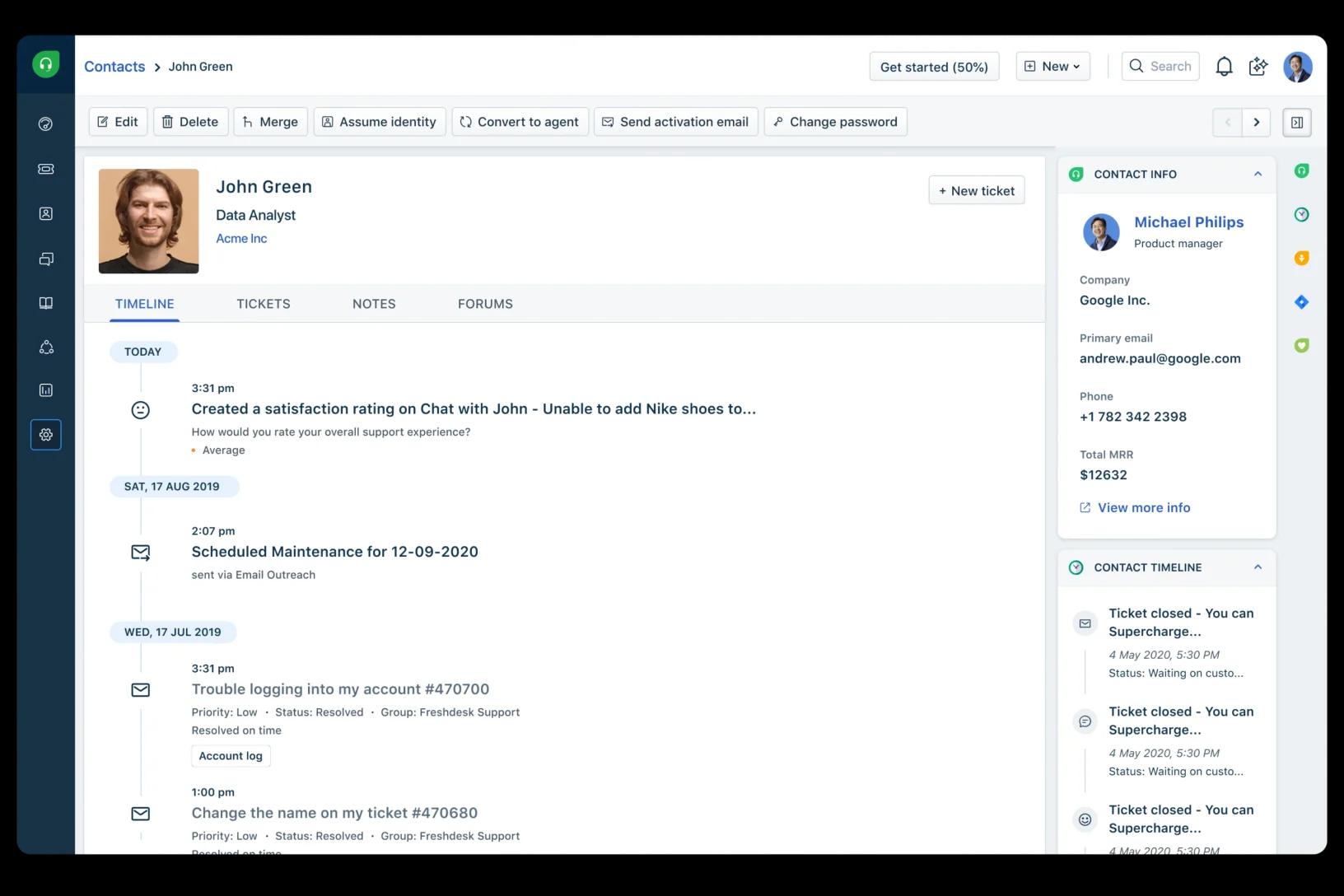
Key Features:
Multi-channel support: Communicate directly with support agents through email, web, Facebook, chat, and more.
AI-powered ticketing capabilities: Summarize tickets, enhance tone and messaging, draft effective responses, and generate solution articles.
Extensive knowledge base: Organize content with categories, optimize for SEO, manage workflow approvals and version control, and track article-level feedback and usage analytics.
Workflow automation: Automatically assign tickets based on history (auto-triage), keywords, requester, skills, time-triggers, intelligent assignment, ticket properties, or round-robin.
Reporting and analytics: Gain insights into customer service performance and KPIs with detailed reports and live dashboards.
24/7 email support
Why customers rave about Freshdesk?
Customers rave about Freshdesk for its user-friendly nature, helpful features, and exceptional customer support. Freshdesk allows businesses to provide multi-channel support, and intuitive ticketing and automation capabilities streamline support operations, resulting in faster and more efficient support. Its complex knowledge base helps to create self-service capabilities to assist customers with their inquiries. Freshdesk is an effective platform for boosting team productivity and creating satisfied customers.
Sign up for a free trial2. Freshdesk Omni
Freshdesk Omni is a helpdesk software that offers a comprehensive and intuitive approach to managing customer interactions across communication channels of your choice. It caters to businesses of all sizes and simplifies the customer support process by centralizing emails, social media messages, live chat, and phone calls into a single, easy-to-manage platform. With its user-friendly interface and extensive customization options, Freshdesk Omni makes it easy for businesses to set up a sophisticated helpdesk center without extensive technical expertise.

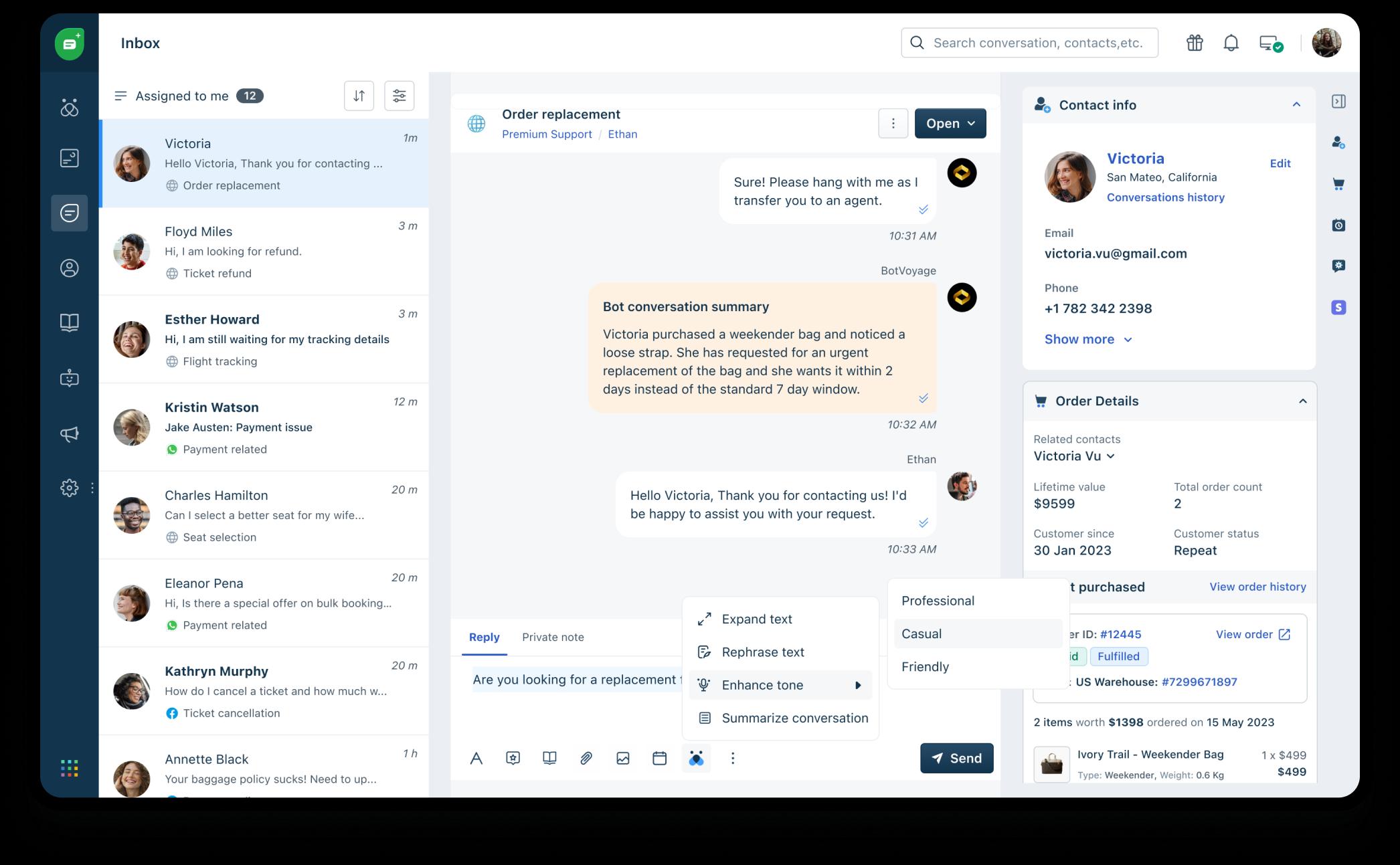
Key Features:
From bots to conversational experiences, ticketing, and collaboration, Freshworks covers the entire customer service journey. It helps with the following:
AI-powered ticketing: Freshdesk Omni features AI and automation tools that streamline workflows by assigning tickets based on agent workload or expertise and setting priority levels for more urgent matters. Natural language prompts help admins easily build complex chatbot flows, create training plans for agents, and set up automation for faster resolutions.
Self-service automation: Freddy AI Agent, available on any channel, helps with faster and more personalized resolutions. According to the Freshworks Customer Service Benchmark Report 2023, AI agent can help deflect up to 70% of queries, thus reducing wait times and improving overall customer engagement.
Elevating agent productivity: Freddy AI Copilot is an always-on assistant who can suggest responses, recommend next-best action, and summarize events for support reps. Agents receive valuable insights to enhance their actions. This ensures a personalized and proactive approach to customer engagement.
Making data-driven decisions: Freddy AI Insights can analyze performance data for opportunities to remove bottlenecks and optimize productivity. It can even recommend actions to solve problems and execute them.
Advantages:
Your current systems can be easily integrated with Freshdesk Omni, which offers a user-friendly interface for your agents and can seamlessly expand to accommodate your business's growth.
Some other benefits include:
User-Friendly: Its intuitive interface reduces training time and boosts agent productivity.
Scalability: It grows with your business, adapting to changing needs seamlessly.
Efficient Ticket Management: It streamlines support processes, ensuring responsiveness and quality.
Multi-Channel Support: It consolidates customer interactions across channels for consistent service.
Why Customers Love Freshdesk Omni?
Customers love Freshdesk Omni for its comprehensive yet intuitive approach to customer support, seamlessly integrating multiple communication channels into a single platform. Its ability to automate and streamline ticket management, with a user-friendly interface and easy-to-use generative AI features, significantly enhances the efficiency of support teams, making it easier to deliver prompt, personalized service.
Freshdesk Omni’s generous free plan for up to 10 agents and its scalable paid options offer businesses of all sizes numerous benefits and robust features. Its focus on improving customer satisfaction through effective issue resolution and self-service options solidifies its reputation as a customer favorite in the customer support software market.
Start free trial3. ManageEngine
ServiceDesk Plus by ManageEngine is a comprehensive IT help desk software that offers a wide range of features for ticket management, asset management, and change management. Designed for IT service management, it provides a holistic solution to manage IT services and support.
Key Features:
Enterprise service management
Analytics
AI-powered insights
IT operations management
Pros and Cons of ManageEngine:
Customization Options: Allows customization of forms, templates, and workflows to suit different organizational needs.
Integration Capabilities: Integrates well with other ManageEngine products and third-party applications for a connected IT environment.
Cost Consideration: May be relatively costly, especially for small businesses.
Customization Complexity: Advanced customization might require skilled personnel or additional support.
Learning Curve: Extensive features may require a learning curve for new users.
4. HubSpot
HubSpot is a versatile platform that combines CRM, marketing, sales, and customer support tools into one integrated system. This unification facilitates improved collaboration and workflow efficiency. With its mobile help desk software, HubSpot ensures that support teams can access critical information and respond to customer queries promptly, even while on the go.
Key features:
CRM capabilities
Marketing Hub
Sales Hub
Service Hub
Pros and Cons of HubSpot:
Unified Platform: Integrates CRM, marketing, sales, and customer support tools for better collaboration.
Mobile Accessibility: Enables support teams to access information and respond to customer queries from anywhere.
Cost Considerations: Advanced features, especially in the help desk module, are part of premium plans, which can be costly.
Customization Limitations: The level of customization may not meet the needs of businesses with very specific requirements.
Scalability Issues: Might be less scalable for very large enterprises with complex needs.
5. Zoho
Zoho Desk is a versatile help desk software that emphasizes mobile accessibility, allowing agents to handle customer support effectively from any location. The software stands out for its comprehensive ticket management system, multichannel support, and the integration of automation and AI to streamline support tasks.
Key Features:
Telephony
Instant messaging
Live chat
Social media applications
Multichannel
Pros and Cons of Zoho:
Mobile Accessibility: Zoho Desk's mobile app enhances agent flexibility and responsiveness with the ability to manage tickets and respond to queries from anywhere.
Ticket Management: Features a robust ticketing system with automation to streamline workflows.
Integration Limitations: The range of third-party app integrations might not be as extensive as other platforms.
Reporting Complexity: Creating custom reports can be complex, potentially challenging for businesses needing specific reporting.
Limited Free Plan: The free plan has restrictions on user numbers and features, which might be quickly outgrown by small businesses.
6. Deskpro
Deskpro is a comprehensive help desk software that emphasizes mobile accessibility, allowing agents to efficiently manage customer interactions on the go. It offers a unified ticketing system and extensive customization options, making it a versatile choice for businesses looking to personalize their customer support system.
Key Features:
Automation
Reporting tools
Self-service and knowledge base
Customization
Pros and Cons of Deskpro:
Mobile Accessibility: Deskpro's mobile app enhances agent flexibility and responsiveness, enabling ticket management and customer communication from anywhere.
Unified Ticketing System: Efficiently manages and tracks customer issues across channels like email, chat, and social media.
Pricing Structure: The pricing may be higher than other help desk solutions, potentially impacting small businesses with tight budgets.
User Interface: Feedback suggests areas for improvement in the user interface for a smoother experience.
Limited Reporting Features: Reporting and analytics features may not be as extensive or user-friendly as other solutions.
7. JitBit
JitBit Helpdesk is recognized for its user-friendly interface and effective ticketing system. It's particularly suited for small to medium-sized businesses, offering features like automation, a comprehensive knowledge base, and affordability.
Key Features:
Reporting tools
Mobile helpdesk
Automation
Team mailbox
Knowledge base
IT ticketing system
Pros and Cons of JitBit:
User-Friendly Interface: Known for ease of use for both support agents and end-users.
Ticketing System: Efficient ticket management with automated workflows to streamline support processes.
Limited Advanced Features: May lack some advanced features found in other help desk solutions, potentially impacting organizations with complex needs.
Integration Options: The range of integrations might be narrower compared to other solutions.
Customization Limitations: Customization in forms and workflows may be more limited.
8. Helpshift
Helpshift stands out with its mobile-centric approach, tailored specifically for mobile customer support. This focus makes it ideal for businesses that engage heavily with mobile users, offering in-app support and a range of automated messaging features to streamline customer interactions.
Key Features:
Self-service tools
Language AI
Mobile CRM
Automated chatbots
Knowledge base
Pros and Cons of Helpshift:
Mobile-Centric Approach: Designed for mobile customer support, providing a seamless experience for mobile device users.
In-App Support: Enables users to access support directly within applications, enhancing user experience and ease of access.
Reporting Features: Reporting and analytics capabilities may not be as advanced or customizable as in some other platforms.
Learning Curve: Initial implementation might have a learning curve, particularly for new users.
Integration Complexity: Integrating Helpshift with other platforms and CRMs can be complex.
9. LiveChat
LiveChat specializes in offering real-time communication through its live chat capabilities, providing a platform that is user-friendly and highly customizable. This focus on live chat interaction is paired with multichannel support and robust reporting and analytics tools, making it a valuable asset for businesses looking to optimize their customer engagement strategies.
Key Features:
Chat widget customization
Reports and analytics
Multiple messaging channels
Multiple chat tools
Pros and Cons of LiveChat:
Real-Time Communication: Excels in delivering immediate live chat interactions with customers.
User-Friendly Interface: Easy for both support agents and customers to use, enhancing the chat experience.
Focus on Live Chat: May lack certain features found in more comprehensive help desk solutions, potentially requiring additional tools.
Pricing Model: Subscription-based pricing may be higher relative to other similar solutions; careful budget assessment is advised.
Limited Ticketing System: The ticketing system is more basic, which might not suffice for organizations needing a robust system.
10. Team Support
TeamSupport is a versatile help desk software that focuses on enhancing team collaboration and mobility. It offers a robust ticketing system, mobile accessibility, and several features to promote self-service and efficient issue resolution. These functionalities make it a suitable choice for businesses looking for a collaborative and flexible customer support solution.
Key Features:
Analytics
Automation
Ticketing and live chat
Multichannel support
Pros and Cons of Team Support:
Mobile Accessibility: Enables agents to manage tickets and customer interactions on the go, ideal for remote or field teams.
Ticketing System: Offers a strong ticketing system with customizable workflows and automation for streamlined resolutions
Learning Curve: New users may require training to effectively utilize the platform.
User Interface Design: Some feedback suggests the interface design may not be as intuitive as other solutions.
Integration Limitations: The range of third-party integrations might be more limited compared to other platforms.
11. Kayako
Kayako stands out with its mobile-friendly platform, offering a unified system for customer support that includes live chat, email, social media, and self-service features. This integration helps streamline customer interactions and enhance team collaboration. Kayako's focus on automation and a customizable knowledge base further adds to its efficiency and user empowerment.
Key Features:
Live chat
Self-service
Kayako Collaborators
CRM integration
Activity tracking
Pros and Cons of Kayako:
Mobile Accessibility: Allows agents to handle customer interactions and manage tickets on the go, enhancing responsiveness.
Unified Customer Support Platform: Offers a comprehensive platform including live chat, email, and social media, improving customer interaction management.
Learning Curve: New users might require training for effective usage due to the platform's extensive features.
Pricing Model: May be relatively higher in cost compared to other solutions; businesses should evaluate based on budget.
Integration Challenges: Some users have reported difficulties with integrating specific third-party tools.
12. Deskero
Deskero is a dynamic help desk software known for its mobile accessibility and a unified ticketing system. It facilitates efficient management and tracking of customer issues across various channels, coupled with automation features and multichannel support. Deskero's customization options allow businesses to personalize the platform according to their specific needs.
Key Features:
Multichannel
Advanced ticketing
Customization
Reporting tools
Social integration
Pros and Cons of Deskero:
Mobile Accessibility: Enables agents to manage customer interactions and tickets while on the go, improving response times.
Unified Ticketing System: Efficiently handles customer issues across multiple channels, including email, chat, and social media.
Learning Curve: May require training for new users to effectively utilize the platform.
Integration Challenges: Some users have faced difficulties in integrating with specific third-party applications.
Reporting Limitations: Reporting and analytics features might not be as robust as those in larger, more focused help desk solutions.
In our experience, Freshdesk ticks all of the boxes of powerful and flexible help desk software.
Benefits help desk software
Help desk software offers numerous benefits for organizations. Here are some of the key benefits of using help desk software.
Improved customer support
Helpdesk software plays a crucial role in improving customer support. As many help desk software are multichannel and have mobile accessibility, support teams are able to deliver support through multiple channels at different times. This means that there will be reduced response times compared to service without this multichannel function, and there will be quicker inquiry and issue resolution. As most customers prefer quick and effective support, helpdesk software is useful as it assists businesses in meeting these demands with a central platform for managing customer issues and questions. Faster response times and multichannel support also increase customer loyalty and make an organization stand out from the competition.
Reduced workloads
Using helpdesk software is also instrumental in reducing workloads for support teams. Helpdesk software has the ability to automate repetitive tasks like ticket categorization and routing. These automation capabilities allow support agents to focus their energy on more complex and unique customer inquiries, increasing job satisfaction and overall productivity. Additionally, as helpdesk software is often multichannel, this means agents can address even more inquiries, and the software is able to filter out repetitive questions or issues and solve them itself.
Reducing workloads with helpdesk software is also helpful in decreasing human errors. Automation tools ensure tickets are assigned to the correct agents and inquiries are being responded to in a timely and correct manner. This means help desk software can provide better levels of consistency and reliability in terms of customer support, which betters the reputation of an organization. Help desk software’s ability to centralize data and interactions also means agents do not have to struggle with juggling multiple tools or systems, which simplifies their work. With an increasing demand for efficient customer support, reducing workloads with helpdesk software is a benefit for businesses wanting to provide exceptional service.
Enhanced data and analytics
A benefit of using help desk software is its ability to produce enhanced data and analytics. Data is important for decision making and using help desk software to get this data provides organizations with multiple insights into support operations. Help desk software reports and dashboards can capture key performance metrics like customer satisfaction scores, response times, ticket volumes, and more. These metrics assist businesses in gaining a deeper understanding of customer preferences, behaviors, and needs, as well as agent productivity. Analyzing these metrics can help organizations identify areas of improvement or any current issues that may be hindering them from growth.
Enhanced data and analytics can also help businesses make more informed strategic decisions that impact the entire business. Metrics on customer trends, preferences, and more can help businesses develop marketing strategies, and customer engagement initiatives, and can help inform product development. By tracking metrics related to customer and agent interactions, organizations can create quality training and coaching sessions to improve employee skills and service.
Streamlined ticket management
Streamlined ticket management is another advantage of using help desk software. This feature simplifies the process of handling customer inquiries and issues. With help desk software, support agents will be able to create, manage, and track tickets all from one central platform. Being able to categorize and prioritize tickets also means urgent issues are addressed quickly and creates an organized workflow. This leads to reduced response times and overall efficiency in support operations.
Automation features from help desk software also help with ticket routing based on predetermined criteria and categorizations. Also, with a comprehensive ticket history and communications records, agents can create personalized and informed responses to inquiries. Overall, streamlined ticket management tools help to make an organized support system resulting in enhanced customer satisfaction.
Top 4 features to look for in help desk software
Multichannel workspace
Support across multiple communication channels, from SMS to email to social media, is essential to meet customers where they are. Multichannel workspace features in help desk software help support teams assist customers from various channels into one single unified platform. This is a game-changer for customer support and ensures customer questions and issues are addressed efficiently regardless of the communication channel a customer may choose. Multichannel features also enhance customer satisfaction as customers do not have to repeat themselves when switching between channels.
Automation
Automation offers numerous advantages. It helps organizations streamline their support and reduces the amount of manual and repetitive work. Automation can be applicable to ticket routing, creating precomposed answers to inquiries, and more. Helpdesk automation helps support teams ensure tickets are sent to the right agents, which can help improve response times and ticket resolution. Automation also reduces the risk of human errors, leading to greater accuracy and consistency.
Knowledge base
Knowledge bases in help desk software are a valuable tool for both customers and support teams. Knowledge bases contain a wealth of information like articles, how-to guides, troubleshooting steps, and more to address common inquiries and issues. Knowledge bases often have self-service capabilities for customers, which allows customers to answer their questions independently any time they want. Knowledge bases improve customer satisfaction with their instant access to information.
Integration and API
When it comes to help desk software, integration and API capabilities are helpful features to have. These features seamlessly connect support operations with other tools, enabling organizations to create a system where data can flow between the help desk software and other applications like project management tools and communication platforms. This reduces the need for manual data entry and reduces the risk of errors as well.
Mobile help desk FAQs
What core mobile features should a help desk app include?
A mobile help desk app should include push notifications for real-time alerts on new tickets, replies, SLA breaches, and escalations. It should also offer ticket management on the go, internal notes and collaboration, knowledge base access without a VPN, and offline access with draft-and-sync. Use these five as a scorecard: if a tool misses more than one, treat it as a partial mobile solution, not a full one.
What are common use cases for a mobile help desk?
The main use cases for a mobile help desk are customer service, internal IT, and field work. For customer service, tools like Freshdesk offer omnichannel coverage and AI resolution; for internal IT, ITSM-oriented tools provide asset and change management; and for field work, field service software offers mobile scheduling, dispatch, and invoicing. The best fit depends on which of these is your priority, along with your team size.
How can a mobile help desk improve customer satisfaction?
A mobile help desk lets agents respond wherever they are, cutting response times in urgent or after-hours scenarios, while automation routes each ticket to the right agent the first time to keep quality consistent across a distributed team. Ticket history and communication records on any device let agents craft informed, personalized responses that build loyalty — and the payoff is measurable, as with Ryan Specialty's 75% first-contact resolution rate on Freshdesk.
Power Up Your Customer Support with Freshdesk
With a mobile help desk software, like Freshdesk, every query is an opportunity to showcase your responsiveness and commitment to customer care. Freshdesk stands out as a leader in this domain, offering an all-encompassing solution that caters to the dynamic needs of growing businesses. It's time to take your customer support to the next level. Explore the capabilities, integrate with ease, and watch customer satisfaction soar.
Related resources
Choosing the Right Helpdesk Software
Explore our guide to selecting the best helpdesk software for your business and enhance your customer service strategy.
Explore Freshdesk's Helpdesk Features
Discover powerful helpdesk features designed to streamline customer support and improve team productivity with Freshdesk.
Master Helpdesk Software Best Practices
Learn essential best practices for optimizing helpdesk software and delivering exceptional customer support.
Boost Customer Experience with CX Automation
Download our eBook to discover how automation can transform your customer experience and streamline your service processes
Sign up for your free trial today with Freshdesk
No credit card required