Top 20 customer service software in 2026
Streamline your support operations and improve customer satisfaction with the customer service system. Get started with Freshdesk Omni today!


A customer service management system is software that turns requests from every channel into tracked tickets and carries them through to resolution. This compares 12 of them on time to value, AI, and cost.
They differ in what they are built on. Freshdesk, Zendesk, and HappyFox are standalone help desks. Zoho Desk sits inside the Zoho suite, Agentforce Service inside Salesforce, HubSpot Service Hub inside HubSpot, and ServiceNow CSM on the ServiceNow platform. Front, Help Scout, and Hiver are built on the email inbox, Intercom on messaging, and Gorgias on the storefront. Where they differ most is AI: how fast it stands up and how it is billed.
How we compared them
Each platform was weighed on six criteria:
AI setup time: How long it takes to stand up the AI, based on whether the vendor offers guided setup flows, quick-starts, or onboarding tours versus custom configuration work.
Omnichannel ticketing: Which channels arrive in one workspace, based on whether email, chat, messaging, voice, and social are native or added through integrations.
AI and automation: How each tool sets up its AI, whether agents deploy ready to use, what its automation costs, and how it resolves requests and assists agents.
Analytics and reporting: How well a platform turns support activity into clear metrics and trends, so teams can spot problems early and act before they escalate.
Integration ecosystem: How well a platform connects to the tools your team already uses, so context flows between systems and agents work without switching windows.
Pricing transparency: Whether pricing is published clearly enough to model before you buy, including how AI is charged, so total cost holds no surprises as usage grows.
Compared at a glance
Platform | G2 rating | Base price (USD) [billed annually] | AI resolution model | Best for
|
Freshdesk | $19 per agent/month | Prebuilt AI agents that resolve on email, webchat, WhatsApp, and social. | Growing support teams adopting AI quickly without a long transformation program. | |
Zendesk | from $19 per agent/month | Resolution Platform charges per automated resolution across the AI Agents suite. | Support teams standardizing on Suite plans, with AI assembled from tiers and add-ons | |
Front | from $25 per user/month | Frames AI as drafting assistance within shared inboxes, not end-to-end resolution. | Shared inboxes coordinated across teams, with automation sold as add-ons | |
Zoho Desk | from $7 per agent/month | Bundled licensing with usage-based add-ons for its Zia AI features. | A help desk sold within the Zoho application suite, with AI on upper tiers | |
Help Scout | from $25 per user/month | Bills its AI as a helpful assistant, not an independent resolver. | A shared inbox with self-service and collaboration, AI billed per resolution | |
Intercom | from $29 per month | Charges per resolution, paid only when Fin resolves a conversation outcome. | AI resolution billed per outcome, on its own or another help desk | |
ServiceNow CSM | — | price on request | Built on workflow automation requiring configuration to achieve case resolution outcomes. | Case management on a shared IT and operations platform, configured before launch |
HappyFox Help Desk | from $24 per agent/month | Add-on automation bots close simple tickets using predefined workflow rules. | Ticketing shared across support, IT, HR, and operations, with metered AI add-ons | |
Gorgias | from $10 per month | Priced per automated resolution, billed as usage-based automation add-on pricing. | Ecommerce support tied to Shopify order data, priced by monthly ticket volume | |
Hiver | from $25 per user/month | Shared-inbox collaboration with tagging and rules, not end-to-end ticket resolution. | Shared inboxes inside Gmail and Outlook, rather than a separate help desk | |
Agentforce Service | from $25 per user/month | Priced per conversation via Agentforce, sold as consumption-based, flow-driven automation. | Service built on the Salesforce CRM data layer, with AI priced per conversation | |
HubSpot Service Hub | from $20 per seat/month | Customer Agent resolves conversations, billed by credits per resolution. | Service inside the HubSpot CRM, with AI metered in platform credits |
Review-site ratings: G2, as of 26 Aug 2026. Prices are each vendor's published base price on the date shown in Sources.
Popular software options
1. Freshdesk
AI agents, agent assistance, and service insights in one customer service platform, with predictable session-based pricing.
Freshdesk is a customer service management system for growing teams that need AI working in support without running an AI program to get it. AI agents resolve customer requests end-to-end on email, webchat, WhatsApp, and social, and hand off to a person when a case needs judgment, every channel feeds one workspace where conversation history and context stay together, and Copilot gives the agent handling a ticket the background and the next step.
What separates it from most AI-powered customer service platforms is the adoption path. Teams launch one use case with prebuilt AI agents and guided setup, prove the value on real volume, then widen to more topics and more channels at their own pace, without an implementation project or a specialist team standing between them and their first result.


Freshdesk is AI-powered customer service delivered as a working ecosystem, with the assistants and agents running together across the platform rather than as isolated add-ons. For the team, this changes the daily work: agents get context and next steps in one place, and Freshdesk Command Center is the single place to run support, so agents, admins, and reporting work in one tab rather than one tab per function. Onboarding walks you through configuration step by step, so the team launches a first use case fast and expands at its own pace.
The platform gives growing teams AI-powered customer service, with Freddy AI Agents, Freddy AI Copilot, and Freddy AI Insights working together.
Freddy AI Agent is billed by session, not by outcome. A session is a 72-hour interaction window, and how the exchange inside it is classified never changes what it costs. Every plan includes the first 500 sessions, and additional sessions are $49 per 100. Freddy AI Copilot is $29 per agent/month on Pro and Enterprise, added for the agents who need it rather than every seat. Freddy AI Insights ships with Enterprise. For the full breakdown, see What is Freshdesk pricing.
Results customers report
iPostal1 — 54% of queries resolved with Freddy AI
Hobbycraft — 30% of queries handled by Freddy AI
Ryan Specialty — 75% first-contact resolution rate
Woolacombe Bay — 69% reduction in resolution time
TotalExpert — 248% ROI on one platform
What Freshdesk does
Resolve with AI — AI agents understand intent, act across systems, and resolve requests end-to-end on email, webchat, WhatsApp, and social, handing off to an agent when judgment is needed
Meet customers everywhere — every channel, with context and history in one connected workspace
Empower every agent — Freddy AI Copilot surfaces context and the next best action
Improve continuously—Freddy AI Insights flag shifts in CSAT, SLA compliance, and resolution time and trace them to the tickets behind them
How teams adopt it
Ready-to-use AI — Vertical AI Agents come with 50+ prebuilt workflows for ecommerce, fintech, travel, and logistics, helping teams launch industry-specific use cases faster with less configuration.
Guided rollout — in-product tours and quick-starts walk an admin through configuration rather than leaving them a blank canvas
Expert guidance — hands-on help with setup and tuning, for customers who qualify
Grow at your pace — prove one use case, then widen to more teams and channels when you are ready
What each Freshdesk product does
Freddy AI Agent Studio — build and launch AI agents that interpret a request, act across your systems, and carry it through to resolution
Freddy AI Agent for Email — takes email requests and moves the conversation to resolution through multi-turn conversations and handoff to human agents wherever required.
Freddy AI Copilot—puts customer context and the recommended next step in the agent's view while they work, and its Value Report shows time saved per agent
Freddy AI Insights—answers questions about support data with charts, flags shifts in CSAT, SLA compliance, and resolution time on its own, and traces each one to the tickets behind it, on Enterprise
Freshdesk Command Center — one place to watch every channel, keep full context, and step in when a person is needed
Integrations and MCP — keeps context moving between Freshdesk and the tools your team already runs on
Vertical AI Agents — industry-specific agents for ecommerce, fintech, travel, and logistics, with prebuilt workflows and integrations to systems like Shopify, Stripe, FedEx, and more.
Key features of Freshdesk
Freddy AI Agent: Interprets each customer request on email, webchat, WhatsApp, and social, and works through the steps to close it on its own.
Unified workspace: Brings ticketing, messaging, and self-service into a single workspace so agents resolve with full context across every conversation.
Ticket management: Seven default agent roles that one agent can hold at once, duplicate tickets merged into a single thread, and collision blocking that stops a stale reply before it sends.
Knowledge base: Publish self-service articles that answer common questions and feed AI agents accurate, consistent responses.
Advanced analytics: Build custom reports on volume, resolution, and workload, with a satisfaction score built from feedback customers actually submit rather than a score inferred from the conversation.
Pros | Cons |
Offers a consolidated view of customer inquiries from multiple channels, along with automatic ticket categorization. | Advanced features might require training for the team. |
User-friendly interface that requires minimal training for agents and admins. | Doesn’t have built-in workforce management capabilities. |
Freddy AI Agent resolves routine requests end-to-end, so agents handle the cases that need judgment. | Fewer features in the mobile app compared to the desktop version. |
Seamlessly integrates with the Freshworks ecosystem for extended functionalities. |
Pricing: Growth from $19 per agent/month
2. Zendesk
Mature omnichannel ticketing, with AI agents included on every Suite and Support plan.
Zendesk organizes its support around a Resolution Platform, with AI capabilities split across plan tiers rather than bundled as one offering. AI Agents, AI Knowledge Base, and AI Action Builder are included starting at the Suite Team plan, not on Support Team. Admin Copilot, AI App Builder, AI Writing Tools, and AI Quick Reports sit at a higher tier still.
Standing up this stack means mapping each desired capability to its required plan tier before rollout, then configuring the builder tools and admin controls that sit above base Suite. An AI agent only goes live once the plan is chosen and the admin configuration is done.
Zendesk AI agents are included in every Suite and Support plan, billed by automated resolutions rather than seats.
Zendesk prices its AI in two ways. Automated resolutions are metered per outcome rather than per seat, so the AI bill follows ticket volume. Copilot is $50 per agent/month and must be bought for every agent, not only those who would use it. Workforce Management is another $50 per agent/month, with advanced security and extra storage charged on top. AI Intelligent Triage, AI Auto Assist, Generative AI for Voice, sandbox environment, and custom agent roles all require Suite Enterprise plus Copilot.
Key features of Zendesk
Unified ticketing system: Consolidates queries from all channels into a single interface, giving agents a complete view of each customer interaction, regardless of the communication channel.
AI agents: Automate conversations across channels to handle customer requests, billed by automated resolution rather than by seat.
Help center: Publishes branded self-service documentation with themes, article organization, and search so customers can find answers without contacting an agent.
Reporting dashboards: Surface ticket volume, agent performance, and customer satisfaction metrics across configurable views for tracking service operations.
Pros | Cons |
Omnichannel integration enables smooth connectivity with multiple support channels. | Scattered admin experience with key features spread across multiple windows |
Facilitates effective team collaboration between cross-functional teams | Support is 8/5 by default, with 24/7 assistance and onboarding each paid for separately |
Simplified ticket management and customer history visibility enable quick responses and faster resolution. | AI agent builder ships without prebuilt workflows, so agentic AI is set up manually |
Pricing: from $19 per agent/month (Support Team plan)
3. Front
Strong cross-team collaboration on shared inboxes, with AI automation available as add-ons.
Front is an email management system built around a shared inbox: multiple teammates manage and respond to shared addresses like support@ and info@ from one place, with the complete communication history visible to everyone on the thread. Adopting Front requires configuring shared inboxes, routing rules, and permissions for each address before teams can work from them.
An administrator sets up workspace structure, integrations, and access controls, since shared-inbox permissions determine who can view, assign, and reply to a given conversation. Rollout time depends on how many inboxes, rules, and integrations a team needs configured before agents can start working in Front day-to-day.
Front spreads its AI across separately named products rather than one included capability: Copilot, Smart QA, Smart CSAT, and advanced analytics are per-seat add-ons, while Autopilot is billed per conversation. Front Copilot $20 per seat/month, Smart QA $20 per seat/month, Smart CSAT $10 per seat/month, Advanced analytics $25 per seat/month, and Autopilot $0.05 per conversation. To reach a working configuration, a team enables each add-on it wants on top of a base plan and, for Autopilot, absorbs a usage charge. Pricing Front for AI requires totalling the base plan, the chosen add-ons, and per-conversation volume before the real cost is clear.
Key features of Front
Unified interface: Provides a shared inbox for all your communication channels. Enables multiple team members to access and collaborate on customer messages in real time.
Collaborative drafts: Lets multiple agents co-write, comment, and refine a single reply before it reaches the customer.
Live chat: Lets teams handle real-time website and in-app conversations alongside email in the shared inbox.
Workflow rules: Automatically assign, tag, and route messages based on conditions your team defines, keeping shared inboxes organized without manual sorting.
Pros | Cons
|
Simple to set up and deploy, with minimal training requirements. | Complex search functionalities make it time-consuming to locate specific emails. |
Enables real-time collaboration with teammates; edit drafts, mention peers, and more without CC-ing or forwarding emails. | Limited user seats make it harder and expensive to scale with more users. |
More intuitive UI and better features in the shared inbox compared to Gmail and Outlook. | The sequence feature is underdeveloped, limiting workflow automation capabilities |
Pricing: from $25 per user/month (Starter plan)
4. Zoho Desk
Low entry cost and broad integration, with Zia AI bundled on upper plans.
Zoho Desk is a help desk product built around Zoho's broader suite of business applications, so its data, admin model, and licensing sit inside that wider portfolio rather than standing alone. The Free edition includes three user licenses. A team that starts on the no-cost tier works within that seat count until it upgrades. AI Agents (bring your own key or Zoho's LLM, including pre-built agents and 30M free tokens/month) is available starting on the Express plan.
Reaching AI agents therefore depends on the plan a team lands on, so adoption planning has to account for which tier unlocks the capability it needs. Configuration falls to administrators who set up ticket rules, roles, and permissions, and rollout time tracks the number of workflows and integrations a team brings across.
Zoho Desk's AI is called Zia. Zia AI, described as built-in generative, predictive, and analytical AI capability, is gated to the Professional plan and above. Teams can also bring their own model key. Generative AI (BYOK) lets customers connect their own OpenAI or DeepSeek API key to enable features like sentiment analysis, ticket summarization, and smart reply suggestions. Zoho Desk publishes no per-resolution AI price. Its published costs sit in add-ons and plan tiers instead. Light Agents $6 per month, and Enterprise Support is included. Enterprise Support is bundled into the fee rather than billed as a separate AI usage charge, so teams evaluating total AI cost need to work it out from plan tier and add-ons rather than a single published rate.
Key features of Zoho Desk
Omnichannel ticketing: Helps provide swift assistance across multiple channels, including emails, calls, messaging apps, social media platforms, live chat, and web forms.
Zia AI assistant: Suggests replies, tags tickets, and flags sentiment to help agents prioritize and respond faster.
Lets agents publish self-service articles for customers to find answers on their own. Zoho Desk's Multilingual help center supports publishing Knowledge Base articles in over 40 languages, gated to Professional plan and above.
Brings email, chat, phone, and social into a single ticketing view so agents track conversations without switching tools.
Pros | Cons
|
Effective SLA tracking and improved team organization. | Agents have limited visibility over customer details, limited to basic ticket details. |
Built-in knowledge base helps deliver better service and consolidate product insights. |
Limited chat and phone support (only 8 to 5), even on the Enterprise plan. |
Seamless integration with other Zoho products. | Live chat is an Enterprise-only feature, and it comes from a separate Zoho product, SalesIQ. |
Pricing: from $7 per user/month (Express plan)
5. Help Scout
Among the simplest platforms to set up, with a free tier for small teams.
Help Scout organizes support around a shared inbox, with self-service and collaboration features in one workspace. Adopting it means planning around how seats are counted, because that shapes both configuration and cost as a team grows. All user-based plans are billed on a per-user-per-month basis.
Teams sizing a rollout should map who needs full access before committing, since access depends on how each role is provisioned. Plus and Pro plans include some Light Users as part of the plan. Confirm the tier and seat counts during setup rather than after, so administrators can provision the right level of access from the start and match each person to the role they actually need.
Help Scout's AI is branded as AI Answers, and some plans charge per AI resolution for it on top of the plan's other features. AI Answers costs $0.75 per resolution, each additional inbox $10 per month billed annually, and extra Docs sites $20 per month. So the running total depends on resolution volume, the number of inboxes, and the number of Docs sites, each metered separately on top of the base plan rather than folded into a single per-agent line.
Key features of Help Scout
Shared inbox: Help Scout organizes customer emails and conversations into a collaborative inbox agents can manage, tag, and assign together.
Automation and workflows: Enables you to set up workflows that automate repetitive tasks like assigning customer support tickets, tagging, and routing conversations.
Beacon widget: Embeds a help widget directly on your site for contextual support. All plans include Beacon, a help widget with live chat and proactive messaging.
Saved replies: Agents insert pre-written responses for common questions, keeping answers consistent without typing the same reply repeatedly.
Pros | Cons
|
The collision detection feature helps ensure that no two agents are working on the same ticket. | Limited automation capabilities, tailored mainly for small teams and low support volumes. |
Help Scout’s well-organized and simple user interface eases implementation. | Offers only around 100+ integrations, far fewer than competitors. |
A responsive team that actively addresses feature requests with real implementations. | Missing advanced features like shared ownership and linked tickets, making cross-team collaboration less efficient. |
Pricing: from $25 per user/month, billed monthly or annually (Starter Suite plan)
6. Intercom
Messaging-first inbox with Fin answering from help center content, billed on outcomes Intercom defines rather than by seat.
Intercom is an integrated customer service platform built around messaging: web, mobile, and messaging conversations land in a shared inbox alongside a help center, with reporting behind both. Fin, its AI agent, is included on every Intercom plan and answers from published help center content, handing off what it cannot resolve. Fin can also be licensed on its own to run on another help desk, at the same per-outcome rate with a monthly minimum.
Intercom prices seats and Fin outcomes separately. Plans run $29 per seat/month on Essential, $85 on Advanced, and $132 on Expert, each billed annually and each including Fin AI Agent.
Fin itself is billed by outcome: a resolution, procedure handoff, or disqualification costs $0.99, and a qualification costs $9.99. Intercom defines the outcomes. An assumed resolution, where the customer stops replying after Fin answers, is billed as a resolution, with charges capped at one per conversation. AI agent analytics such as CX Score, Trends, Monitors, and Scorecards sit in the Pro add-on, $99 per month for the first 1,000 conversations and per conversation above that.
Key features of Intercom
AI-powered agent assist tool: Features Copilot, an AI assistant that equips customer service agents with relevant information. Provides support content to resolve customer queries faster and more accurately.
Reporting: Fin Operator answers questions with charts at the level of overall trends, incident detection flags spikes in conversation volume, and the default satisfaction metric, CX Score, is inferred from the conversation rather than taken from customer feedback.
Fin AI Agent: Answers from published help center content across web, mobile, and messaging channels, then hands off what it cannot resolve.
Help center: Surfaces existing articles so Fin can answer from published content instead of drafting new responses.
Pros | Cons
|
Easy to set up and quick onboarding that helps speed up implementation. | Incident detection only flags spikes in conversation volume, and it sits in the paid Pro add-on. |
All customer information is available in one cluster, mitigating the need to switch between platforms. | Duplicate tickets are linked, and one is closed, so the two histories stay separate. |
Supports multiple languages, enabling prompt assistance for global users. | Higher pricing compared to alternatives, especially as you scale. |
Pricing: from $29 per seat/month, billed annually (Essential plan), plus $0.99 per Fin outcome.
7. ServiceNow CSM
Deep workflow automation on one platform shared with IT and operations.
ServiceNow CSM is a customer service management application built on the ServiceNow platform, where case management, workflow automation, and self-service run on the same underlying data model as its IT and operations products. It is built around that shared platform: cases, workflows, and knowledge draw on one model rather than a standalone service tool.
Adopting it means configuring that platform before support goes live. Teams already running ServiceNow for IT inherit the model and its administration; teams new to it plan for platform configuration, administrator involvement, and a rollout timeline that reflects the depth of the underlying system.
ServiceNow's customer service platform names its AI "Now Assist" and bills it as consumption-based usage on top of the platform: additional cost, with no published price. Teams don't get a fixed number to plan against; Now Assist usage shows up as an ongoing line item that scales with volume rather than a one-time setup cost. Budgeting for it means estimating consumption in advance, since the platform discloses no ceiling and no per-resolution rate to check it against.
Key features of ServiceNow CSM
Unified agent workspace: Offers agents a comprehensive dashboard with a 360-degree view of the customers across all channels, including complete conversation history. It also includes macros, AI assistance, and team collaboration tools.
Smart case management: Consolidates cases from all communication channels and intelligently routes them to appropriate agents based on their skills, availability, and department.
AI-powered analytics: Uses predictive intelligence to analyze historical data, predict potential downtimes, and enable proactive issue resolution. It also includes performance analytics to monitor both human and AI agent efficiency in resolving customer issues.
Field service integration: Links dispatch and technician updates to case records so agents can track on-site work without switching systems.
Pros | Cons
|
Easy ticket management with centralized tickets and automated workflows. | Steep learning curve for new users, especially when implementing complex automation. |
Intuitive and easy-to-use user interface. | Occasional performance lags during peak usage. |
Seamless cross-platform team collaboration. | Time-consuming initial setup and configuration. |
Pricing: price on request
8. HappyFox Help Desk
One ticketing system across support, IT, HR, and operations teams.
HappyFox is a cloud-based customer support and help desk software that helps businesses centralize service management across multiple customer support channels. It provides a unified workspace for agents and converts incoming inquiries into organized tickets, with automated skills-based assignment and collision detection. Adopting it starts with matching a plan to your agent count. The Basic plan is capped at up to five agents, while Team, Pro, and Enterprise Pro have no agent limit.
Teams that expect to expand past five agents should budget for Team, Pro, or Enterprise Pro, each of which comes with configuring assignment and workflow rules per queue. SSO (GSuite/SAML/Azure) is included starting on the Basic plan. Administrators can therefore connect identity providers from the entry tier during rollout, which shortens early configuration work.
HappyFox sells its AI as separate products rather than as capabilities bundled into a help desk plan: HappyFox AI, Assist AI, Autopilot, and its chatbot are each bought and priced on their own. The helpdesk is priced per agent actively managing tickets, with annual billing discounted 20%, agents capped at five on the Basic plan and unlimited above it, and an alternative unlimited-agent plan charged as a flat annual fee against a yearly ticket allowance. Autopilot is metered by action rather than by seat, so a team's AI cost scales with usage on top of the plan tier it already pays for.
Key features of HappyFox Help Desk
Automated workflows: Enables the creation of rule-based workflows to automate repetitive tasks and ticket assignments, suggest auto-responses, and more.
AI Resolve and AI Copilot: Helps agents deliver prompt resolutions through smart replies, ticket summaries, and writing assistance.
Reporting & analytics: Allows businesses to track KPIs like CSAT scores, resolution time, wait time, agent performance, and more.
SLA management: Sets escalation rules and due-by timers across ticket priorities, then alerts agents before breaches occur.
Pros | Cons
|
Easy to use and implement for small-scale teams. | Fixed pricing caps annual tickets and charges extra for overages, driving up costs. |
Prompt and easily reachable vendor support. | Live chat and chatbot are offered as add-ons, not built-in features. |
Pricing: from $24 per agent/month (Basic plan)
9. Gorgias
Purpose-built for ecommerce, with Shopify order data native to every ticket.
Gorgias is a help desk built around e-commerce workflows, with agent actions and macros tied to storefront and order data. Adopting it starts with connecting each storefront and the apps agents act through, then configuring rules, macros, and automations so those actions run inside a ticket. The Gorgias help desk scales from 50 to 5,000 tickets a month and is never priced per agent.
Plan selection therefore tracks monthly ticket volume, and an administrator must map each plan tier to forecasted volume rather than headcount. Voice and SMS can be added to any plan, with pricing that scales according to call and text volume. Because voice and text costs follow usage, budgeting depends on forecasting call and message volume across the plan you choose.
Gorgias's AI product is called AI Agent, available on every plan and billed only when it resolves a conversation. A resolved conversation costs $0.90 on most plans and $1 on Starter, and plans include between 90 and 2,500+ automated interactions a month before usage charges begin. When an AI Agent cannot resolve a conversation, it moves to the help desk plan as a standard ticket, and Gorgias does not charge for both. The help desk scales from 50 to 5,000 tickets a month and is never priced per agent. Teams evaluating Gorgias should treat resolution volume as a variable cost layered on the base plan rather than a fixed line.
Key features of Gorgias
Omnichannel customer support: Enables businesses to manage customer queries across multiple channels, including email, social media, live chat, WhatsApp, etc, from a single dashboard.
Order-aware macros: Insert order and customer details into replies so agents respond without leaving the ticket. Gorgias has a native Shopify integration that pulls order, customer, and product data directly into tickets. Gorgias is built on a direct OpenAI partnership for deeper model access fine-tuned for product recommendations, order management, and brand voice.
AI automation: An e-commerce-focused AI agent handles order, shipping, and returns questions tied to a merchant's storefront.
Live chat: Lets agents respond to website visitors in real time, with conversation history and order details visible alongside the chat window.
Pros | Cons
|
User-friendly interface that supports quick onboarding for agents. | Pricing is a bit expensive for smaller businesses. |
A proactive customer service team that provides fast issue resolution for businesses. | Frequent updates can sometimes slow down the entire software. |
Smooth automation with streamlined ticket assignments and effective features like macros and triggers. | Add-on charges are costly once all the billable tickets are exhausted. |
Pricing: from $10 per month (Starter plan)
10. Hiver
Support runs inside Gmail and Outlook, so agents learn no new interface.
Hiver is a customer service tool built around shared inboxes inside Gmail and Outlook, letting teams manage multiple business email addresses without leaving their existing mailbox. Because it works within Gmail and Outlook, adopting it requires agents to already run one of those mailboxes; teams outside that setup do not have a supported path. Configuration centers on connecting each shared inbox and assigning agents, which an administrator handles per mailbox. Advanced automation and analytics sit on higher tiers, so the plan you choose gates which capabilities you can roll out.
Hiver enables businesses to manage communication across multiple channels, be it email, WhatsApp, or chat, from a single platform that feels like your inbox. The platform allows users to create no-code rules to automatically route, assign, tag, and perform similar operations with ease. Its AI features are included in Hiver's plans, so it publishes no separate per-resolution AI price. Capabilities layer on through add-ons: the Voice channel, for example, costs extra per agent on top of a plan.
Key features of Hiver
Gmail shared inbox: Turns Gmail into a shared inbox where teams assign, track, and collaborate on customer emails without leaving the inbox.
AI-automated workflows: Leverages AI and route-based workflows to automatically assign tickets to the right agent directly on the email without the need for forwarding or CC-ing.
Advanced analytics and reporting: Tracks customer interactions and monitors key KPIs, including response time, resolution time, and CSAT score. Adds custom fields to store and filter conversations for easier analysis and better performance.
Analytics: Tracks shared-inbox activity and response patterns, giving managers visibility into workload distribution and team performance over time.
Pros | Cons
|
Easy implementation and onboarding with prompt vendor support. | Auto-responders lack a scheduling feature and are manually controlled. |
Seamlessly integrates with Gmail, eliminating the need to learn a new platform. | Searching for previously closed emails can often become tedious. |
Automation features like rules, templates, and auto-assignment help streamline repetitive tasks. | Lacks advanced customization options and reporting features found in other platforms. |
Pricing: from $25 per user/month (Growth plan)
11. Agentforce Service
Service grounded in Salesforce CRM data, with AI actions across customer records.
Agentforce Service, formerly Salesforce Service Cloud, is a customer service platform built around Salesforce's wider data and CRM layer. Data 360 connects a company's systems and unifies customer context for both humans and AI agents. Customer 360 provides built-in business logic, workflows, and processes that ground agent actions.
Because agent actions are grounded in that layer, adopting it is a platform configuration project: teams connect their systems, model the business logic and workflows the platform relies on, and stand up the processes that support runs on. That work typically calls for dedicated administrators to configure objects, permissions, and automation. Organizations should scope the effort accordingly and plan the rollout as a phased program rather than a switch-on.
Agentforce is the AI agent layer inside the platform. Salesforce publishes no per-conversation or per-resolution rate, so teams sizing AI cost work it out with sales rather than modelling it from the pricing page.
Key features of Agentforce Service
Case management: Tracks and organizes support cases from creation to resolution across every channel.
Unified customer view: Centralizes customer data, including purchase history, tickets, and other historical information, for more personalized and satisfactory issue resolution.
Omnichannel routing: Distributes cases across voice, chat, email, and messaging by agent availability, skills, and configured workload rules.
CRM integration: Syncs case records, account history, and customer data across Salesforce objects to inform agent workflows.
Pros | Cons
|
Improved team collaboration through Slack integration and a shared knowledge base. | Steep learning curve; agents may require technical knowledge and configuration skills. |
Better case management with centralized case tracking, omnichannel routing, and automated workflows. | Starter plan lacks pre-built or custom integrations, limiting scalability. |
Pricing: from $25 per user/month (Starter plan)
12. HubSpot Service Hub
Service connected to marketing and sales data on one customer platform.
HubSpot Service Hub is the customer service product in HubSpot's Smart CRM, organizing tickets, conversations, and customer records around a single contact timeline. Its AI is delivered through two Breeze agents, each gated by plan and metered by credit. Customer Agent is available starting on the Professional plan and uses HubSpot Credits. Data Agent is available starting on the Starter plan and uses HubSpot Credits.
Reaching either agent means an administrator first configures the CRM data model, ticket pipelines, and permissions so records resolve correctly. Because both agents draw on HubSpot Credits, teams also budget for credit consumption alongside seat cost as volume grows, which adds a usage-tracking step to rollout beyond initial setup.
Customer Agent resolves inquiries and escalates when it needs to, drawing 50 HubSpot Credits for every conversation it closes. Other Breeze actions start at 10 credits. Every plan comes with a monthly allowance: 500 credits on Starter, 3,000 on Professional, and 5,000 on Enterprise. Beyond that, credits cost $9.00 per 1,000 prepaid annually or $0.01 each as you go. They reset every month and never roll over, so the AI bill rises and falls with how much the team resolves.
Key features of HubSpot Service Hub
Ticketing: Captures customer requests as tickets and organizes routing, assignment, and status tracking within a shared support workspace.
Help desk automation: Routes and organizes tickets using workflows and rules, reducing manual triage across the queue. Customer Agent can resolve over 65% of customer inquiries automatically, according to HubSpot's homepage.
Service analytics: Monitors how well your agents are performing by measuring their productivity and post-support survey scores. Tracks KPIs like ticket volume, chat wait time, and average resolution time.
CRM integration: Syncs customer and ticket data natively with its CRM, keeping service records connected across sales and support tools. HubSpot's homepage lists integrations including Gmail, Shopify, Mailchimp, Zapier, Google Ads, and Slack among 2,000+ integrations.
Pros | Cons
|
Requires minimal training and is easy to use. | Lacks core ticketing features like parent-child ticketing, collision detection, and shared ticket ownership. |
AI tools significantly boost productivity, helping human agents save time and prioritize critical issues. | Prioritizes CRM-specific channels over key support channels like Instagram, Apple Messages, and LINE. |
Integrates natively with HubSpot CRM, Marketing Hub, and Sales Hub, offering a unified view of the customer journey. | Essential features like SLAs and a knowledge base are locked behind upper-tier plans. |
Pricing: from $20 per seat/month (Starter plan)
CSM vs. CRM: support and issue resolution versus sales, marketing, and relationship tracking
The axis most lists miss is the object each system is built to change. A CRM is built to move a relationship forward: it tracks accounts, opportunities, and campaigns so sales and marketing know what to do next. A customer service platform is built to resolve the issue in front of a customer, across every channel, with the full history at hand. Confuse the two and you buy a database when you need a resolution engine. Freshdesk sits firmly on the service side, where ready-to-use AI understands the request and works toward an answer, not just a record of one.
Start with the work you actually need to run. If your team's job is resolving issues and answering questions across channels, you want a support platform built for resolution and agent productivity. If your priority is tracking deals, campaigns, and long-term account relationships, that is CRM territory. Weigh where your daily volume lives, who owns the conversations, and how fast a tool can be stood up. A support system like Freshdesk earns its place when quick issue resolution and a guided rollout matter more than pipeline management.
Core features
On core features, measure three things: how much of the AI is ready to use on day one, how many channels reach one workspace, and how each AI line is billed. Most platforms in this comparison now bundle AI resolution, an agent assist layer, and reporting; the real difference is whether those pieces work as one system or as parts you assemble. The single connected workspace brings AI agents, assisted agents, and operational intelligence into one place teams run support from. Zendesk, by contrast, needs its Resolution Platform to stand up and a separate Copilot line added before the same picture takes shape.
Freddy AI Agents, Freddy AI Copilot, and Freddy AI Insights work as one system here rather than separate tools you stitch together. The through-line is Freshdesk Command Center, where you run support, watch what AI resolves, and step in when a person is needed. You see the whole operation in one view, so the pieces reinforce each other instead of competing for your attention.
Popular platforms
Across these platforms, the real difference is less about channels and reporting than about how their AI starts working. Most support teams weighing their options land on three deciding factors: how long the AI takes to stand up, whether the AI agents arrive ready to handle real cases, and how the AI is priced. Zendesk's AI agents are built in its agent builder before they resolve anything, and Fin arrives as connector templates a team assembles into its own workflows. The alternative is one connected platform where AI resolution, assisted agents, and insights are set up together.
Comparing platforms comes down to how quickly AI works and what it costs to run. Look past feature lists to three things: how long the AI takes to set up, whether the agents are ready to deploy or need building from scratch, and how the AI is priced. Measure setup time against first resolution, and check whether the pricing model gives you a published rate you can forecast against.
How to choose
For growing teams that want fast time-to-value without a long rollout
Here you can start with one use case, put Freddy AI Agents on real requests within days, and prove value while your team stays focused on customers.
For e-commerce brands routing orders and returns through support
Gorgias requires connecting store and order data, mapping return flows, and standing up the integrations that tie commerce channels to each conversation. Plan for administrators to own that setup, budget for rollout time, and account for add-on charges once automation scales. Read the Benefits of multichannel support before you commit to a support tool built around one storefront.
For teams handling high ticket volume that need CRM-linked case management
You need case history tied to account and purchase data. Agentforce Service and HubSpot Service Hub are built that way — service sits inside the CRM and inherits its data model, which also means inheriting its configuration work before agents see value. Freshdesk connects to those systems rather than living inside one, so AI agents can read customer context without a CRM implementation standing in front of them.
For teams that live in a shared email inbox
You need structure without abandoning the mailbox. Front, Help Scout, and Hiver are built around that; Hiver runs inside Gmail and Outlook, and Help Scout positions on being the simplest to set up. What none of them does is resolve the email itself. Freddy AI Agent for Email takes requests through to resolution rather than routing them to a person faster.
For support that runs on complex, multi-step resolution workflows
You need branching logic and clean handoffs between teams. ServiceNow builds this on its wider platform, and Front is designed for multi-department coordination. Both ask you to map the logic before anything runs. Freddy AI Agent Studio starts from prebuilt skills, so a first workflow can go live while the harder branches are still being designed.
The bottom line
Freshdesk helps customer service teams move from their first AI agent to AI-powered customer service.
Weigh the choice on how quickly the platform reaches value, not on feature lists alone. Ask how long AI setup takes, whether the agents work for your real use cases out of the box, and whether the pricing stays clear as you scale. The right platform lets you start with one use case and expand when you are ready, without a lengthy program to get there.
A growing team gets AI that launches quickly, a platform that meets customers everywhere, and a single place to run support as it scales. Start with one use case, prove it works, and expand when you are ready. Open your account and see how quickly it fits the way your team already works.
Sources
Freshdesk plans (Growth, Pro, Enterprise): pricing page — verified 24 Aug 2026 · G2 reviews (as of 25 Aug 2026)
Zendesk: pricing page (read 25 Aug 2026) · G2 reviews (as of 25 Aug 2026)
Front: pricing page (read 26 Aug 2026) · G2 reviews (as of 26 Aug 2026)
Zoho Desk: pricing page (read 25 Aug 2026) · G2 reviews (as of 25 Aug 2026)
Help Scout: pricing page (read 25 Aug 2026) · G2 reviews (as of 25 Aug 2026)
Fin (Intercom): pricing page (read 25 Aug 2026) · G2 reviews (as of 25 Aug 2026)
ServiceNow CSM: pricing page (read 25 Aug 2026)
HappyFox Help Desk: pricing page (read 25 Aug 2026) · G2 reviews (as of 25 Aug 2026)
Gorgias: pricing page (read 25 Aug 2026) · G2 reviews (as of 25 Aug 2026)
Hiver: pricing page (read 26 Aug 2026) · G2 reviews (as of 26 Aug 2026)
Salesforce Service Cloud: pricing page (read 25 Aug 2026) · G2 reviews (as of 25 Aug 2026)
HubSpot Service Hub: pricing page (read 25 Aug 2026) · G2 reviews (as of 25 Aug 2026)
Customer results: permissioned by Freshdesk
How we shortlisted the 12 most reliable customer service software
Our research team followed a structured evaluation process approach where they evaluated the 35+ platforms based on the following parameters:
Reviews and ratings: We analyzed user feedback and ratings on trusted platforms such as G2, Capterra, and Gartner.
Ease of use: Our team evaluated usability by taking note of customer feedback on various channels, including public discussion platforms like Reddit and review platforms.
Key features: We prioritized platforms offering the most in-demand and effective features. These include multi-channel support, service automation, ticket management, self-service support, and customization.
Integration capabilities: The shortlisted platforms needed to have smooth integration capabilities with essential business tools like CRMs, billing software, marketing automation tools, and more.
Pricing: We compared the cost of various platforms and selected only those that offered strong value and features for their pricing tiers.
These were not all, but some of the key parameters we considered while compiling our list of the 12 most reliable customer service and support software. Now, it’s time we start our discussion with a quick comparison of these solutions.
A quick comparison of the 12 leading customer service software
Platform | G2 Ratings | Most Striking Feature | Base Plan Price | Top Users |
|---|---|---|---|---|
Freshdesk | 4.4 (3,519 reviews) | Freddy AI: AI-powered ticketing automation | $19/agent/month | - Disney - S&P Global - Bridgestone |
Zendesk | 4.3 (6,214 reviews) | Omnichannel support with in-depth analytics | $25/agent/month | - Siemens - Uber - Instacart |
Front | 4.7 (2,291 reviews) | Shared inbox with real-time collaboration | $29/seat/month | - GoDaddy - ClickUp - ECHO |
Zoho Desk | 4.4 (6,521 reviews) | Zia—AI agent for self-service and reporting | $9/user/month | - McAfee - Hafele - Mercedes-Benz |
Help Scout | 4.4 (409 reviews) | Shared inbox with help desk functionalities | $55/month (unlimited users) | - Vimeo - GUSTO - The New Yorker |
Intercom | 4.5 (3,408 reviews) | Fin (AI chatbot) and Agent Copilot for agent assistance | $39/seat/month | - Amplitude - Synthesia - Perplexity |
ServiceNow CSM | 4.4 (198 reviews) | Intelligent case management | Custom | - XEROX - Delta - ZOOM |
HappyFox | 4.5 (523 reviews) | HappyFox AI agents | $29/agent/month | - DARTMOUTH - Darwinbox - Pinewood School |
Gorgias | 4.6 (520 reviews) | In-desk eCommerce platform controls | $10/month/50 tickets | - Reebok - Mr Beast Store - BABYGOLD |
Hiver | 4.6 (1,183 reviews) | Gmail-like interface | $24/user/month | - Upwork - Flexport - Veolia |
Salesforce Service Cloud | 4.4 (5,630 reviews) | 360-degree customer view | $25/month | - Indeed - Pepsico F- INNAIR |
HubSpot Service Hub | 4.4 (2,525 reviews) | Integration with HubSpot CRM | $20/seat/month | - Babbel - Kahoot! - Kaplan |
Now that you’ve seen a side-by-side comparison of the top customer service software, let’s dive deeper into what each platform offers—its key features, ideal use cases, pros, and cons.
A comprehensive breakdown of the top customer service software
Searching for the right customer service software from the many options available can feel overwhelming. To demystify this problem and simplify your decision-making, let’s take a closer look at each of the software solutions we’ve listed above, one by one.
1. Freshdesk

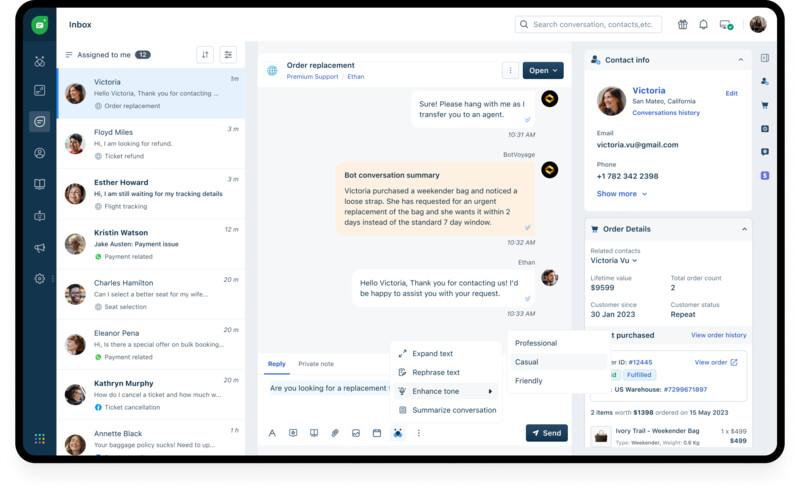
Freshdesk, a product of Freshworks, is one of the most widely used customer service software, trusted by top businesses worldwide to deliver effective and prompt customer support. With Freshdesk, you can delight customers with quick and satisfactory query resolutions. It also offers self-service options across portals and web platforms, all powered by an extensive AI-powered knowledge base to help customers resolve common queries on their own.
Freshdesk provides multichannel support, allowing your business to manage customer conversations across multiple channels, including email, live chat, social media, phone, and web portals, from a unified dashboard.
This platform is powered by Freddy AI, a customer service AI agent that surpasses basic bots as it learns from your existing knowledge bases and provides accurate support without agent interference, helping reduce average resolution time by 93%.
96.09% Positive CSAT Response | 12m 31s Decrease in First Assign Time | 25% Increase in CSAT |
Key features of Freshdesk
Advanced ticketing management: Helps manage, route, and resolve tickets effortlessly with a unified workspace. Ensures tickets are assigned to the appropriate agent for accurate and personalized support.
Customer self-service support: Equips customers and agents with a searchable knowledge base optimized for SEO and available across all portals. Reduces repetitive queries and enables customers to find the answer on their own.
Freddy AI Agent: Provides instant resolutions to common queries and escalates them to human agents when required. When connected with the backend can also perform common actions like refunds, order updates, etc.
Freddy AI Copilot: Accelerates query resolution by helping agents deliver satisfactory, context-aware responses. Reduces ticket volume by handling routine queries and enabling self-service, allowing customers to find answers independently.
Built-in collaboration tools: Enhances cross-functional team collaboration with features like shared ownership, knowledge base management, and threaded conversations.
Advanced reporting and analytics: Monitors agent performance by tracking key KPIs such as ticket volume, resolution times, CSAT scores, timesheets, and more.
Freshdesk pricing
Freshdesk’s pricing plan consists of a free tier for businesses that includes support for up to two agents, along with four paid plans: Growth, Pro, and Enterprise. Check out the details below:
Plan | Price (USD) | Features |
|---|---|---|
Free | $0 | Up to two agents and basic ticketing, knowledge base, and pre-built reports |
Growth | $19/agent/month | Free plus shared inbox, customer portal, basic analytics and insights, ticket dispatch, automation, role-based access control, and single sign-on |
Pro | $59/agent/month | Growth plus multilingual conversations, up to 5,000 collaborators, Freddy AI Agent, Freddy AI Copilot (add-on), custom real-time dashboards, round robin, and load-balanced assignment. |
Enterprise | $95/agent/month | Pro plus custom object analysis, approval workflow, skill-based ticket assignment, agent shifts, out-of-office scheduler, JWT authentication, audit logs, Sandbox, and domains and IP whitelisting |
Pros and cons of Freshdesk
Pros | Cons |
|---|---|
Offers a consolidated view of customer inquiries from multiple channels, along with automatic ticket categorization. | Advanced features might require training for the team. |
User-friendly interface that requires minimal training for agents and admins. | Doesn’t have built-in workforce management capabilities. |
Reduced incoming ticket volume due to Freddy AI’s precision and quick query resolution, requiring minimal manual interference. | Fewer features in the mobile app compared to the desktop version. |
Seamlessly integrates with the Freshworks ecosystem for extended functionalities. |
User reviews
"We adopted Freshdesk because it is a highly adaptable solution with metrics that allow us to track and follow up on our customers and agents efficiently." Christophe Tomborski Back Office Manager Bridgestone |
"Freshdesk has helped us install more efficient workflows and processes while still maintaining HIPAA compliance. It has been a game-changer for agents and members." Mahmoud Shehadeh Director of Member Support Hinge Health |
Verdict
Freshdesk is a user-friendly, affordable customer service platform that centralizes support across multiple channels. With AI-powered automation and Freddy AI, it helps resolve tickets faster and reduces manual effort, making it an ideal solution for small to mid-sized businesses.
2. Zendesk
Zendesk is an omnichannel customer service software that you can customize and scale according to your requirements. As one of the oldest and most widely recognized customer support platforms, it offers a comprehensive suite of products. These tools help optimize support operations and enhance customer experience through faster ticket resolution and workflow automation.
Zendesk also provides a centralized platform for businesses to collect, manage, and resolve customer inquiries from multiple channels. Its AI agent, Zendesk AI, is the cherry on the cake, which significantly helps automate help desk tasks and speed up issue resolutions.
To help you make an informed choice, dive into our detailed comparison of Zendesk vs Freshdesk and determine which solution best aligns with your support requirements.
Key features of Zendesk
Unified ticketing system: Consolidates queries from all channels into a single interface, giving agents a complete view of each customer interaction, regardless of the communication channel.
Advanced analytics and reporting: Zendesk’s Explore offers an interactive dashboard where you can monitor important KPIs and generate reports for better service insights.
Integration capabilities: Supports a library of 1,200+ pre-built apps and provides a set of APIs to extend platform functionalities.
Zendesk pricing
Zendesk pricing is divided into four plans: Support Team, Suite Team, Suite Professional, and Suite Enterprise. For more details, check the comparison table below:
Plan | Price (USD) | Features |
|---|---|---|
Support Team | $25/agent/month | All basic features like ticketing, unified agent workspace, multi-channel routing, and customer interaction history |
Suite Team | $69/agent/month | Support team features plus AI agents, live chat, Google Analytics, call routing, call recording, and social messaging |
Suite Professional | $149/agent/month | Suite team plus skills-based routing, SLAs, self-service portal, IVR, multilingual customer support, and custom analytics |
Suite Enterprise | Custom pricing | Suite Professional plus Sandbox, audit logs, assign agent roles, contextual workflows, extend wait times, and get audit logs |
Note: To access AI features like Agent Copilot, AI workflows, insights, and suggestions, users must purchase the “Advanced AI” add-on, which costs $50/agent/month.
Pros and cons of Zendesk
Pros | Cons |
Omnichannel integration enables smooth connectivity with multiple support channels. | Scattered admin experience with key features spread across multiple windows |
Facilitates effective team collaboration between cross-functional teams | 24/7 support is not available by default; it requires additional payment for Premier Support |
Simplified ticket management and customer history visibility enable quick responses and faster resolution. | No built-in bulk messaging feature for proactive customer outreach |
3. Front
Front, often designated as an email management system, is one of the best AI customer service software that centralizes all customer conversations and workflows into a shared inbox. It allows multiple teammates to manage and respond to shared email addresses like support@ and info@. This ensures everyone stays on the same page and has access to the complete communication history.
Additionally, Front seamlessly integrates with leading CRMs, such as Salesforce and HubSpot. This enables support teams to access complete customer activity and context for faster and more effective issue resolution.
You can also explore a detailed comparison of Front vs Freshdesk to see how the two platforms measure up.
Key features of Front
Unified interface: Provides a shared inbox for all your communication channels. Enables multiple team members to access and collaborate on customer messages in real time.
Front intelligence: Offers insights into the customer journey, summarizes long email threads, and surfaces the knowledge base to help agents resolve customer issues faster.
Advanced analytics: Helps gain deep insights into your team performance and customer experience through KPI monitoring and advanced reporting.
Front pricing
Front offers four flexible pricing models, billed monthly or annually. The Starter and Growth packages are available for both monthly and annual billing, while Scale and Premier are available only for annual billing. Check the table below for more information:
Plan | Price | Features |
|---|---|---|
Starter | $29/seat/month | Shared inboxes, basic ticketing, omnichannel communication, knowledge base, 10 rules, and up to 10 seats |
Growth | $79/seat/month | Starter features plus live chat and chatbots, up to 20 rules, voice and telephone communications, Ticket SLAs & analytics, AI summarize, and AI Compose |
Scale | $99/seat/month (billed annually) | Growth plus up to 200 rules, multilingual support, AI article translation, advanced team controls, onboarding assistance, and a dedicated account team |
Premier | Custom (billed annually) | All Scale features plus custom build hours, access to pre-release and beta features, up to 100 knowledge bases |
Pros and cons of Front
Pros | Cons |
|---|---|
Simple to set up and deploy, with minimal training requirements. | Complex search functionalities make it time-consuming to locate specific emails. |
Enables real-time collaboration with teammates; edit drafts, mention peers, and more without CC-ing or forwarding emails. | Limited user seats make it harder and expensive to scale with more users. |
More intuitive UI and better features in the shared inbox compared to Gmail and Outlook. | The sequence feature is underdeveloped, limiting workflow automation capabilities |
4. Zoho Desk
Zoho Desk is a cloud-based customer service and helpdesk software that’s part of the extensive Zoho ecosystem. It helps businesses track, organize, and prioritize tickets for faster resolution of issues that require immediate attention.
If you’re already a user of the Zoho Suite of products, Zoho Desk might be the ideal support platform for you since it offers native integrations with products like Zoho CRM, Zoho Books, and Zoho Mail. However, if you're comparing platforms to find the right fit, this detailed breakdown of Freshdesk vs Zoho Desk can help you evaluate which tool better suits your support team's needs.
Key features of Zoho Desk
Omnichannel ticketing: Helps provide swift assistance across multiple channels, including emails, calls, messaging apps, social media platforms, live chat, and web forms.
Self-service portal: Hosts an ASAP help widget that businesses can customize as per their brand needs on their websites, enabling customers to auto-solve queries.
AI-powered assistance: Zia, Zoho Desk’s powerful AI, reduces ticketing volumes by providing satisfactory and precise resolutions to user queries using the knowledge base.
Zoho Desk pricing
Zoho Desk offers a free plan suitable for very small businesses and four paid plans for organizations with high customer volumes. Check out the plan details below:
Plan | Price | Features |
|---|---|---|
Free | $0/user/month | 3 agents, basic ticketing, customer management, email, help center, web forms, 2 Macros, mobile app, and multilingual support |
Express | $9/user/month | Free plus social media channels support, 5 agents, 2 email channels, Zia for content analysis, Multi-level escalations, ticket history |
Standard | $20/user/month | Express plus 5 email channels, instant messaging, community forums, ASAP widget, 24/5 phone support |
Professional | $35/user/month | Standard plus Round-robin ticket assignment, agent performance time tracking, multi-department support, ticket sharing, collision detection |
Enterprise | $50/user/month | Professional plus multi-brand help centers, full Zia capabilities, IVR, Telephony, role-based access control |
Pros and cons of Zoho Desk
Pros | Cons |
|---|---|
Effective SLA tracking and improved team organization. | Agents have limited visibility over customer details, limited to basic ticket details. |
Built-in knowledge base helps deliver better service and consolidate product insights. | Requires additional technical effort to deploy chatbots on channels beyond WhatsApp. |
Seamless integration with other Zoho products. | Limited chat and phone support (only 8 to 5), even on the Enterprise plan. |
5. Help Scout
Help Scout is a unique customer service software that offers a shared inbox that feels like a regular email inbox, but in reality, is much more than that. It is a comprehensive help desk platform that features self-service, ticketing, automation, and advanced collaboration tools.
Its shared inbox acts as a centralized hub where customer inquiries from email, live chat, and social media channels are consolidated. This gives agents a unified view, enabling them to collaborate and deliver timely, comprehensive support.
To see how it compares to leading customer service solutions like Freshdesk in terms of features, pricing, and usability, check out this detailed Help Scout Freshdesk comparison.
Key features of Help Scout
Live chat and self-service portal: Help Scout features Beacon, a live chat and self-service widget that can be embedded on websites for real-time support and help articles.
Automation and workflows: Enables you to set up workflows that automate repetitive tasks like assigning customer support tickets, tagging, and routing conversations.
Advanced insights and analytics: Offers access to critical team and business insights such as response times, wait times, chat duration, and busy hours. Also provides CSAT scores to analyze customer satisfaction and improve team performance.
Help Scout pricing
Help Scout follows a straightforward pricing model, offering one free plan and three paid plans ideal for small businesses testing the platform and established businesses looking to optimize their workflows. Check the table below to know more:
Plan | Price | Features |
|---|---|---|
Free | $0/month | Up to 50 contacts/month, unlimited users, shared inbox, knowledge base, Beacon widget with AI answers, AI drafts, AI assist, 2FA, in-app messaging, customer profile, and activity history, pre-built and custom reports |
Standard | $55/month | Free plus unlimited messages, 100 contacts/month, 2 inboxes, complete automation, CSAT ratings, advanced reporting, export data |
Plus | $83/month
| Standard plus up to 25,000 contacts, custom fields, restrict docs, advanced views, workflows, team features, and advanced permissions |
Pro | Custom | Plus features and more contacts, enhanced security, dedicated onboarding, and more |
Pros and cons of Help Scout
Pros | Cons |
|---|---|
The collision detection feature helps ensure that no two agents are working on the same ticket. | Limited automation capabilities, tailored mainly for small teams and low support volumes. |
Help Scout’s well-organized and simple user interface ease implementation. | Offers only around 100+ integrations, far fewer than competitors. |
A responsive team that actively addresses feature requests with real implementations. | Missing advanced features like shared ownership and linked tickets, making cross-team collaboration less efficient. |
6. Intercom
Intercom is a unique customer support platform that combines its powerful Fin AI agent with its help desk capabilities to deliver superior customer service. It follows a messenger-first approach, which emphasizes forging stronger customer relationships via proactive messaging and live chats.
Fin AI efficiently handles most routine queries using its knowledge base and past resolution history, allowing human agents to focus on only the most priority customer issues. Intercom provides an omnichannel platform where customer queries from different channels, such as email, live chat, SMS, social media, or phone, are converged for a comprehensive view.
For a detailed evaluation of its features and approach against a strong competitor, dive into our Intercom vs Freshdesk comparison.
Key features of Intercom
AI-powered agent assist tool: Features Copilot, an AI assistant that equips customer service agents with relevant information. Provides support content to resolve customer queries faster and more accurately.
Reporting: Offers AI insights, customizable reports, and agent and AI support that help better understand workflows, results, and customer satisfaction scores.
Powerful integrations: Offers 300+ integrations with various CRM, email, ticketing, social channels, reporting tools, and internal databases, making it easier to scale its capabilities.
Intercom pricing
Intercom offers three plans: Essential, Advanced, and Expert, available on both monthly and annual billing cycles. Additionally, all of these plans include Fin AI integration. To know more about the plans, refer to the table.
Plan | Price | Feature |
|---|---|---|
Essential | $39/seat/month | Fin AI agent costing $0.99/resolution, live messenger, shared inbox, ticketing system, AI compose, basic help center, Copilot, pre-built reports |
Advanced | $99/seat/month | Essential plus multiple team inboxes, automated workflows, round-robin assignment, teammate inactivity, AI Summarize, AI Autofill |
Expert | $139/seat/month | Advanced plus multi-brand messenger and help centers, HIPAA support, SLAs, SSO & identity management |
Pros and cons of Intercom
Pros | Cons |
|---|---|
Easy to set up and quick onboarding that helps speed up implementation. | Lacks parent-child ticketing capabilities, making cross-team collaboration difficult. |
All customer information is available in one cluster, mitigating the need to switch between platforms. | No skill-based routing, leading to inefficient ticket assignments to unqualified agents. |
Supports multiple languages, enabling prompt assistance for global users. | Higher pricing compared to alternatives, especially as you scale. |
7. ServiceNow CSM
ServiceNow CSM is a powerful customer support system that helps deliver exceptional support across multiple channels by ensuring each customer query is addressed promptly. With a comprehensive self-service portal and AI agents for 24/7 support, this platform resolves most inquiries without human intervention. This significantly reduces the burden on support teams. Moreover, ServiceNow’s AI not only automates query routing but also equips agents with all the necessary context to resolve cases efficiently. Features like AI-generated summaries and context-aware auto-responses save time and accelerate resolution, making it one of the best AI customer service tools.
Key features of ServiceNow CSM
Unified agent workspace: Offers agents a comprehensive dashboard with a 360-degree view of the customers across all channels, including complete conversation history. It also includes macros, AI assistance, and team collaboration tools.
Smart case management: Consolidates cases from all communication channels and intelligently routes them to appropriate agents based on their skills, availability, and department.
AI-powered analytics: Uses predictive intelligence to analyze historical data, predict potential downtimes, and enable proactive issue resolution. It also includes performance analytics to monitor both human and AI agent efficiency in resolving customer issues.
ServiceNow CSM pricing
Plan | Price | Feature |
|---|---|---|
CSM Standard | Custom | Case Management, omnichannel, agent workspace, advanced work assignments, DevOps, ServiceNow AI capabilities, and self-service |
CSM Professional | Custom | CSM Standard plus performance analytics, task intelligence, proactive customer service operations, vendor management workspace, and service catalog |
CSM Enterprise | Custom | CSM Professional plus shift-based assignment, workforce optimization, and process mining |
Pros and cons of ServiceNow CSM
Pros | Cons |
|---|---|
Easy ticket management with centralized tickets and automated workflows. | Steep learning curve for new users, and when implementing complex automation. |
Intuitive and easy-to-use user interface. | Occasional performance lags during peak usage. |
Seamless cross-platform team collaboration. | Time-consuming initial setup and configuration. |
8. HappyFox
HappyFox is a cloud-based customer support and help desk software that helps businesses centralize service management across multiple customer support channels. It provides a unified workspace for agents, ensuring no query goes unanswered. Its powerful ticketing system converts all incoming customer inquiries into easily tractable and organized tickets and includes features like automated skills-based assignment, collision detection, and more.
With advanced integration capabilities, HappyFox allows businesses to connect the platform with a range of third-party applications, including CRM tools, eCommerce platforms, project management, and collaboration tools.
Choosing a cloud help desk? Our HappyFox vs Freshdesk comparison provides the key insights to find your ideal fit.
Key features of HappyFox
Automated workflows: Enables the creation of rule-based workflows to automate repetitive tasks and ticket assignments, suggest auto-responses, and more.
AI Resolve and AI Copilot: Helps agents deliver prompt resolutions through smart replies, ticket summaries, and writing assistance.
Reporting & analytics: Allows businesses to track KPIs like CSAT scores, resolution time, wait time, agent performance, and more.
HappyFox pricing
HappyFox’s pricing model is divided into two models: agent-based pricing and unlimited agents. Let’s take a look at both of the models in detail.
Agent-based pricing:
Plan | Price | Key Features |
|---|---|---|
Basic | $29/agent/month
| Omnichannel support, unlimited tickets, up to 5 agents, and SLA management |
Team | $69/agent/month | Basic plus custom email, custom domain, multi-brand Helpdesk, custom ticket queues, and 24/5 email support |
Pro | $119/agent/month | Team plus proactive agent collision, load-balanced ticket assignment, task management, and asset management |
Enterprise PRO | Custom | Pro plus advanced audit logs, customer success manager, and 2 TB attachment store |
Unlimited agents:
Plan | Price (annual plans) | Key Features |
|---|---|---|
Growth | $1,999/month | Unlimited agents, 20,000 tickets/year, and 20 custom fields |
Scale | $3,999/month | 150,000 tickets/year, and 100 custom fields |
Scale Plus | $5,999/month | 300,000 tickets/year and 200 custom fields |
Ultimate | Custom | 10,00,000 tickets/year and 300 custom fields |
Pros and cons of HappyFox
Pros | Cons |
|---|---|
Easy to use and implement for small-scale teams. | Fixed pricing caps annual tickets and charges extra for overages, driving up costs. |
Prompt and easily reachable vendor support. | Live chat and chatbot are offered as add-ons, not built-in features. |
Smooth integration with third-party applications like CRM and eCommerce platforms. | Lacks advanced AI features like sentiment analysis, intent detection, and automated triage. |
9. Gorgias
Gorgias is one of the best e-commerce customer service software available in the market. Its conversational AI helps accelerate query resolution and, more importantly, provides meaningful recommendations to enhance conversations. Gorgias seamlessly integrates with over 100 e-commerce tools, offering a holistic view of customers to deliver more personalized and impactful interactions. Additionally, this customer service platform provides plugins for Shopify, BigCommerce, and Magento. These integrations allow e-store operators to perform actions like editing orders and issuing refunds directly within the help desk software.
For eCommerce businesses evaluating a specialized solution against a more comprehensive platform, our in-depth Gorgias vs Freshdesk comparison offers crucial insights.
Key features of Gorgias
Omnichannel customer support: Enables businesses to manage customer queries across multiple channels, including email, social media, live chat, WhatsApp, etc, from a single dashboard.
In-desk eCommerce platform controls: Integrate platforms like Shopify, Magento, and WooCommerce to perform operations such as editing, refunding, or canceling orders directly from the helpdesk.
Proactive support: Helps launch chat campaigns to offer personalized shopping assistance, product recommendations, and respond to pre-purchase queries in real time.
Gorgias pricing
Gorgias offers five flexible pricing plans: Starter, Basic, Pro, Advanced, and Enterprise. Refer to the table below to learn more about these plans.
Plan | Price (USD) | Features |
|---|---|---|
Starter | $10/month | 3 user seats, 50 billable tickets/month, Shopify and WooCommerce integrations, multi-channel support (excluding voice and SMS), create on-site campaigns for Shopify, SSO, complete automation, analytics |
Basic | $60/month | Starter plus 300 billable tickets/month, 500 user seats, BigCommerce integration, Voice and SMS support, up to 150 integrations, self-service and automation statistics, team management, and user permissions |
Pro | $360/month | Basic plus 2,000 billable tickets/month and Magento integrations |
Advanced | $900/month | Pro plus 5000 billable tickets/month |
Enterprise | Custom | Advanced plus custom features |
Pros and cons of Gorgias
Pros | Cons |
|---|---|
User-friendly interface that supports quick onboarding for agents. | Pricing is a bit expensive for smaller businesses. |
A proactive customer service team that provides fast issue resolution for businesses. | Frequent updates can sometimes slow down the entire software. |
Smooth automation with streamlined ticket assignments and effective features like macros and triggers. | Add-on charges are costly once all the billable tickets are exhausted. |
10. Hiver
Hiver is a customer service software that offers a Gmail and Outlook-like interface, allowing you to manage multiple business email IDs through a shared inbox, ensuring no query goes unanswered.
It enables businesses to manage communication across multiple channels, be it email, WhatsApp, or chat, from a single platform that feels like your inbox. The platform allows users to create no-code rules to automatically route, assign, tag, and perform similar operations with ease.
Key features of Hiver
AI-assisted live chats: Help add branded live chat widgets to your website or app. Enables AI chatbots to provide instant, real-time support and route messages to the appropriate agents.
AI-automated workflows: Leverages AI and route-based workflows to automatically assign tickets to the right agent directly on the email without the need for forwarding or CC-ing.
Advanced analytics and reporting: Tracks customer interactions and monitors key KPIs, including response time, resolution time, and CSAT score. Adds custom fields to store and filter conversations for easier analysis and better performance.
Hiver pricing
Hiver offers a free plan and four paid plans: Lite, Growth, Pro, and Elite, starting at $19. Refer to the table below for more details.
Plan | Price (USD) | Features |
|---|---|---|
Free | $0 | Multichannel shared inbox, ticketing, Slack integration, Mobile app, 24/7 email and chat support, team collaboration, Live chat, voice, and WhatsApp support, and knowledge base |
Lite | $24/user/month | Free plus customer portal, round-robin auto assignments, SLAs, Custom fields, collision detection, approval workflows, AI Compose (20 users/day), Asana, Jira, QuickBooks, analytics for conversation data |
Growth | $34/user/month | Lite plus custom reports, user and tag data analytics, Zapier integrations |
Pro | $49/user/month | Growth plus chatbots, assignment Limits for Round-robin, custom dashboards, scheduled data reports/exports, CSAT, API and access, Salesforce integrations, and onboarding assistance |
Elite | Custom | Pro plus skill-based routing, Okta Integration, 6 custom roles, dedicated success manager, quarterly team training, and custom build hours |
Pros and cons of Hiver
Pros | Cons |
|---|---|
Easy implementation and onboarding with prompt vendor support. | Auto-responders lack a scheduling feature and are manually controlled. |
Seamlessly integrates with Gmail, eliminating the need to learn a new platform. | Searching for previously closed emails can often become tedious. |
Automation features like rules, templates, and auto-assignment help streamline repetitive tasks. | Lacks advanced customization options and reporting features found in other platforms. |
11. Salesforce Service Cloud
Salesforce Service Cloud is a widely recognized customer service platform trusted by leading companies to deliver fast and effective support to their customers. Backed by the Salesforce ecosystem, the platform helps businesses resolve customer queries across multiple channels, including email, social media, and chat.
Service Cloud is part of the broader Salesforce Customer 360 platform. This enables seamless integration with other Salesforce products like Marketing Cloud and Sales Cloud for a comprehensive customer view.
To truly understand if deep CRM integration or a dedicated, best-in-class helpdesk is your priority, explore our detailed Salesforce Service Cloud vs Freshdesk comparison.
Key features of Service Cloud
Omnichannel routing: Directs queries from multiple channels (email, chat, social media, phone) to the appropriate agent based on their availability, capacity, and skills.
Unified customer view: Centralizes customer data, including purchase history, tickets, and other historical information, for more personalized and satisfactory issue resolution.
Einstein AI: Helps businesses deliver great customer support through valuable insights and automation. Offers case classification and routing, article recommendations, best actions, and predictive analytics.
Salesforce Service Cloud pricing
Salesforce Service Cloud offers five pricing packages: Starter Suite, Pro Suite, Enterprise, Unlimited, and Einstein 1 Service. Here are the details:
Plan | Price (USD) | Features |
|---|---|---|
Starter Suite | $25/user/month | Comes with basic case management, knowledge management, email marketing, and analytics |
Pro Suite | $100/user/month | Starter plan plus omnichannel routing, sales quoting and forecasting, and real-time chat |
Enterprise | $165/user/month | Includes Einstein AI for service, advanced workflow automation, and self-service help center |
Unlimited | $330/user/month | 24/7 support, AI-powered chatbots, and complete chat and messaging support |
Einstein 1 Service | $500/user/month | Unlimited plan plus AI-powered chat analysis (service intelligence), data cloud, and Slack |
Pros and cons of Service Cloud
Pros | Cons |
|---|---|
Complete client tracking from initial call to query resolution. | Cluttered UI with complex navigation and unnecessary sales-focused features. |
Improved team collaboration through Slack integration and a shared knowledge base. | Steep learning curve; agents may require technical knowledge and configuration skills. |
Better case management with centralized case tracking, omnichannel routing, and automated workflows. | Starter plan lacks pre-built or custom integrations, limiting scalability. |
12. HubSpot Service Hub
HubSpot Service Hub is part of the larger HubSpot ecosystem and is built on top of HubSpot’s Smart CRM. This allows businesses to gain a holistic view of their customers by accessing complete activity details from various departments, including marketing, sales, and operations. This platform is powered by the Breeze customer agent, which helps businesses effortlessly manage large ticket volumes by delivering context-aware responses sourced from knowledge base content. This ensures customers receive accurate, helpful support 24/7, ultimately boosting customer satisfaction.
Key features of HubSpot Service Hub
Intelligent ticketing management: Uses AI to automate advanced features such as ticket routing, conditional SLAs, and task assignments.
Call tracking: Enables you to make and receive phone calls directly within the system, with IVR phone tree support for smart call routing.
Service analytics: Monitors how well your agents are performing by measuring their productivity and post-support survey scores. Tracks KPIs like ticket volume, chat wait time, and average resolution time.
HubSpot Service Hub pricing
HubSpot Service Hub’s pricing model is very simple, with one free plan and three paid tiers: Service Hub Starter, Service Hub Professional, and Service Hub Enterprise.
Plan | Price | Key Features |
|---|---|---|
Service Hub Starter | $15/seat/month
| 500 minutes of calling, email reply tracking, simple ticket automation, meeting scheduling, live chat, and conversation routing |
Service Hub Professional | $100/seat/month | Starter plus Customer success workspace, customer feedback surveys, 3,000 minutes of calling, insights dashboard, SLAs, service analytics, and help desk |
Service Hub Enterprise | $150/seat/month | Professional plus skill-based routing, IVR, conditional SLAs, field-level permissions, and admin notifications management |
Pros and cons of HubSpot Service Hub
Pros | Cons |
|---|---|
Requires minimal training and is easy to use. | Lacks core ticketing features like parent-child ticketing, collision detection, and shared ticket ownership. |
AI tools significantly boost productivity, helping human agents save time and prioritize critical issues. | Prioritizes CRM-specific channels over key support channels like Instagram, Apple Messages, and LINE. |
Integrates natively with HubSpot CRM, Marketing Hub, and Sales Hub, offering a unified view of the customer journey. | Essential features like SLAs and a knowledge base are locked behind upper-tier plans. |
Now that you’ve explored the top 12 customer support tools and what they offer, the next step is figuring out which one fits your business best. In the next section, we’ll walk you through key factors to consider when choosing the right customer support software.
Try the all-in-one customer service solution
Start your free trial today. No credit card required.
12. Sprout Social
Sprout Social is a social media management platform that can also be used to monitor customer service on social media. This is perfect for businesses running on social media and only wanting to deliver customer service across the same social channels.
Sprout Social can help your team be fast and efficient with features like delegation, personalization, and seamless in-app collaboration.
Key features
Social CRM: You can access important customer details and provide personalized service to build lasting relationships.
All-in-one platform: Enable greater visibility across your team and seamless in-app collaboration with a user-friendly and centralized social media customer service platform.
Reporting capabilities: Create reports that provide insight into individual and team response times and message threads to help you evaluate the quality of your customer service.
Pros and cons of Sprout Social
Pros:
Excellent for monitoring customer sentiment across social channels
Best for teams that receive a lot of support requests via social media — both in DMs and posts.
Cons:
Limited to only social media channels
13. Gorgias
Gorgias is customer service management software that is built specifically for e-commerce businesses. The robust plugins with Shopify, BigCommerce, and Magneto make it easy for online businesses to perform actions like editing orders and refunding payments right from within the help desk software.
Key features
Centralize all support tickets: Have every customer data displayed when you're talking to them. Edit orders, modify subscriptions, and refund payments without leaving the platform.
Proactive support: Respond to customers' queries about your products on your ads and posts, increasing your sales and ad effectiveness.
Multi-channel service: Track all conversations by support agents over text messages, social media answers, and live chat conversations on your website.
Pros and cons of Gorgias
Pros:
Integrations with popular eCommerce website builders make it an ideal choice if you have a website on any of those platforms.
Also helps with sales along with support, helping you get more conversions.
Cons:
The reporting feature is limited—it only allows for historical data within 90 days.
14. Happyfox
Happyfox is a customer service solution that can be used not only by a customer service team but also by HR and marketing teams. This platform lets you streamline your internal support with the IT support and support operations modules.
Key features
Omnichannel support: Convert email, phone, chat, social media, and web requests into tickets and keep them organized in a single place.
Ticket categories: Classify your inbound tickets into predefined categories like products, sales, support, etc., and all requests will flow into the right ticket categories of your support ticket system.
Live Chat: Add a chat plugin to your support center or your website by integrating with HappyFox Chat or other supported live chat widgets. These customer conversations can be recorded as helpdesk tickets.
Pros and cons of Happyfox
Pros:
Pricing is not a per-user model, as many other tools. So you can add unlimited agents to any plan.
Neat interface as every ticket is properly organized automatically.
Cons:
When creating workflows, it has limited triggers and actions.
Reporting capabilities are basic.
15. Hiver
Hiver is a Gmail-based customer service management software that is perfect for lean customer service teams that do not want to let go of the comfort of using Gmail but are struggling to keep track of customer requests. Users can manage all support channels from the Gmail panel.
Key features
Shared inbox: Gmails can be turned into actionable tasks, given them to designated owners and resolutions.
Collaboration within Gmail: Enable cross-department collaboration in Gmail and also invite external collaborators.
Automation: Automate Gmail-based tasks like assigning emails and tagging messages.
Pros and cons of Hiver
Pros:
Because it’s email-based, Hiver is very easy to set up and manage. Best for teams that don’t want to go through the hassle of setting up a custom platform.
Wide range of email templates for providing faster responses to customers.
Cons:
There is no way to create support tickets unless related to a Gmail account.
The analytics and reporting feature is very basic.
16. MailChimp
MailChimp is an email marketing platform that helps businesses create, send, and automate email campaigns. It's known for its user-friendly interface and robust audience segmentation capabilities, making it a popular choice for customer engagement and marketing.
Key features
Email Marketing: Use email campaigns for customer engagement and support updates.
Audience Segmentation: Targeted messaging for customer segments.
Automation: Automate email responses and follow-ups for customer inquiries.
Pros and cons of MailChimp
Pros:
Good for customer engagement and updates via email
Automation features can enhance support.
Detailed analytics for email performance.
Cons:
Not primarily designed for customer service.
Limited real-time support features.
Pricing can be expensive for large subscriber lists.
17. LiveAgent
LiveAgent is a comprehensive customer service and helpdesk software that offers multi-channel support, ticketing, live chat, and knowledge base features. It's designed to streamline customer interactions and enhance support efficiency, making it a valuable tool for managing customer service inquiries.
Key features
Multi-Channel Support: Handle customer inquiries from various channels.
Ticketing System: Efficiently manage and resolve customer issues.
Live Chat: Offer real-time customer service on your website.
Knowledge Base: Provide self-service options for customers.
Pros and cons of LiveAgent
Pros:
Real-time live chat for instant support.
Extensive customization options.
Cons:
Learning curve for advanced setup and configuration.
Pricing can be high for businesses with many agents.
18. Buffer
Buffer is a social media management platform that allows businesses to schedule and analyze social media posts across various platforms. While it's primarily used for social media marketing, it can also be employed to manage support-related social media communications.
Key features
Social Media Scheduling: Plan and schedule support updates on social media.
Analytics: Measure social media engagement and performance.
Collaboration: Collaborate with team members for coordinated customer service.
Pros and cons of Buffer
Pros:
Simplifies social media support
Provides analytics to evaluate social media engagement.
Supports team collaboration for coordinated support efforts.
Cons:
Doesn’t integrate other channels of communication
Pricing for advanced plans can be costly.
19. ClickUp
ClickUp is a versatile project and task management platform with customization options. While not specifically a customer service software, it can be adapted to manage support workflows and collaboration, offering flexibility for various business needs.
Key features
Task Management: Organize support tasks and projects.
Collaboration: Collaborate with team members on customer service initiatives.
Customization: Highly customizable for various workflows.
Pros and cons of ClickUp
Pros:
Highly adaptable to different support workflows.
Integrates with a variety of tools to enhance support processes.
Offers both task and project management capabilities.
Cons:
Complexity may be overwhelming for straightforward customer service tracking.
Learning curve for advanced features.
20. Slack
Slack is a team messaging and collaboration platform that facilitates real-time communication among team members. While it's not a dedicated customer service tool, it can be used for internal communication among support teams, ensuring efficient collaboration and information sharing.
Key features
Team Messaging: Real-time communication for support teams.
Channels: Dedicated spaces for specific customer service projects or topics.
Integration: Connects with various tools to enhance customer support processes.
File Sharing: Easy sharing of customer service documents and resources.
Pros and cons of Slack
Pros:
Facilitates efficient communication and collaboration for customer ervice teams.
Wide range of integration options with other support systems.
Cons:
Limited customer support-specific features. Advanced functionality may require integration with other tools.
What are the essential features of a customer support solutions?
A robust customer support solution consists of several essential features that work in tandem to deliver exceptional customer experiences. These features empower support teams to efficiently manage customer interactions, improve response times, and build stronger customer relationships.
Multi-channel ticketing
In today's digital age, customers interact with businesses through various channels such as email, phone, live chat, and social media. A multi-channel ticketing system unifies these interactions into a single platform, providing agents with a comprehensive view of each customer's journey. By centralizing communication, businesses can ensure consistent and efficient support across all channels.
Collaboration
Effective customer support often requires collaboration among team members. A customer support solution should facilitate seamless collaboration by allowing agents to share information, assign tasks, and escalate issues within the platform. This fosters knowledge sharing, improves problem-solving, and ensures a unified approach to customer support.
Automations
Automation is key to increasing efficiency and improving agent productivity. Customer support solutions should offer features like automated ticket routing, email templates, and self-service options. By automating routine tasks, agents can focus on more complex issues and provide higher-quality support.
Self-service
Empowering customers to find answers independently is crucial for efficient support. A robust self-service portal with a comprehensive knowledge base, FAQs, and how-to guides can significantly reduce ticket volume. By offering self-service options, businesses can improve customer satisfaction and free up agents to handle more complex inquiries.
Customization
Every business has unique customer support needs. A flexible customer support solution allows for customization to match specific workflows and processes. This includes options to tailor ticket fields, reporting dashboards, and agent roles to align with the business's specific requirements.
Reporting and analytics
Data-driven insights are essential for measuring performance and identifying areas for improvement. A customer support solution should provide comprehensive reporting and analytics capabilities. By tracking key metrics such as ticket volume, average response time, customer satisfaction, and agent performance, businesses can gain valuable insights into their support operations and make data-driven decisions to optimize performance.
How does customer service platform work?
A customer service platform functions as a centralized hub for managing and optimizing customer interactions. It serves as a bridge between a business and its customers, streamlining communication and improving overall support efficiency. By consolidating various communication channels into a single platform, customer service teams can effectively manage and respond to inquiries, complaints, and requests.
Components of a customer support system
A typical customer support system comprises several interconnected components working together to deliver exceptional service. At its core, a ticketing system organizes and tracks customer issues. This system often integrates with a knowledge base, providing customers with self-service options and empowering agents with quick access to information. Additionally, live chat and email support functionalities enable real-time interactions with customers. Analytics and reporting tools offer valuable insights into customer behavior and support performance, allowing businesses to make data-driven decisions.
Why use customer service solutions in your business?
Implementing a customer service solution is essential for businesses seeking to enhance customer satisfaction, improve operational efficiency, and drive growth. By centralizing customer interactions, these platforms provide a holistic view of customer journeys, enabling businesses to identify pain points and areas for improvement. Furthermore, automation features streamline repetitive tasks, freeing up agents to focus on complex issues and building stronger customer relationships. Ultimately, a well-implemented customer service solution can significantly impact customer loyalty and advocacy, leading to increased revenue and business growth.
Why use customer service solutions in your business?
Customer service software solutions are essential for businesses of all sizes. Without them, customer requests can be missed, leading to delayed responses and dissatisfied customers. According to eMarketer, 60% of customers said they are concerned about bad customer service.
Customer service systems enable efficient tracking of response times and customer feedback, fostering continuous improvement. As your business expands, managing support requests across agents and departments becomes complex, necessitating ticket systems.
Even in smaller operations, this software streamlines processes, automating repetitive tasks, freeing time for addressing complex issues, and focusing on business growth.
How to select the best customer support software for your business?
Choosing the right customer support tool can significantly impact your team’s efficiency and your customers’ satisfaction. Here’s how to find the best fit for your business needs:
1. Identify business requirements
Start by identifying what your business needs from a customer support platform. Understand the type of solution that will address your business and user pain points. Ask yourself:
Do you need multichannel support (email, chat, calls, social media)?
What features do you require in your platform (AI agents, automated ticketing, self-service portal, etc)?
Outlining your needs can help you make more informed decisions in choosing the right customer service solution that can help you streamline your customer service.
2. Evaluate usability
Any tool, no matter how feature-rich it is, is only effective if it is easier for your users to adapt and use. Look for:
Clean and intuitive interface
Short learning curve
Support quick onboarding for agents
Pro tip: The best way to accurately evaluate usability is to explore a product demo or try out the free plan firsthand. This experience will help you better understand the features and interface and determine whether it aligns with your team’s workflows. |
3. Pricing
Pricing transparency is crucial. Here’s what to look for when looking at potential customer service tools’ pricing plans:
Is the plan price justifiable for the features included?
Does the platform have hidden costs, like set-up fees, support charges, and licensing fees?
4. Integration capabilities
The platform you are considering investing in must effortlessly integrate with your existing business systems and tools, such as CRM, eCommerce platforms, and team collaboration tools. This ensures a smoother workflow, eliminates data silos, and provides a unified system where you can gain a holistic view of customers to deliver better customer service.
Freshdesk’s integrations and configurations allow businesses to connect support services organization-wide. This enables better support quality, enhanced collaboration, and a more elevated customer experience.
5. Training and support
Simply purchasing a comprehensive and effective customer service software doesn’t solve all your problems. You also need to partner with a trusted service provider that offers onboarding assistance and around-the-clock support. Also, comprehensive documentation and additional resources should be available to help your employees onboard quickly.
Confirming this before finalizing a product is imperative to ensure you cut short the induction time and onboard people quickly to enhance your work productivity.
6. Security and Compliance
When reviewing customer service software solutions, it is crucial to assess the platform's security and compliance standards to ensure your customer and business data stays safe. Make sure the solution is PCR compliant and adheres to industry standards such as SOC 2 and ISO 27001.
Also, check for essential security features like data encryption, access-based control, audit logs, and other mechanisms that ensure fortified security.
7. Make the final decision
After thoroughly reviewing usability, pricing, integration capabilities, security, compliance standards, and training support, it’s time to make your final decision. Select a customer service solution that aligns with your business needs.
Ensure it offers the required features at a justifiable price, is easy to adopt, is secure and compliant with the industry norms, and seamlessly integrates with your existing systems.
Get a customer service software demo
Book a personalized demo to see how our easy-to-use ticketing solution can help you elevate your customer service.
Customer service software: best practices
Customer service software has become indispensable for businesses aiming to deliver exceptional customer experiences. By implementing best practices in the use of customer service software, companies can efficiently manage customer inquiries, enhance satisfaction, and build lasting relationships.
Automation for Efficiency: Leverage automation features within your software. Automate routine tasks like ticket routing, email responses, and appointment scheduling. This saves time and ensures quicker response times, leaving your team more time to focus on complex issues.
Personalization: Use customer data to personalize interactions. When customers contact support, your software should provide agents with relevant information about the customer's history and preferences. This enables more tailored and effective responses. It’s also best to create custom workflows and rules to suit your organization’s needs.
CRM: Integrate your customer service software with your Customer Relationship Management (CRM) system. This synchronizes customer data, enabling a 360-degree view of the customer. Agents can access customer information easily, improving the quality of interactions.
Training and Onboarding: Train your team effectively on using the customer service system. Ensure they are proficient in its features and capabilities. Regularly update training to keep up with software updates and changes.
Feedback Collection: Use your software to collect customer feedback after each interaction. Analyze this feedback to identify areas for improvement and address customer concerns promptly.
5 Current trends for customer service platforms
The customer service landscape is constantly evolving, driven by technological advancements and changing customer expectations. Staying abreast of these trends is essential for businesses to deliver exceptional support and maintain a competitive edge.
1. Self-service is becoming more popular among customers
Customers increasingly prefer to find answers and resolve issues independently. Self-service options, such as comprehensive knowledge bases, FAQs, and interactive tutorials, empower customers to take control of their experience. By investing in robust self-service capabilities, businesses can reduce support ticket volume, improve customer satisfaction, and free up agents to handle more complex inquiries.
2. The rise of messaging platforms
Messaging platforms like WhatsApp, Facebook Messenger, and Apple Messages have become popular channels for customer communication. Customers expect businesses to be available on these platforms, offering quick and convenient support. Integrating messaging into customer service platforms allows businesses to meet customer expectations and provide a seamless omnichannel experience.
3. Customers expect personalized customer service
Customers crave personalized experiences, and customer service is no exception. Leveraging customer data and AI-powered tools, businesses can deliver tailored support that resonates with individual needs and preferences. By understanding customer history, preferences, and behavior, agents can provide more relevant and helpful assistance.
4. Social media customer service
Social media platforms have become essential channels for customer interaction. Customers often use social media to express their opinions, ask questions, and seek support. Businesses must actively monitor social media channels and respond promptly to customer inquiries and complaints. Integrating social media into customer service platforms enables efficient management of social media interactions.
5. Omnichannel is becoming the norm
Customers interact with businesses through multiple channels, and they expect a consistent experience across all touchpoints. Omnichannel customer service involves connecting different communication channels into a unified platform, providing a seamless and cohesive customer journey. By offering support across various channels, businesses can meet customer expectations and build stronger relationships.
Related resources
Customer Service
Learn more about customer service through our ultimate guide and take a look at how to improve the customer service offering of your business
Freshdesk Omni product tour
Experience an interactive product tour of Freshdesk Omni before your personalized demo and explore the capabilities of Freshdesk Omni.
Customer engagement platform
Click here to scover what defines a customer engagement platform, its operations, benefits,, and leading customer engagement platforms in 2026.
Customer feedback software
Explore our comprehensive guide on customer feedback tools, providing insights into the top customer feedback softwares of 2026.
Customer experience software
Take a look at our exclusive guide on customer experience management tools, providing insights into the top customer experience softwares of 2026.
Freshdesk product tour
Experience an interactive product tour of Freshdesk and explore its capabilities first hand.
Frequently asked questions about customer support software
Which customer service software has the best AI live support?
There are many AI-based customer service software that offer advanced AI live support, such as Freshdesk (Freddy AI), Intercom (Fin AI), and Zendesk (AI for Service). While each of them offers distinctive functionalities, Freshdesk stands out as the most affordable option, with base plans starting at $15/agent/month, along with a free version suitable for small teams of up to 2 members.
Which AI customer service software offers the best integration with existing systems?
Salesforce Service Cloud, Zendesk, Gorgias, Intercom, and Freshdesk are some AI customer service software that offer the best integration capabilities. Among these, Salesforce Service Cloud is highly reliable for enterprise-level integrations with CRM and other tools. It supports over 1700 integrations, which can be used to scale your complex customer service environments.
How complex is data migration when switching to a new customer service software?
The complexity of data migration depends on several factors: the volume of data, the support tools available with your existing platform, and the compatibility between the platforms. For example, migrating a large dataset can be time-consuming and complex. However, platforms like Zendesk, Freshdesk, and Salesforce often include built-in import tools, making migration more convenient.
How does customer support software ensure security and compliance?
Customer support platforms like Freshdesk follow standard security protocols like data encryption (TLS 1.2 and AES-256), role-based access controls, multifactor authentication, and more to ensure your data security. Additionally, leading platforms comply with industry standards such as ISO 27001, SOC 2 Type II, HIPAA, and more to ensure data integrity.
What are the various types of customer support software?
There are several types of customer support software available in the market. These include self-service software, ticketing management, live chat software, CRM, field service management, and call center software. Apart from these, there are all-in-one suites that combine the features of these individual software programs into a single platform.