Best asset management software for small businesses: The complete guide

Simplify operations and boost profitability with Freshservice's intuitive asset management software for small business solutions to eliminate manual tracking headaches.

Try it FreeGet a demo
it asset management

Small businesses face asset misplacement and inefficient resource allocation every year, which leads to loss of money, time, and competitive advantage. The solution lies in modern asset management software for small business operations. These software can transform chaotic manual processes into streamlined, automated systems.

Platforms like Freshservice ITAM help you track every piece of equipment, monitor software licenses, schedule maintenance, and prevent costly surprises that can derail small business budgets.

This guide reveals how the right asset management system can save your business thousands of dollars.

What is asset management software for small businesses?

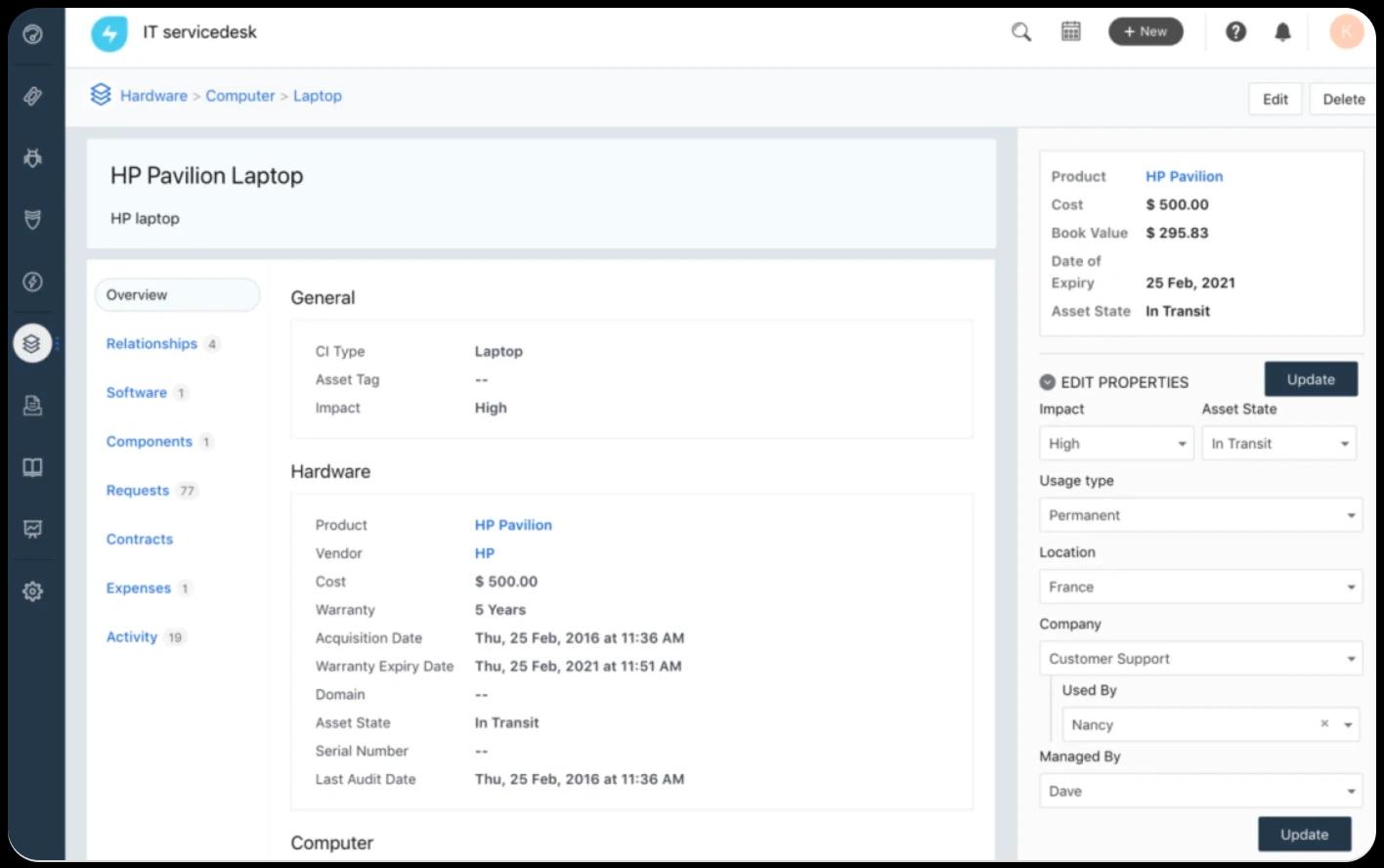
Asset management software gives you a centralized platform to track, monitor, and optimize both physical and digital resources across their lifecycle. Instead of relying on error-prone spreadsheets, you can get automation, real-time updates, and actionable insights into utilization and costs.

Such software lets you manage IT hardware (laptops, servers, mobile devices), software licenses, office equipment, vehicles, tools, and inventory in one place. It also makes it easier to track digital assets like cloud subscriptions or intellectual property and helps you stay compliant and avoid unnecessary expenses.

What key features should you look for in small business asset management software?

Smart asset management software for small business operations should include essential features that directly address your biggest pain points and should be simple enough for small teams to use effectively. Here are a few top features to look for:

  • Asset lifecycle tracking (purchase → maintenance → disposal): Prevent duplicate purchases and optimize replacement cycles with complete visibility from purchase to disposal. You'll know exactly when equipment needs servicing and when replacement becomes more cost-effective than continued repairs.

  • Asset tracking and inventory management (barcode, QR, RFID, GPS): Get real-time location visibility and reduce equipment loss. Employees can quickly check out equipment using smartphone scanners, and managers receive alerts when assets move beyond designated boundaries or require return.

  • License and warranty management: Receive proactive alerts for renewals and coverage expiration. This prevents compliance issues, ensuring you maximize warranty benefits when equipment fails.

  • Reporting and analytics: Identify cost drains, downtime, and idle assets through detailed insights. This will help you understand which assets provide value and which deplete resources.

  • Mobile access and usability: Empower field teams to update asset details instantly for accuracy and adoption.

Track every asset in one place with Freshservice.

Get a demo

Top asset management software solutions for small businesses

Here's a detailed comparison of leading asset management software for small business solutions:

Software

Starting price

Best for

Key strengths

Freshservice

$19/agent/month

All-in-one ITSM

Unified, AI-powered platform

UpKeep

$20–$45/user/month

Mobile maintenance teams

Mobile-first, preventive maintenance

Limble CMMS

$28/user/month

User-friendly automation

Simple interface, robust support

MaintainX

Free, paid from $25/user/month

Frontline operations

Workflow digitization, safety focus

Fiix

$45/user/month

Industrial/enterprise use

Analytics, multi-site features

FMX

Custom

Facility management

Cloud-based, modular, budget-friendly

1. Freshservice

Freshservice is a unified IT management platform with enterprise capabilities made accessible for small and growing businesses. It uniquely combines ITSM, ITAM, ESM, and advanced automation.

Freshservice’s asset management module tracks the lifecycle of hardware, software, and digital assets, automating routine inventory, compliance, and contract management, pain points that typically drain small IT teams. Its real-time asset discovery and AI-driven insights via Freddy AI allow businesses to predict and prevent issues before they disrupt operations, ensuring compliance and reducing unplanned outages.

Pros

  • Eliminates asset blind spots with automated, real-time discovery (on-prem, cloud, SaaS), helping small IT teams ditch manual spreadsheets.

  • Streamlines regulatory compliance by centralizing contracts, renewals, and software licensing, making audits painless.

  • Reduces firefighting for IT teams and helps businesses stay proactive, not reactive. AI-driven automation surfaces issues and automates workflows, letting teams focus on strategic tasks.

  • Handles IT, hardware, software, and employee service requests from one unified dashboard.

  • Get ROI quickly, without complex setup, thanks to fast deployment.

  • Enjoy advanced features like service catalog, CMDB, and change management, included without enterprise-level complexity.

Cons

  • Some advanced features require upskilling or configuration for optimal use.

Pricing

  • Starter ($19/agent/month, billed annually)

  • Growth ($49/agent/month, billed annually)

  • Pro ($99/agent/month, billed annually)

  • Enterprise (Custom price)

What customers are saying

“This software is easy to integrate with other 3rd party applications. It allows for ticket/service automations that can streamline workflows. Asset Management is extremely useful and easy to setup as well."

Source

See Freshservice in action with a personalized demo.

2. UpKeep

UpKeep is built for mobile-first maintenance and asset operations management. It is ideal for businesses with distributed teams or field technicians. Its easy mobile interface solves the frequent pain of delayed or missed updates for remote staff. Preventive maintenance scheduling and automated reminders minimize surprise breakdowns, while IoT integrations add visibility for critical equipment.

Pros:

  • Keeps field teams in sync and accountable with mobile checklists and asset updates in real time

  • Prevents reactive maintenance cycles by automating PM schedules and alerts, reducing emergencies

  • Integrates with IoT sensors for real-time asset condition monitoring

Cons:

  • Reporting and customization are limited compared to advanced desktop solutions.

  • Users note that pricing can increase quickly at scale, especially with premium features.

Pricing: Lite ($20/user/month), Starter ($45/user/month), with more advanced tiers at custom pricing

3. Limble CMMS

This small business asset management tool is purposely designed for rapid, low-friction adoption by small businesses. The interface’s simplicity means users learn it fast, minimizing training costs and mistakes. Custom automations handle scheduled maintenance and create work orders with minimal manual intervention, addressing the pain of assets falling through the cracks.

Pros:

  • Reduces ramp-up time for both managers and technicians, making implementation less disruptive and more cost-effective

  • Automated preventive maintenance and asset tracking cut down on missed services and asset underutilization

  • Enjoy responsive, high-quality customer support eases onboarding

Cons:

  • Fewer deep customization or analytics options for large/complex environments

  • Limited advanced asset hierarchy features compared to enterprise tools

Pricing: Standard ($28/user/month), Premium+ ($69/user/month), with a free plan available for basic needs.

4. MaintainX

MaintainX is geared for frontline and facilities teams. Digital work orders and safety compliance tools replace manual paperwork to improve accountability and reduce regulatory risk. Real-time messaging and forms streamline collaboration, ideal for small businesses seeking to digitize processes without heavy IT resources.

Pros:

  • Eliminates paperwork, boosting responsiveness and simplifying compliance with checklists and audit trails

  • Centralizes communication so asset-related tasks are never missed or miscommunicated

  • Reduces legal/operational risk with safety and compliance tracking

Cons:

  • Asset tracking depth, analytics, and reporting are less robust than in traditional ITAM systems

  • Limited advanced asset management features in lower tiers

Pricing: Basic (Free), Essential ($16–$25/user/month), Premium ($49–$75/user/month), Enterprise (custom/priced higher), all with monthly/annual billing options

5. Fiix

This solution is known for advanced asset management and maintenance analytics. It centralizes data and automates asset schedules across locations, solving the challenge of scattered asset info and slow decision-making for small manufacturers or multi-site operations. Drag-and-drop asset hierarchies and integration capabilities stand out for growing businesses.

Pros:

  • Collates asset data from siloed systems, improving operational visibility and cross-location management

  • Automated maintenance and inventory control help avoid missed PMs and costly part shortages

  • Get multi-site support that suits complex small businesses or those considering growth

Cons:

  • Users complain about higher startup complexity than simpler CMMS tools

  • Custom reporting and dashboard features still somewhat limited

Pricing: Basic ($45/user/month), Professional ($75/user/month), Enterprise (custom)

6. FMX

FMX excels at facility and fixed asset management and offers modular features for businesses varying greatly in size. The cloud platform helps facilities managers get instant insight into asset health, prioritize work orders, and optimize inventory to help reduce unpleasant surprises and keep budgets on track.

Pros:

  • Tracks asset condition across facilities, aiding capital planning and maintenance budgeting

  • Modular plans allow small businesses to start affordably and scale as needs grow

  • Manage diverse assets and compliance with facility-specific features

Cons:

  • Users note that asset management is more focused on facilities and lacks ITAM depth.

  • Automation and integrations not as broad as heavier platforms

Pricing: Custom pricing

Free vs. paid asset management tools

Understanding the trade-offs between free and paid solutions helps you make the right investment decision for your business needs.

Aspect

Free tools

Paid tools

Asset limit

50-100 assets typically

Unlimited or high limits

Users

1-3 users maximum

Unlimited users

Support

Community forums only

Dedicated support teams

Features

Basic tracking only

Full lifecycle management

Integrations

Limited or none

Extensive third-party connections

Mobile apps

Basic functionality

Full-featured mobile access

Reporting

Simple lists

Advanced analytics

Customization

Minimal options

Extensive customization

Most businesses find that investing in paid asset management software for small business operations pays for itself through reduced losses, better maintenance scheduling, and improved purchasing decisions.

Cost Considerations & ROI for Small Business Asset Management

Asset management software for small businesses typically costs $29-$75 per user monthly, with additional expenses for implementation, training, and hardware like scanners or tags.

Hidden costs include system integration, data migration, and ongoing maintenance.

However, ROI often appears within 6-12 months through reduced asset losses, prevented duplicate purchases, and improved maintenance efficiency.

Calculate potential savings by estimating current losses from missing equipment, expired licenses, and reactive maintenance costs compared to proactive management expenses.

What are the benefits of implementing asset management software for your business?

Modern asset management for small business operations delivers measurable returns through several key improvements:

  • Reduced duplicate purchases: Organizations often waste money buying equipment they already own but can't locate, with proper tracking systems eliminating this costly oversight.

  • Enhanced productivity: Efficient asset tracking ensures employees have access to necessary equipment when needed, reducing downtime and project delays.

  • Theft and loss prevention: Real-time location tracking through GPS and RFID technology helps recover missing assets and deters theft, with some industries saving millions annually.

  • Accurate forecasting: Better asset condition tracking enables more precise budgeting for replacements and maintenance costs.

  • Compliance management: Automated license and warranty tracking prevents costly violations and ensures you maximize coverage benefits.

  • Maintenance cost reduction: Proactive maintenance scheduling can reduce costs while saving time on maintenance tasks.

  • Improved decision-making: Detailed utilization reports reveal which assets provide value and which should be retired or relocated.

These benefits compound over time, with businesses typically seeing positive ROI within the first year of implementation.

Now that you understand the core benefits, let's examine how to select the right solution for your specific needs.

Looking to start ITAM in your organization?

Start your free trial today

How to choose the right asset management software

Selecting the best asset management software for a small business requires careful evaluation of your current needs and future growth plans.

List your assets and pain points

Start by cataloging all assets requiring tracking, including IT equipment, software licenses, vehicles, tools, and office equipment. Consider whether assets have unique specifications, travel between locations, or require special maintenance protocols.

Document current pain points like missing equipment, expired licenses, or unexpected breakdowns. This assessment helps you prioritize features and identify which solutions address your most pressing challenges.

Evaluate pricing models

Look beyond initial subscription costs to include implementation, training, hardware (tags, scanners), and ongoing maintenance expenses. Some vendors include basic hardware at no extra cost, while others charge separately for each component.

Consider pricing models carefully. Per-user pricing can become expensive as you grow, while asset-based pricing might better suit businesses with many assets but few users managing them.

Check integration with existing systems (accounting, ERP, helpdesk)

Evaluate how well potential solutions connect with your current accounting software, ERP systems, and helpdesk platforms. Seamless integration prevents data silos and reduces manual entry requirements.

Most modern platforms offer API integrations, but verify that your specific systems are supported before making a final decision.

Prioritize ease of implementation and training

Choose solutions with proven quick implementation timelines and minimal training requirements. Complex systems often fail because employees resist using them or lack proper training.

Look for vendors offering comprehensive onboarding support, training materials, and ongoing assistance to ensure successful adoption.

Review vendor support and update frequency

Evaluate support quality, response times, and available channels (phone, email, chat). Consider the vendor's update frequency and whether new features are included in your subscription or require additional fees.

Strong vendor relationships become crucial when you need quick resolution of technical issues or guidance on best practices.

Best practices for implementing asset management software in small businesses

Successful asset management software for small business implementation requires strategic planning and consistent execution.

  • Start with comprehensive asset tagging using barcodes, QR codes, or RFID labels that include essential information like purchase date, location, and assigned user.

  • Establish clear ownership assignments so every asset has a designated responsible party who maintains its condition and location data.

  • Conduct regular audits quarterly to verify asset locations, conditions, and utilization rates.

  • Train all staff members on proper check-in/check-out procedures and mobile app usage to ensure data accuracy and system adoption.

  • Maintain updated asset information through automated alerts and scheduled reviews.

  • Implement security protocols to protect sensitive asset data while ensuring authorized personnel have appropriate access levels.

  • Schedule periodic system reviews to assess performance and adjust processes as your business evolves and grows.

Get the most effective asset management for small businesses with Freshservice

If you are looking to solve all the common SMB challenges, such as manual errors, compliance issues, and data silos, look no further. Freshservice addresses every major asset management for small businesses through its unified, AI-powered platform that combines enterprise capabilities with small business simplicity.

The platform's asset management module provides complete lifecycle tracking from procurement to disposal, with automated workflows that eliminate manual processes and reduce errors.

Real-time dashboards show asset utilization, maintenance schedules, and cost analytics that help you make informed decisions about purchases and replacements. Freshservice's Freddy AI automatically categorizes assets and identifies optimization opportunities without requiring complex setup or ongoing management.

The mobile-first design ensures your team can update asset information from anywhere, maintaining data accuracy and improving adoption rates. Integration capabilities also connect seamlessly with existing accounting, procurement, and helpdesk systems, creating a unified view of your business operations.

Discover how Freshservice simplifies hardware asset management.

Get a demo

Related resources

No-Nonsense Guide to ITSM

Learn more

Complete guide to ITOM

Learn more

Level up the workplace with automation and AI

Learn more

FAQs related to asset management software for SMBs

Why do small businesses need asset management software?

Small businesses need asset management software for small business operations to prevent costly losses, reduce duplicate purchases, and maintain compliance with software licenses. Manual tracking methods result in errors, missing equipment, and unexpected expenses that can significantly impact tight budgets and operational efficiency.

What features should small businesses prioritize?

Priority features include asset lifecycle tracking, automated alerts for maintenance and warranties, mobile access for field teams, and integration capabilities with existing systems. Focus on solutions that provide immediate value through loss prevention and maintenance optimization rather than complex features you won't use.

How does asset management software help small businesses save money?

Asset management for small businesses saves money by preventing duplicate purchases, reducing theft and loss through better tracking, optimizing maintenance schedules to extend asset life, and ensuring compliance with software licenses.

How do I choose between barcode, QR, RFID, or GPS tracking?

Choose based on your asset types and tracking needs. Barcodes work well for stationary equipment, QR codes enable smartphone scanning, RFID provides hands-free bulk scanning in warehouses, and GPS tracks mobile assets like vehicles. Many systems support multiple technologies for different asset categories.

What integrations matter most for SMBs?

Essential integrations include accounting software for cost tracking, procurement systems for purchase workflows, and helpdesk platforms for maintenance requests. IT asset management software for small businesses should also connect with existing productivity tools to minimize workflow disruption and data entry requirements.

How is asset tracking different from asset management in small businesses?

Asset tracking focuses on location and basic information, while asset management encompasses the complete lifecycle, including procurement, maintenance, utilization analysis, and disposal planning. The best asset management software for small businesses provides both tracking and strategic management capabilities for optimal resource utilization.