Mastering Best Practices for AI for Incident Management
Do you have high expectations that AI will make IT Service Management (ITSM) solutions run faster and more efficiently? While AI is expected to improve everything from response times to user satisfaction, it requires some groundwork to ensure the technology delivers the measurable value it promises.
Effective incident management sits at the heart of ITSM, detecting, diagnosing, and resolving disruptions quickly. As an ITSM practitioner, the key question is how to use AI to make incident management smarter, not just faster.
This article walks through six fundamental practices you need to get right before automation can impact how you handle incidents.
Summary of best practices in AI for incident management
Best practice | Description |
|---|---|
Deflect low-complexity tasks to AI assistants | Let users resolve routine issues like password resets and access requests without raising a ticket. |
Implement intelligent, automated routing | Get tickets to the right team faster by automating assignments based on issue type, skills, and availability. |
Streamline the work of your (human) agents | Use AI to reduce time spent on data entry, searching, and copying information so agents can focus on real problem-solving. |
Detect trends and root causes | Group similar incidents to identify underlying problems before they generate more tickets. |
Drive continuous improvement through AI learning | Use resolved tickets to refine routing, suggestions, and automation rules over time. |
Keep humans in the loop | Set clear boundaries for automation and maintain human oversight for complex or sensitive incidents. |
#1 Deflect routine incidents with virtual assistants
AI assistants have advanced beyond static scripts, becoming intelligent digital teammates providing 24/7 user support.
In modern ITSM, AI assistants can deflect a significant portion of low-complexity incidents before they ever reach a human agent. This frees support teams to focus on higher-value work.
To implement AI assistants effectively, start by identifying which incidents consume the most agent time without requiring real problem-solving. Pull a report of your top incident categories by volume over the past quarter. You'll likely find that a handful of repetitive issues, such as performing password resets, solving VPN access issues, or correctly classifying incoming incidents, account for a disproportionate ticket share. These are your deflection candidates.
For each candidate, make sure you can document a reliable fix and that the assistant can actually carry it out. Otherwise, you're just adding an extra step before the user ends up with a human agent anyway.


Assigning low-complexity tasks to AI frees agents to focus on high-value work
Automated AI assistants should be integrated directly into your organisation’s service portal, collaboration platforms, or virtual agents so users can resolve issues in the workflow. For context, a password reset assistant only works if it's connected to Active Directory and can trigger the reset itself. If the assistant can only point users to a knowledge article, you'll see lower deflection rates and more frustrated users.
The same principle applies to email. When a user submits a ticket, an AI-powered email bot can automatically acknowledge the request and suggest relevant knowledge base articles before an agent even reviews it. This creates an additional deflection opportunity. If the suggested article resolves the issue, the user can close the ticket themselves.
The screenshot below shows how this can be configured in Freshservice using the Freddy Self Service Email Bot. With this feature, automated responses to new tickets can be customized using dynamic placeholders. The "Solution article suggestion" feature (highlighted) enables the bot to recommend relevant knowledge base articles, helping users self-serve before an agent responds.

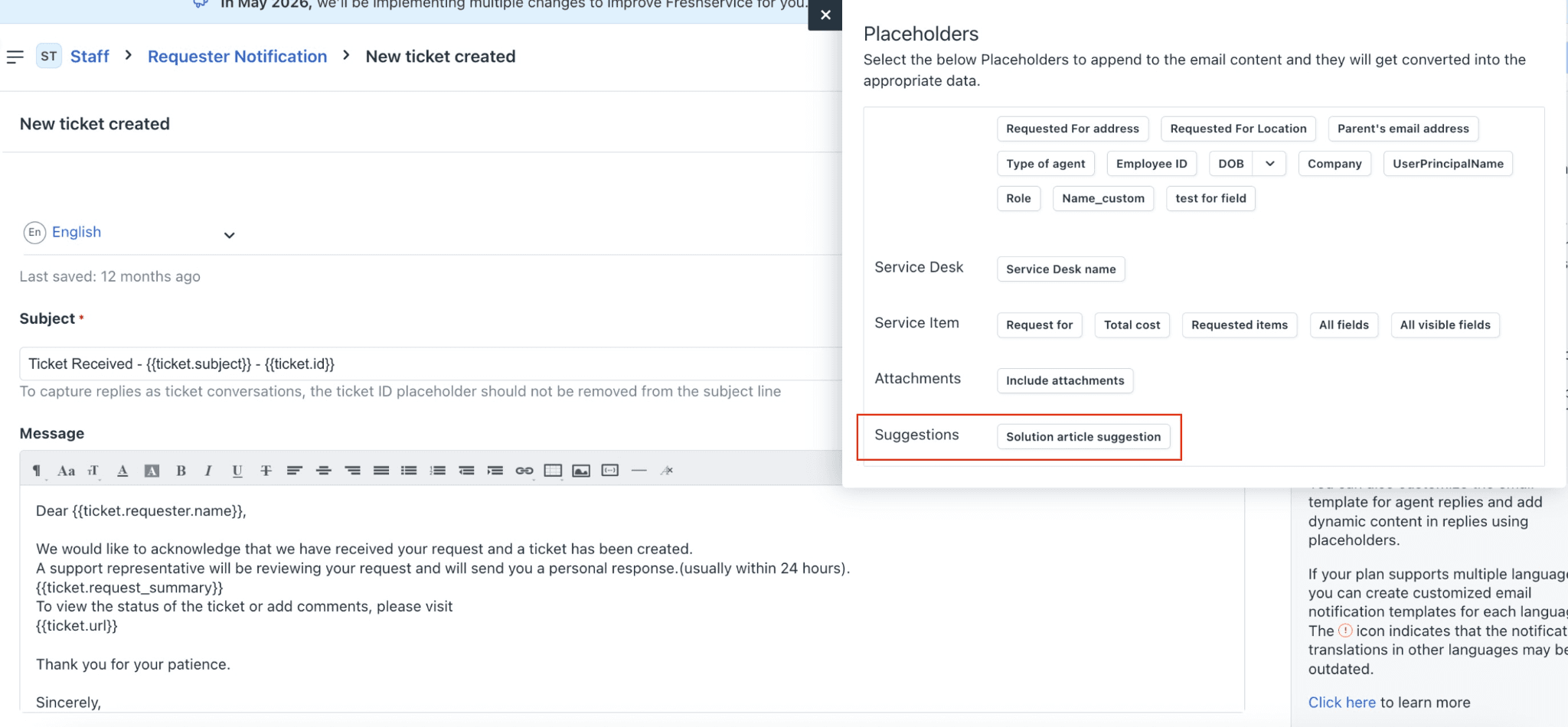
Configuring Email Bot under the Freddy Self Service category to deflect email queries
Once the AI solution is live, track:
How many incidents the assistant resolves without escalation
How long those resolutions take compared to agent-handled tickets
Whether users are abandoning conversations midway.
If escalation rates are high, you may need clearer prompts, better integrations, or updated troubleshooting steps. It’s important to feed your AI assistant with up-to-date knowledge articles, feedback on incorrect answers, and reinforcement training from resolved incidents.
When designed well, an AI assistant doesn’t just deflect incidents; it also enhances the user experience by providing fast, accurate help whenever needed.
People-first AI for exceptional employee experiences


Freddy AI Agent

Freddy Al Copilot

Freddy Al Insights
#2 Route tickets to the right team automatically
Ensuring that incidents are routed to the right team quickly is one of the simplest ways to improve Mean Time to Resolution (MTTR).
AI enables intelligent routing by analyzing historical data, agent expertise, and service context to automatically assign incidents to the most suitable resolver group or individual.
However, for automated routing to work effectively, it’s vital to feed your AI with high-quality, categorized input data that contains accurate historical records and has defined service ownership models. The algorithm is only as good as the operational data supporting it.
Start small by cleaning up a single high-volume category where misrouting is a known problem. Map out which team should handle those incidents and under what conditions. Build your routing rules around that, run it for a few weeks, and compare the results to your previous manual routing.
Did tickets reach the right team more often? Did resolution times improve? If not, dig into what went wrong before expanding further.


Freshservice’s Freddy AI for intelligent ticket routing
There's also a workload benefit of fairness worth considering. Manual routing often defaults to whoever seems most capable, which overloads experienced team members and leaves newer staff underutilised.
On the contrary, intelligent automated routing can distribute work more evenly based on availability, skill level, or current queue size. The outcome is faster resolution, healthier team workloads, and an objective, data-driven routing process that improves over time.
#3 Streamline the work of your agents
AI’s real return on investment (ROI) often comes from removing friction for human agents. Instead of replacing people, an effective AI-powered incident management solution should free staff from repetitive “busywork” like logging tickets, updating fields, or searching for known fixes.
Implementing a solution that automates tasks such as providing recommended solutions, predictive field population, and auto summarization of ticket history can trim minutes off each incident. Multiplied across thousands of tickets, that represents a significant performance boost and human effort savings spent on mundane activities.
You can automate much of this, but the setup matters.
For field population, train your system on closed tickets where the categorisation was accurate. If your historical data is inconsistent, like tickets miscategorised or priority levels applied randomly, you'll just automate the same mistakes. Clean a subset of your data first, focusing on your highest-volume incident types, and use that as your baseline.
For surfacing similar past incidents, the match needs to be useful, and not just keyword-based. For instance, a ticket mentioning "Outlook" shouldn't pull up every Outlook-related incident from the past year.
Configure your matching to weight factors like affected service, error messages, and resolution method. If agents are ignoring the suggestions, they're probably not relevant enough. Finally, review what's being surfaced and tighten the criteria.

Freshdesk Command Center offers agents full customer context and AI-powered assistance
With this type of drudge work taken off their plates by AI, human agents can focus on the 20% of incidents that require human judgment or empathy, such as major incidents, complex integrations, and high-impact outages. This not only boosts efficiency but also morale. Agents spend their time solving real problems, not tab-hopping between systems.
#4 Spot trends and root causes through pattern detection
Incident management is also about recognizing patterns that prevent disruptions from recurring. These patterns can be surfaced thanks to AI’s ability to process enormous ticket data volumes, identifying trends, anomalies, and emerging root causes in near real-time.
For example, clustering algorithms can group similar incidents from across departments to reveal systemic issues, like a misconfigured network device or recurring software bug. But the grouping logic matters. Simple keyword matching will lump unrelated tickets together.
Configure your system to weight fields that actually indicate a shared cause, such as specific error codes, affected configuration items, or the sequence of events leading up to the issue.
To achieve real results in this space, it’s necessary to take an integrated approach across the entire ITSM function that establishes an AI “learning loop”. Once you surface patterns reliably, connect them to your problem management process. Related incidents should trigger a problem record automatically, or at a minimum notify someone to investigate.


Incorporating AI insights across incident, problem, and change management to create a cycle of service improvement
When a batch of similar incidents points to a root cause, that root cause usually needs a fix. And fixes typically go through change management. Someone has to manually recognise the pattern, raise a problem record, investigate, and then separately raise a change request. That takes time, and often doesn't happen because agents are busy closing the next ticket.
If your AI-based automation system can flag a cluster of related incidents and automatically create a problem record or prompt a change request, you shorten the gap between "we noticed this keeps happening" and "we're doing something about it." You also create an audit trail that links the incidents to the problem to the change, so you can later verify whether the fix actually worked.
People-first AI for exceptional employee experiences
Freddy AI Agent
Freddy Al Copilot
Freddy Al Insights
#5 Improve continuously through AI learning
Every incident record is a goldmine of information, containing context, cause, and resolution details all within one structured dataset. AI can extract this intelligence to improve operations, customer experience, and KPIs across an organisation’s entire ITSM function.
Continuous improvement requires establishing a process that enables ongoing model training and refinement. As incidents are resolved and closed, the new data that’s generated is used to refine predictions, enhance routing accuracy, and improve virtual agent responses. As a result, the AI becomes increasingly better aligned with actual user behavior over time, making it faster and more effective.


Continuous improvement through ongoing model training
It is important to note that this approach only works if you build it into your regular operations, and a human agent is verifying the automation.
Assign someone to review a sample of closed incidents each week. Look at what went well, what went wrong, and whether the automation helped or got in the way. Make adjustments based on what you find, then check again the following week. Small corrections made consistently improve performance more than occasional large overhauls.
When paired with robust analytics, these insights drive measurable business outcomes. You learn which service areas generate the highest volume of incidents, where process bottlenecks occur, and how knowledge articles impact first-contact resolution.
#6 Keep humans in control of decision-making
Despite AI’s potential, it is essential to recognize that Incident Management remains both a technical and a human discipline. Automation can decrease response time, but humans bring situational awareness, accountability, and empathy that AI cannot replicate.
AI-powered incident management solutions must remain subject to “human-in-the-loop” governance. Human oversight is essential to monitor exceptions, detect model drift, and respond to sensitive or risky situations.
Clear escalation paths must be defined that enable AI to hand control back to human agents when confidence thresholds are low or ethical judgment is required.
You also need someone watching for drift. Automation that worked well six months ago might not perform the same way today if your services, team structure, or user behaviour have changed over time. Assign ownership for reviewing flagged exceptions and checking whether the rules still make sense.
When evaluating automation tools, look for ones that actively maintain their own performance. The system should benchmark its own outputs, check whether its suggestions are still accurate, and monitor response times.
If quality drops, the tool should be able to adjust its own logic or flag the issue for review. Some vendors also have dedicated teams that monitor output quality and make updates on the backend, which takes that burden off your internal staff. This kind of built-in maintenance matters because automation that degrades silently will create more problems than it solves.
Conclusion
AI has the potential to revolutionize incident management, but only if it is implemented through a robust process that sets clear expectations and establishes strong guardrails. That said, while AI excels at processing incidents at scale, people are still needed to handle the nuances that can arise throughout the process.
Success depends on striking a balance between automation and human oversight. The ultimate goal isn’t to replace IT professionals. AI can empower them to deliver faster, more innovative, and more resilient IT services.
Freshservice is built with this balance in mind. It combines workflow automation, virtual agents, and intelligent routing with the flexibility to keep your team in control of the decisions that matter. If you're looking to reduce ticket volumes, speed up resolution times, and give your agents more time for meaningful work, see how it works for your enterprise.