The Pillars of Success for IT Automation: A Guide to Best Practices
Enterprise leaders are spending considerable resources to automate operational workflows. However, only a few realize that automation projects fail more often than not. There are numerous reasons for this, but the most common ones are that they over-engineer solutions that break under production load, create dependencies that increase rather than reduce complexity, and often design workflows that require more maintenance than the manual processes they replaced.
The difference between automation success and failure comes down to deployment methodology. Successful organizations treat automation as a product, requiring feature planning, iterative development, user feedback, and continuous improvement. In contrast, those who fail treat it as a one-time project with a finite endpoint.
This article focuses on the role of IT automation in enterprise processes, including best practices that can help organizations plan and deploy effective solutions with real business value.
Summary of IT automation best practices
The IT automation best practices to be covered in this article are:
Best practices | Description |
|---|---|
Begin by defining your IT automation strategy | Align automation initiatives with business objectives and assess organizational readiness before implementation |
Conduct process discovery and mapping exercises | Visualize and optimize existing workflows before automating to ensure maximum value delivery |
Design modular and scalable IT automation workflows | Create reusable components with built-in flexibility and robust error handling capabilities |
Deploy IT automations iteratively and incorporate feedback | Start with MVPs and scale based on real user feedback and measurable business impact |
Establish formal governance and control over IT automations | Implement structured oversight mechanisms to maintain quality, security, and compliance standards |
Monitor, analyze, and improve IT automation workflows | Continuously measure performance against business metrics and adapt to changing organizational needs |
Understanding IT automation
Most organizations turn to IT automation to maximize the value of work performed by people and IT systems. Some leaders inadvertently refer to IT orchestration when thinking about IT automation. The two are related, but the scope is always different.
IT automation eliminates human intervention from individual processes, while IT orchestration coordinates multiple automated processes into complex, multi-system workflows.
Consider a new employee onboarding scenario. Automation handles individual tasks from creating the user account to generating security credentials. Orchestration connects these automated tasks into a complete workflow that triggers account creation, waits for validation, provisions access based on role and department, updates multiple directories simultaneously, and sends confirmation notifications to both the employee and their manager.
Within the enterprise, there are numerous automation opportunities across sales, finance, customer service, HR, and operations that can leverage IT automation to reduce costs, minimize human errors, and improve employee experience. Modern AI agents allow organizations to further scale up and automate routine, frequent, or repetitive tasks.
However, one must be cautious of the risks arising from too much automation, such as increased costs, inflexible processes, reduced resilience, and cybersecurity threats. Your automation journey must also have the appropriate oversight to ensure value is realized while minimizing adverse effects.
People-first AI for exceptional employee experiences


Freddy AI Agent

Freddy Al Copilot

Freddy Al Insights
Begin by defining your IT automation strategy
Before automating any process, organizations must ensure their IT automation strategy aligns with their organizational objectives and overall business strategy. Instead of subjectively selecting tasks to be automated, take a measured approach that considers what business outcomes you can achieve that align with current and future needs.
Identifying processes that represent your largest expenses or have the most direct impact on revenue growth can be an effective approach to start with. The nature of your business should guide these priorities. Because quickly delivering software has a direct and immediate impact on customer satisfaction and market competitiveness, continuous delivery pipeline automation is a sensible first choice for any SaaS company. On the other hand, for a managed service provider, help desk operations may represent the second-largest expense after infrastructure costs, meaning ticket routing and resolution automation can deliver faster Return on Investment (ROI).
However, efficiency gains alone may not tell the complete story.
For context, consider two automation scenarios with identical efficiency metrics.
Company A automates its help desk ticket routing to reduce response time from 4 hours to 30 minutes, while Company B automates its deployment pipeline to reduce feature delivery from 6 weeks to 2 days. Theoretically, both achieve 90% efficiency gains, but only Company B's automation enables it to respond to market changes four times faster than competitors.
As a thumb rule, use ROI as your baseline, but apply higher priority scores to processes that create competitive advantages. For example, assign a 2x multiplier to automation projects that improve customer-facing capabilities versus internal operations.
You can also evaluate the impact of automation across different time horizons. For instance:
Immediate ROI for direct cost savings within 12 months.
Strategic ROI to achieve a competitive advantage gained over 2-3 years.
Compounded ROI by achieving gradual, future capabilities that competitors struggle to replicate.
Engage stakeholders to overcome cultural barriers
A core element in IT automation is understanding the needs and perspectives of key business and IT stakeholders. According to research conducted by Red Hat, cultural barriers are one of the primary reasons that teams struggle to embrace automation. Those setting the automation strategy should engage a cross-section of business users and influential leaders to determine whether the automation plans address what matters most and whether they are willing to discard existing manual procedures. Targeting the issues that stress business users leads to greater buy-in for the IT automation strategy.
Assess your infrastructure reality
Once organizations start documenting actual API capabilities and data flows, they often discover their systems are far less integration-ready than they assumed.
When you start with infrastructure assessment, the process itself is usually straightforward. You inventory system APIs, evaluate server capacity and performance under load, audit security protocols and access controls, and trace how data flows through your infrastructure. However, despite individual components functioning adequately, you'll likely find that they weren't designed to work together at the required automation speed and scale. These limitations only surface when you map out complete automation scenarios rather than testing individual system functions.
For example, your monitoring and ticketing systems might work perfectly independently. Still, a real-time integration for automated incident response can overwhelm notification systems that weren't designed for that throughput.
Document these integration gaps before designing any automation workflows. Instead of assuming that your current setup can handle automated processes, create a realistic timeline that accounts for the infrastructure work needed to bridge system incompatibilities.
Another option is to start with workflows that work within your current system constraints while you address the foundational issues that block more complex automation.
People-first AI for exceptional employee experiences
Freddy AI Agent
Freddy Al Copilot
Freddy Al Insights
Conduct process discovery and mapping exercises
IT automation only adds value when it improves existing business processes. Without process mapping first, you risk automating broken workflows.
Process mapping creates visual diagrams (such as flowcharts or swimlanes) that show every step in your current workflow. These diagrams include decision points, inputs, outputs, and handovers between different roles. Visualizing helps you identify bottlenecks and inefficiencies that can be ultimately addressed through IT automation to increase organizational value.

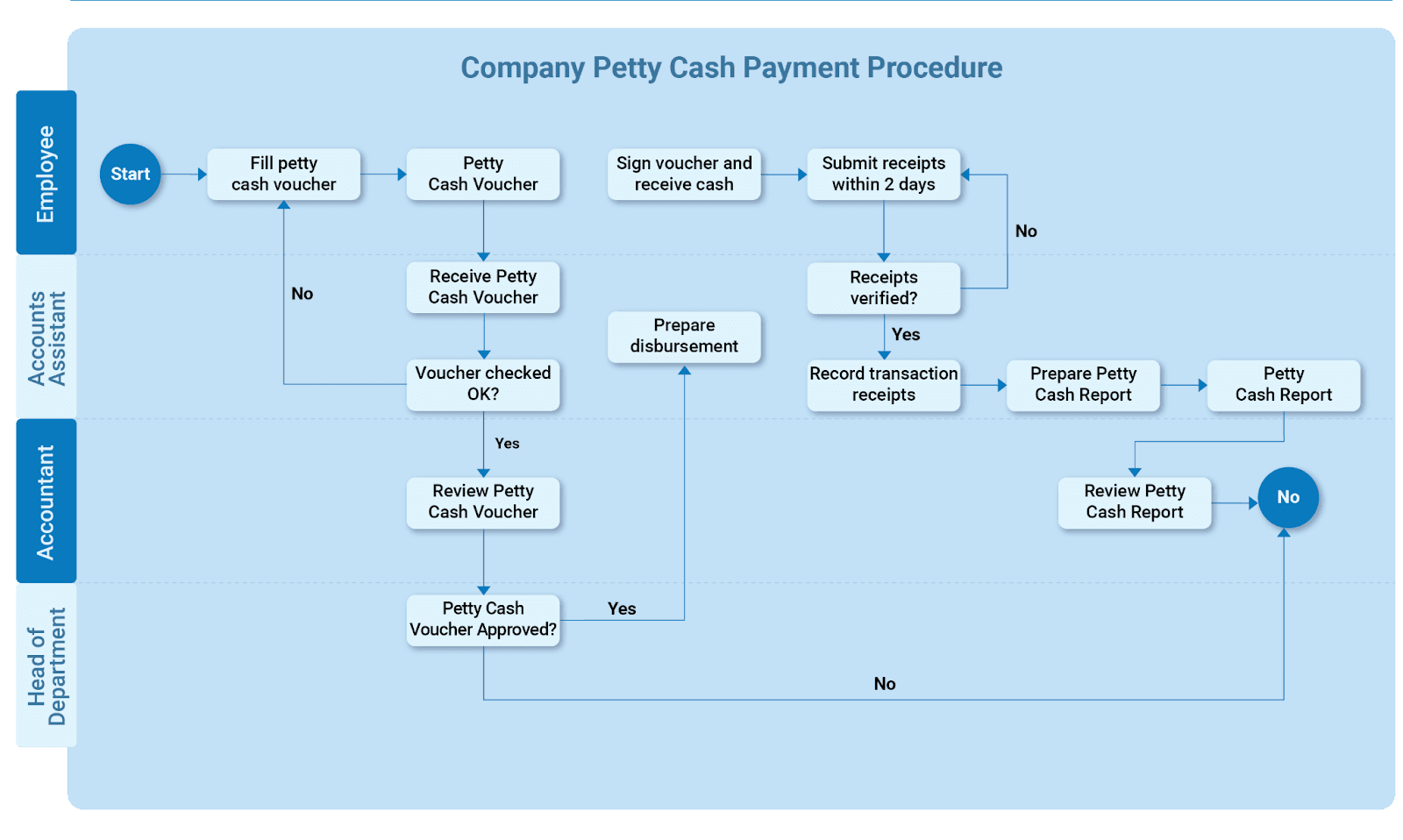
Figure 1: A typical Process Map
Start by gathering stakeholders who understand the process. Include people who know the activities, roles, sequences, timelines, and IT systems involved. Work with these experts to create your process map using standard flowchart symbols. Similar to the illustration above (refer Figure 1), use Business Process Model and Notation (BPMN) so that everyone understands the workflow and communicates clearly. Tools like Microsoft Visio, Draw.io, and BPMN.io can be used to generate flow charts that align to BPMN.
Once the illustration is drafted, have stakeholders validate whether the diagram shows the current reality (As-Is). Then analyze it to find improvement opportunities. You might change steps, sequences, decision points, or roles. The same set of stakeholders should also contribute to designing a future state (To-Be) version for senior leadership’s approval, and subsequently forward it to IT teams for automation.
A comparison of the As-Is and To-Be process maps is important as it helps gap-analyze how IT automation contributes to a reduction in handovers, delays, or errors.
Design modular and scalable IT automation workflows
The next step is to create the IT automation workflows that turn manual tasks into streamlined processes. Start with your most commonly used tasks, but design them to adapt as your organization grows. Focus on high-volume, repetitive work like:
Converting form and email data into service requests.
Routing work items for approval or execution.
Sending notifications and alerts when set thresholds are surpassed.
Some modern automation platforms offer visual designers where you can map out each step, set conditions and business rules, and choose what triggers the process. You can start with ready-made templates for standard ITSM workflows like incident management or change approval, then customize them by adding conditional logic, integrating with your specific systems, or including custom scripts for complex business rules. As shown in the image below, with Freshservice, you can set up rules that show or hide fields, mandate certain information, enable or disable options, or even prevent form submission with custom validation messages based on specific conditions being met.


Figure 2: Business rules configuration with FreshService’s Business Rules for Forms
It is recommended to design reusable IT automation components that facilitate flexibility and versioning. Use internal templates as building blocks to standardize future automations while also easing the integration with pre-existing workflows. Templates provide a customizable blueprint that allows for flexibility when the organization scales and processes have to be modified.
This is especially important during orchestration, where complex processes can branch out into multiple directions, and making a change in a single automation can have adverse effects across the overall process. Templates are also useful from a compliance perspective.
Handle errors before they spread
Automation teams often expect users to follow instructions perfectly and assume data will always be clean. In reality, that's often not the case. Users tend to work around systems in ways you didn't anticipate, and data arrives in messy formats. When you don't account for this, your automation stops working and creates more problems than it solves.
Build fail-safe mechanisms and checkpoints throughout your workflows that catch problems early. Set up routines that handle errors instead of letting them crash the whole process. Create backup workflows for unusual situations so you can see what went wrong and fix it.
Use AI to improve your workflows
According to an ESG research report, most IT operations teams today are turning to AI tools that eliminate manual processes to move faster, improve efficiency, promote productivity, and improve outcomes. Modern AI platforms now let you describe what you want in normal language and get working automation back. Prioritize tools where you can test different approaches, explore existing templates, and track performance without needing to code everything from scratch.
Take Freddy AI as an example of what's possible with today's AI workflow tools. The platform offers three key capabilities to transform your workflow automation:
Freddy AI Agent provides always-on conversational assistance through tools like Slack and Microsoft Teams.
Freddy AI Copilot enhances agent productivity by providing contextual assistance and automated responses that accelerate resolution times.
Freddy AI Insights delivers conversational inquiries and automatically-generated recommendations that help business leaders analyze data and make quick decisions.
When possible, choose workflows that can improve themselves over time. The most advanced systems learn from their own performance and make adjustments without constant oversight, meaning your automation gets better while your team can focus on strategic work instead of maintenance.
Deploy IT automations iteratively and incorporate feedback
When deploying IT automation, always start with sandbox testing to avoid disrupting existing workflows. A sandbox is a replica of your environment that makes it easy to identify and fix issues before deploying in the production environment. Use this sandbox for comprehensive scenario testing with diverse stakeholders to challenge your assumptions and uncover potential problems.
When ready to deploy the IT automation, it is best practice to start with a minimal viable product (MVP), then scale iteratively. An MVP should have enough features to test viability, demonstrate value, and attract feedback for improvement before full go-live. Selected users can be invited to test the MVP on the sandbox, and you can fix identified bugs before roll-out. Further improvements can be made in subsequent iterations. Note that an MVP approach also helps you avoid building features that don't align with your immediate business priorities.

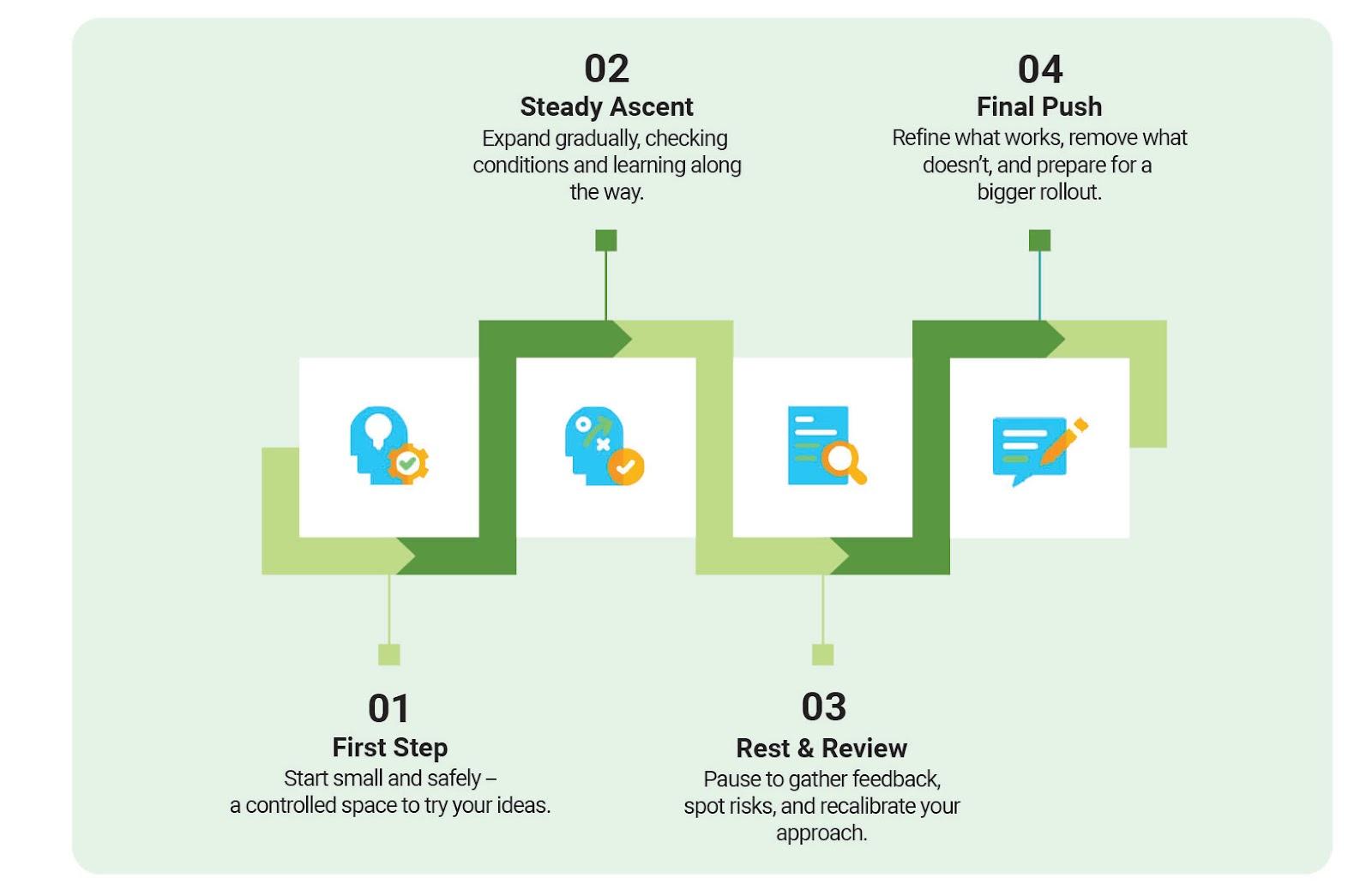
Steps to ‘peak performance’ automation
Steps to 'peak performance' automation
AI can also play a big role in optimizing the automation performance of your DevOps lifecycle over time. As such, you can detect patterns, variations, and bottlenecks that impact effectiveness or user experience far more efficiently than manual monitoring. Look for AI solutions that can analyze large data repositories and recognize complex patterns across your IT automations at scale. It is also important to ensure that the tool is capable of correlating automation outputs with user behavior to uncover hidden performance issues. Such patterns can include correlations between IT automation outputs and user behavior, which can subsequently help you refine your automations and maintain peak performance as your organization evolves.
Establish formal governance and control over IT automations
To ensure that IT automations deliver business value and minimize risk, consider the aspects to govern the implementation of your automation strategy. In a typical scenario, this would mean establishing clear guidelines that spell out who can approve new automations, how they get deployed, and how you'll keep an eye on them once they're running. Just by making sure that everyone follows the same playbook, you're less likely to introduce bugs or security holes that could come back to bite you later.
As part of governance, change control is critical in preventing service disruption. Modifying an IT automation without considering the big picture can affect critical service offerings and activities such as backups, user registrations, or service fulfillments. Decide which platforms everyone should use and stick to them. You can keep detailed records of every version so you can see what changed and when. A typical change management practice should include:
Specification of the approved platforms to be used
Maintenance of tracking version history
Standardized configuration baselines
Rollback procedures
Checks for security and compliance should also be included as part of the approval requirements before IT automations are deployed to production.
Monitor, analyze, and improve IT automation workflows
IT automation workflows should be regularly monitored to ensure they deliver the promised value as per the IT automation strategy. IT teams can measure and track workflow utilization and performance by analyzing data and then presenting it on dashboards. Should an automation be detected as unused or generating errors, the root cause should be analyzed, and corrective actions implemented.
For example, you can monitor first response time to measure how quickly automated workflows initiate after being triggered, agent or system assignment time to track routing efficiency, and resolution time to understand end-to-end workflow performance.

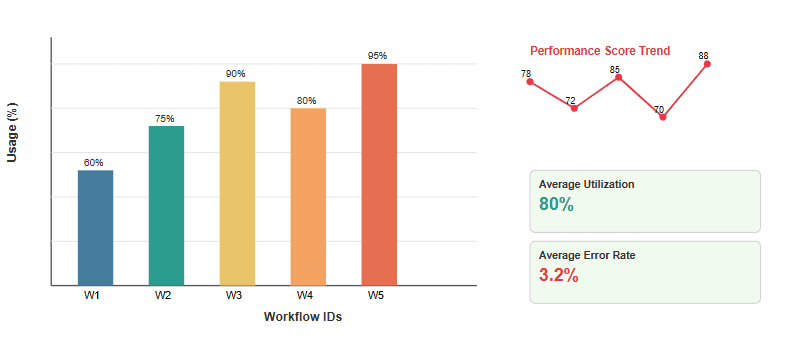
Automation workflow performance metrics
The above illustration shows workflow usage percentages (bar chart, left), a time-based performance score trend (line chart, right), and key performance indicators like average utilization and error rate. Each element directly represents measurable data to identify underperforming automations and guide improvements.
It is recommended that IT teams cultivate a culture of educating users whenever automations are deployed and incorporate their feedback. If users are unhappy with an automation, then the chances of them reverting to manual methods are high, leading to wasted efforts and money down the drain. Keeping users updated on IT automations can go a long way in deriving value from their usage and promoting improvement.
IT teams should also regularly roll out updates on IT automation workflows in line with environmental changes, such as organizational structure or IT systems changes. This ensures that the automations continue to remain relevant and benefit the organization. Updates also ensure that any new business rules are incorporated in line with security and compliance requirements, to limit the chances of IT automations failing corporate governance directives.
Last thoughts
Your automation strategy is likely to determine whether you're spending millions on routine operations or redirecting that capital toward growth initiatives. More critically, automation determines whether your engineering talent is building tomorrow's competitive advantages or continues to be stuck with yesterday's infrastructure.
Start your first iteration cycle now. Pick one process, automate it properly, measure the results, and scale from there. Is your organization ready to take the leap?
Take a demo and see how Freshservice’s ready-to-use AI with robust automation workflows can align with your growth objectives.